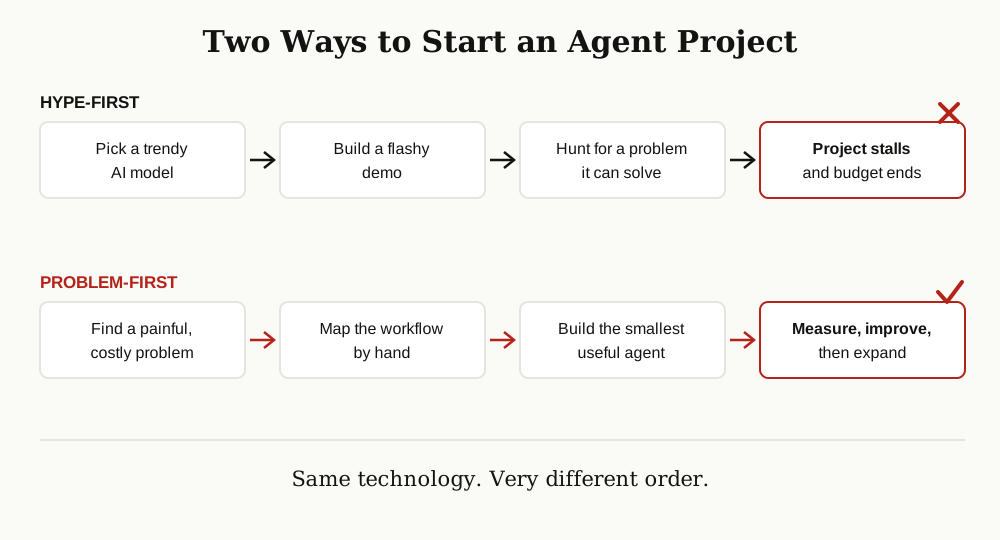
Most agent projects fail in a quiet, predictable way. A team gets excited about the technology, picks a popular model, builds a shiny demo, and then goes looking for a problem the demo can solve. Months later, the demo still has no real users.
Building agentic AI applications with a problem-first approach flips that order. You start with a painful problem that already costs time or money. Then you design the smallest agent that fixes that one problem. The model, the framework and the fancy features all come later, and only if the problem actually needs them.
If you are new to the idea of agents, it helps to first read what agentic AI is and how an agent differs from a normal chatbot. This guide picks up from there and walks through the building process, step by step.
What Problem-First Means
Problem-first means the problem is the boss of the project. Every choice, from the model to the tools to the design, has to answer one question: does this help solve the problem we picked?
This sounds obvious, yet most teams do the opposite. They start from the technology and work backwards. Researchers at the big AI labs keep giving the same advice. IBM describes agentic AI as systems that pursue goals with limited supervision, which is exactly why the goal has to be worth pursuing before you build anything.
A problem-first project has three habits:
- It names the pain in plain words. “Our support team spends nine hours a week copying ticket details into a spreadsheet” is a problem. “We need AI agents” is not.
- It picks one narrow job. Not “handle support”, but “sort incoming tickets into the right queue and draft the first reply”.
- It knows what success looks like before building. Fewer hours, fewer errors, faster replies: pick the number you will watch.
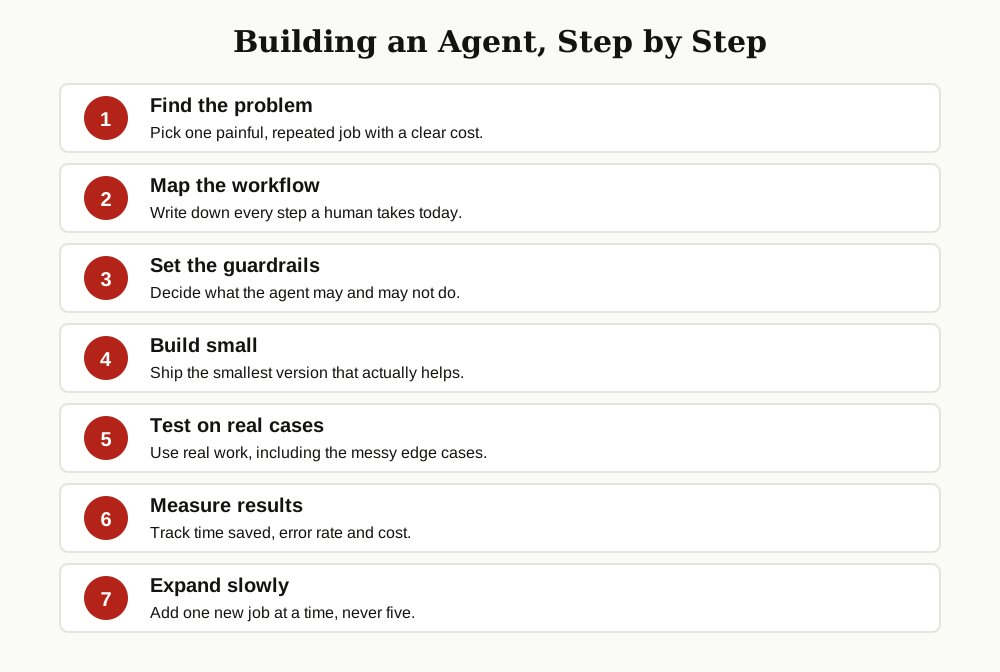
Here is the full path this guide follows, from problem to a growing, trusted agent:
Step 1: Find a Painful, Repetitive Problem
Your first agent should attack work that is boring, frequent and rules-based. Humans hate this work, it eats hours every week, and it follows steps that rarely change. That combination is gold for agentic ai application development, because the win is fast and easy to prove.
Talk to the people who do the work, not just their managers. Ask three questions: What task eats your week? Which part feels like copying and pasting? Where do small mistakes keep slipping in? The answers usually point at the same two or three tasks.
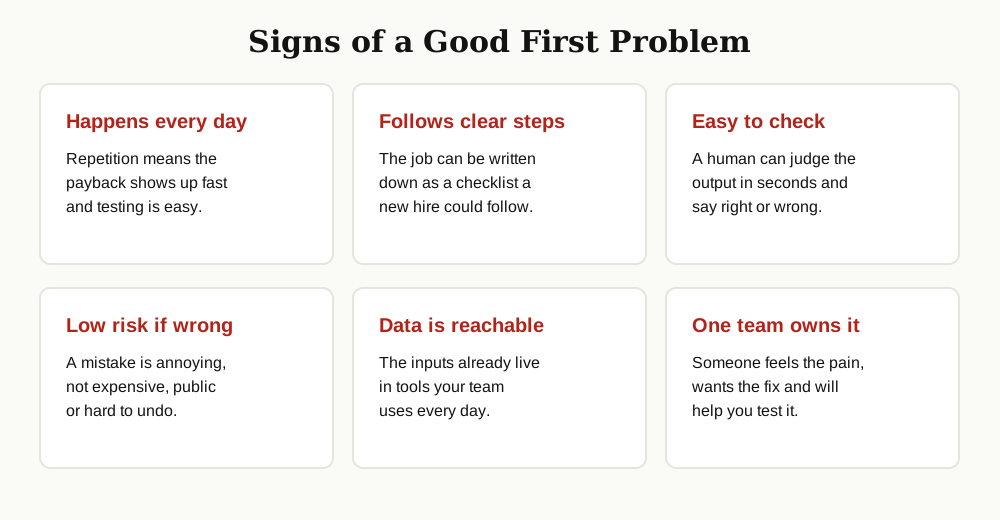
A good first problem usually has these signs:
- It happens every day or every week, so savings add up fast.
- It follows clear steps that a person could write down.
- The result is easy to check, so you can tell if the agent did well.
- A mistake is annoying but cheap, not a public disaster.
- The needed data already lives in tools your team can access.
Avoid problems that need deep judgment, taste or negotiation for your first build. “Answer refund requests under a fixed policy” is a fine first job. “Handle angry customers” is not.
Step 2: Map the Workflow by Hand
Before any code, sit down and write the current workflow on paper. List every step a human takes today, in order, including the boring parts nobody mentions: opening the inbox, checking the order system, copying a number, pasting it into a form, sending a reply.
This map does three jobs for you. First, it shows which steps are truly simple and which ones hide real decisions. Second, it reveals the tools and data the agent will need. Third, it becomes your test plan later, because every step on the map is something the agent must handle.
Mark each step with one of three labels: agent can do it alone, agent can draft it, human approves, or human keeps it. This simple sorting saves you from the most common design error, which is giving the agent the whole workflow when only half of it is safe to automate.
Step 3: Decide What the Agent May and May Not Do
Guardrails are not a finishing touch. They are part of the design, and they belong in the plan before you build. Google Cloud explains AI agents as systems that use tools to complete tasks, and every tool you hand an agent is also a way it can go wrong. So decide the limits early, while it is still cheap.
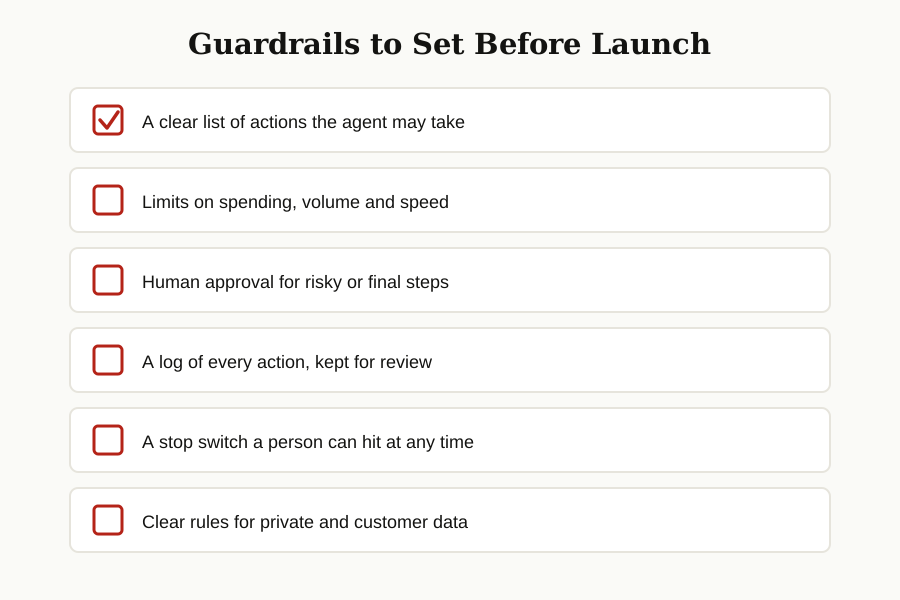
At minimum, write down:
- Allowed actions: the exact list of things the agent may do, such as read tickets, search the help center and draft replies.
- Forbidden actions: things like sending refunds, deleting records or emailing customers without review.
- Limits: how many actions per hour, how much it may spend, and which data it may never touch.
- Approval points: the steps where a human must say yes before anything happens.
- Logging and a stop switch: every action recorded, and one clear way to pause the agent instantly.
Teams doing serious ai agent development treat these rules like product features, not paperwork. When something goes wrong later, the log and the limits are what turn a crisis into a quick fix.
Step 4: Build the Smallest Useful Version
Now build, but build small. Version one of your agent should do the narrow job from Step 1, use the guardrails from Step 3, and nothing more. If the job is sorting support tickets, version one sorts tickets and drafts replies. It does not also chat on the website, update the CRM and write the weekly report.

Anthropic, in its well-known guide to building effective agents, gives advice that matches this approach: start with the simplest pattern that works, and add agent complexity only when simpler tools fall short. Many “agents” that work well in production are really a smart model, one or two tools, and a tight loop of act, check and retry.
A few practical tips for this stage:
- Give the agent one clear job description, written like you would brief a new hire.
- Connect tools one at a time, and test each tool before adding the next.
- If the agent needs your company knowledge, add a search tool over your documents. That pattern, where the agent looks things up before answering, is covered in our guide to agentic RAG.
- Keep a human approval step in the loop for anything that leaves your building, like emails to customers.
Notice what is missing here: swapping between five frameworks or chasing the newest model. The difference between agentic AI and generative AI matters for design, but for version one, your problem and your workflow matter far more than your stack. Coding teams follow the same rule when they use the current crop of AI coding assistants: small, checked steps beat big autonomous leaps.
Step 5: Test on Real Cases and Edge Cases
Demo data lies. Your agent will look brilliant on ten clean examples and then fail on the eleventh real one, where the customer wrote in two languages, attached the wrong file and asked three questions at once.
So test with real cases. Pull a few hundred past examples of the job, the actual tickets, emails or forms your team handled, and run the agent on them in a safe sandbox. Compare its output with what your team actually did. Note every miss, and group the misses by cause: missing data, unclear rules, wrong tool choice, or plain bad reasoning.
Then hunt for edge cases on purpose:
- Empty inputs, broken files and missing fields.
- Rude, confused or very short requests.
- Two valid answers where the policy picks one.
- Requests that the agent should refuse or pass to a human.
Fix the top causes, not every single miss. In building agentic ai applications, a short list of fixed failure patterns is worth more than a long list of patched examples.
Step 6: Measure Time Saved, Errors and Cost
If you cannot measure it, you cannot defend it, improve it or expand it. Before launch, record the baseline: how long the job takes a human today, how often errors happen, and what the work costs per week. Then track the same numbers with the agent running.
| Metric | What to track | Why it matters |
|---|---|---|
| Time saved | Minutes of human work per task, per week | The main reason the agent exists |
| Error rate | Wrong outputs per 100 tasks | Shows if quality beats the human baseline |
| Cost per task | Model and tool cost for each finished task | Keeps the project honest about value |
| Approval rate | Share of drafts humans accept unchanged | A fast way to feel trust growing or falling |
| Escalations | Tasks passed to humans, and why | Points at the next thing to fix |
Review these numbers weekly at first. A healthy first agent usually saves clear time, keeps errors at or below the old rate, and costs far less than the hours it returns. If a number goes the wrong way, your map from Step 2 and your logs from Step 3 will show you where.
Step 7: Expand Slowly, One Job at a Time
Only after the first job runs well for a few weeks should you grow. Add the nearest related job, the one that shares tools and data with the first. A ticket sorter can grow into drafting replies, then into updating the help center when answers change. Each addition goes through the same loop: map it, bound it, test it, measure it.

Slow growth is not a lack of ambition. It is how agentic ai applications earn trust inside a company. One proven win makes the next approval easy. One public failure, caused by launching five jobs at once, can end the whole program.
Common Mistakes to Avoid
Most failed projects make the same handful of mistakes. They start with a huge scope, skip the workflow map, forget guardrails until after an incident, test only on easy examples, and never record a baseline. A few months later, nobody can say if the agent helped, so the budget quietly disappears.
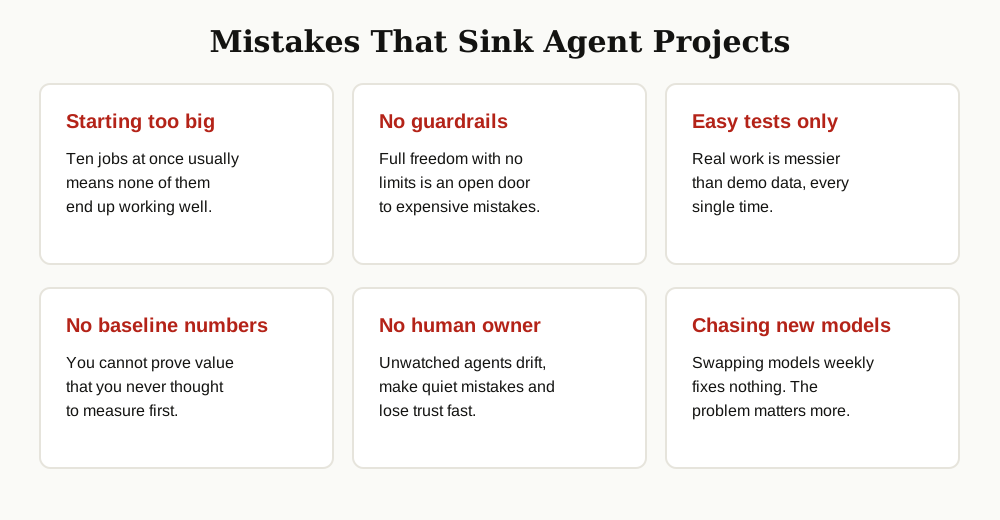
The fixes are all in this guide: narrow scope, hand-drawn map, early guardrails, real tests and honest numbers. None of them need a bigger budget. They need discipline in the first two weeks.
A Worked Example: The Support Inbox Agent
Let us put it all together with a small, realistic case. A software company with a six-person support team gets about 400 emails a day. Two people spend their mornings sorting mail into queues and copying order numbers into the ticket system. That is the painful, repetitive problem.
Map: the team writes down the sorting rules. Billing questions go to one queue, login problems to another, and anything mentioning a refund goes to a senior agent. Order numbers follow a fixed pattern, which makes them easy to spot.
Guardrails: the agent may read mail, assign a queue and fill in the order number. It may not reply to customers, close tickets or touch refunds. Every sorted ticket is logged, and a lead reviews a sample each morning.
Build: version one does only sorting and data entry, nothing else. Test: the team runs it over last month’s inbox in a sandbox and finds it misreads forwarded emails with long chains. They add a rule for that case and test again.
Measure: sorting time drops from about three hours a day to twenty minutes of review. Errors land slightly below the human rate, mostly on unusual spellings of product names, which become new test cases.
Expand: a month later, the agent also drafts first replies for the ten most common questions, with a human approving every send. That second job was never in version one, and that is exactly why version one worked.
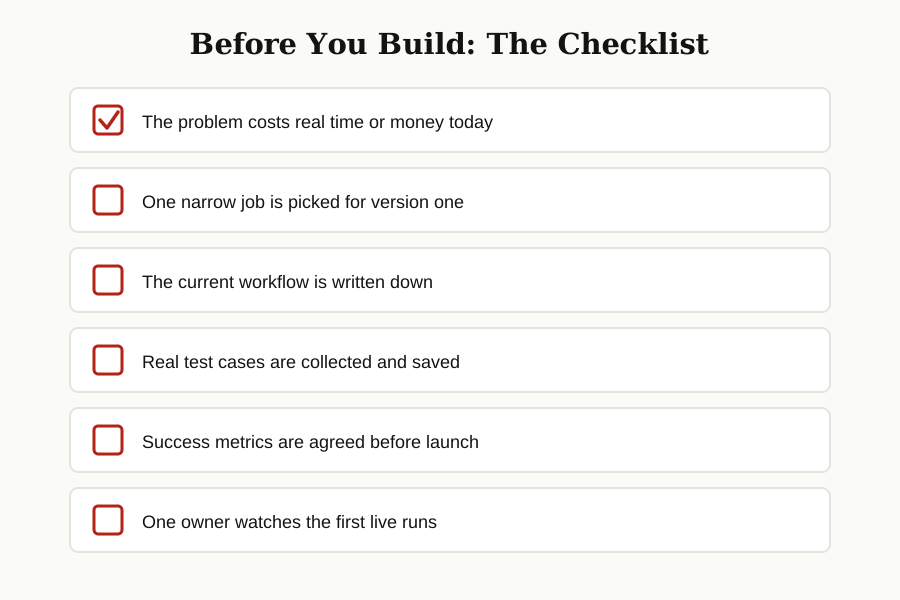
Before starting your own version of this, run through the checklist one more time:
Conclusion
Building agentic AI applications with a problem-first approach is less glamorous than the hype, and far more likely to work. Find one painful job. Map it by hand. Set the guardrails before you build. Ship the smallest useful version. Test it on the messy real world. Measure the result. Then grow, one job at a time.
Do that, and your agent stops being a demo and becomes a coworker your team actually trusts. For more guides like this one, browse our full generative AI and agentic AI category.