A few years ago, an AI coding assistant was just a smarter autocomplete. Today, the best ai coding assistants can plan a feature, edit ten files, run your tests, and open a pull request while you watch. That jump is why so many developers now ask a simple question with a complicated answer: which one should I actually use?
Here is the honest part first. There is no single winner. The right pick depends on your editor, your budget, your team, and how much you trust an agent with your codebase. A student, a startup team, and a bank all need different things, and a tool that thrills one of them can annoy the others.
So this guide keeps it simple. We lined up the eight best ai coding assistants of 2026, checked what each one really does today, and wrote down the strengths and the limits in plain words. These tools all sit on top of advanced machine learning models, and several come from the hottest AI startups in Silicon Valley. Big names do not decide this list, though. Usefulness does.

How We Judged These AI Coding Tools
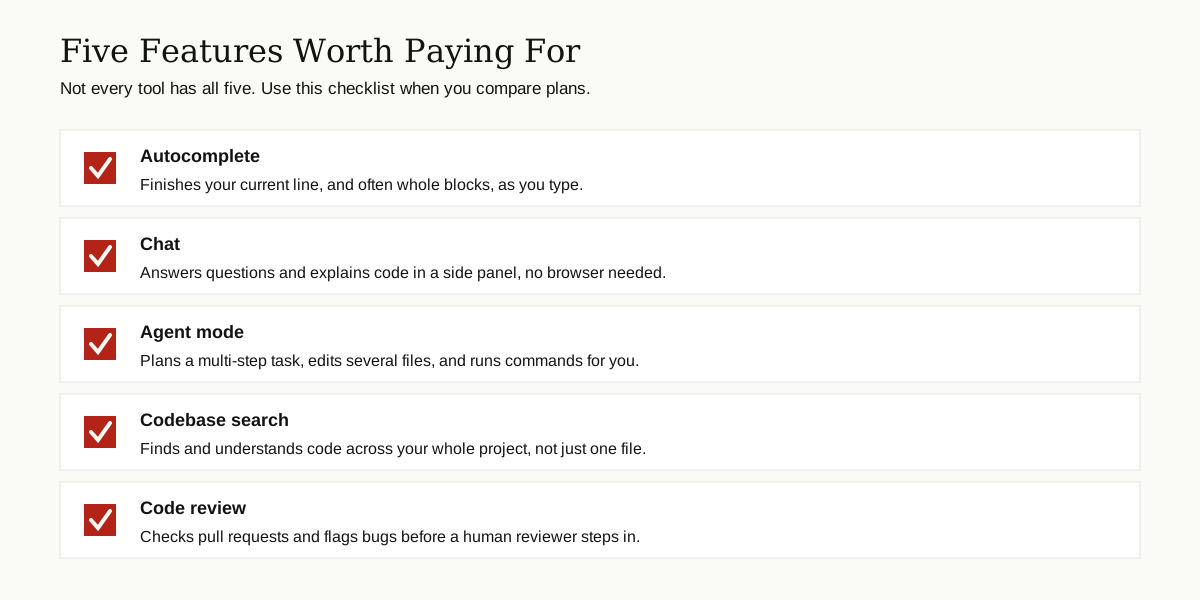
We compared the best ai coding assistants on five things that matter in daily work, not on marketing claims:
- Autocomplete quality. Does it finish lines and whole blocks in a way that saves real typing?
- Agent skills. Can it plan a task, edit several files, run commands, and fix its own errors?
- Codebase awareness. Does it understand your whole project, or only the file on your screen?
- Fit with your tools. Does it work inside your editor, or force you to switch?
- Privacy and price. Where does your code go, and what does the tool cost once the free tier ends?
One more rule: we only list features we could confirm on official pages and recent independent reviews. When prices change often, we say so instead of printing a number that may be stale next month. If you want the wider picture, the Stack Overflow Developer Survey has a full section tracking how developers actually use AI tools like these in their day jobs.
The Best AI Coding Assistants, One by One
Every tool below earns its place for a different kind of reader. Every entry also ends with the catch, because every one of these tools has one.

GitHub Copilot
GitHub Copilot is the name most people know, and it is still the safest first step into AI help. It works as an extension inside VS Code, JetBrains IDEs, Visual Studio, Neovim, and more, so you keep your current setup. You get fast autocomplete, a chat panel, and an agent mode that can edit several files, run terminal commands, and fix its own errors. A background coding agent can even turn a GitHub issue into a pull request, and the code review feature leaves comments on pull requests for you. The catch: on very large projects, its understanding can feel shallow next to Cursor, and heavy agent use eats into monthly request limits. Start with the free tier on the official GitHub Copilot page.
Cursor
Cursor is a full code editor built by Anysphere and based on VS Code, so your themes, shortcuts, and extensions come with you. Its big strength is awareness: Cursor indexes your whole codebase, so its answers and edits respect how your project is really built. Tab predicts your next edit across several lines, and Agent mode plans multi-file changes, runs commands, and shows you clean diffs to approve. Cursor 2.0 added parallel agents and its own fast Composer model, and the Bugbot add-on reviews pull requests on GitHub. The catch is commitment and cost. You must switch editors, and because billing follows model usage, heavy agent days can cost more than the sticker price suggests. Details live at Cursor.
Claude Code
Claude Code, from Anthropic, skips the editor completely and lives in your terminal. You describe a task in plain words, and it reads your project, edits files, runs tests and shell commands, and handles git commits, asking permission before risky steps. A CLAUDE.md file lets you teach it your project rules once, and it remembers them in every session. It also plugs into VS Code and JetBrains if you want a visual home. For big, multi-step jobs, many developers rate it among the best ai coding assistants you can hire by the month. The catch: you pay through a Claude subscription or API usage, heavy days can hit plan limits fast, and there is no friendly visual editor of its own. Check the official site for current pricing.
Windsurf
Windsurf is the editor from the Codeium team, now part of Cognition, and its star is an agent called Cascade. Cascade keeps track of your codebase, your terminal output, and your recent edits at the same time, so when an error appears, it can offer a fix before you even ask. Supercomplete handles fast autocomplete, and separate Write and Chat modes keep exploring and editing apart. The free tier is generous, with unlimited tab completions to start. The catch: Windsurf is younger than Copilot and Cursor, so you will find fewer tutorials, shared setups, and community answers when you get stuck on something odd.

Codeium
Codeium is the plugin sibling of Windsurf, made for people who like the editor they already have. It adds autocomplete and chat to VS Code, JetBrains IDEs, and dozens of other editors, and reviewers consistently note that completions and chat are free and unlimited for individual users. A neat extra is natural language code search: describe the code you are hunting, like the login check, and it finds the spot for you. The catch: the powerful Cascade agent is not included, because that lives in the Windsurf editor, and the chat sometimes needs a few rounds of back and forth on hard questions. For free daily help, though, it is hard to beat.
Tabnine
Tabnine sells one thing the others cannot: control. You still get autocomplete, chat, and agents inside your IDE, but you choose where it runs: Tabnine’s cloud, your own private cloud, your own servers, or even fully offline in an air-gapped setup. Tabnine promises zero data retention and never trains its models on your code, and its own models learn only from open source code with permissive licenses. Big companies can even fine-tune a private model on their own codebase. The catch: the agent features sit on the higher plan, self-hosting takes real setup work, and the raw suggestions are solid rather than class leading.
Amazon Q Developer
Amazon Q Developer is the AWS specialist. It plugs into VS Code, JetBrains IDEs, Visual Studio, and Eclipse, and it shines on cloud work: IAM policies, Lambda functions, and infrastructure templates come out right because it was built inside AWS. Its feature agent breaks a request into steps, edits files across your project, and runs tests after you approve the plan. Security scanning flags exposed credentials and suggests one-click fixes, and code transformation can upgrade old Java projects or port .NET apps to Linux. AWS also aims it at data teams building pipelines, a good bridge if you are growing into the role explained in our guide to what a data scientist does. The catch: the value drops fast outside AWS, and it is worth checking the privacy settings, because data collection for service improvement is opt-out rather than off by default.
JetBrains AI Assistant and Junie
If you already live in IntelliJ IDEA, PyCharm, or WebStorm, the JetBrains AI Assistant needs no new home. It adds chat with real project context, autocomplete that follows your naming style, and next edit suggestions that jump you to the next spot worth changing. Its agent, Junie, plans multi-step tasks, edits files, runs tests and terminal commands, and handles git work from a single prompt. You can also plug outside agents, like Claude Agent or Copilot, into the same IDE, bring your own API key, or run models locally. The catch: you need a JetBrains IDE plus an AI plan with quota, and Junie’s manual control over context is still basic.
Side by Side: AI Coding Assistant Comparison
Short on time? This is the whole guide on one screen. The best ai coding assistants differ less in raw smarts than in where they live and who they serve.
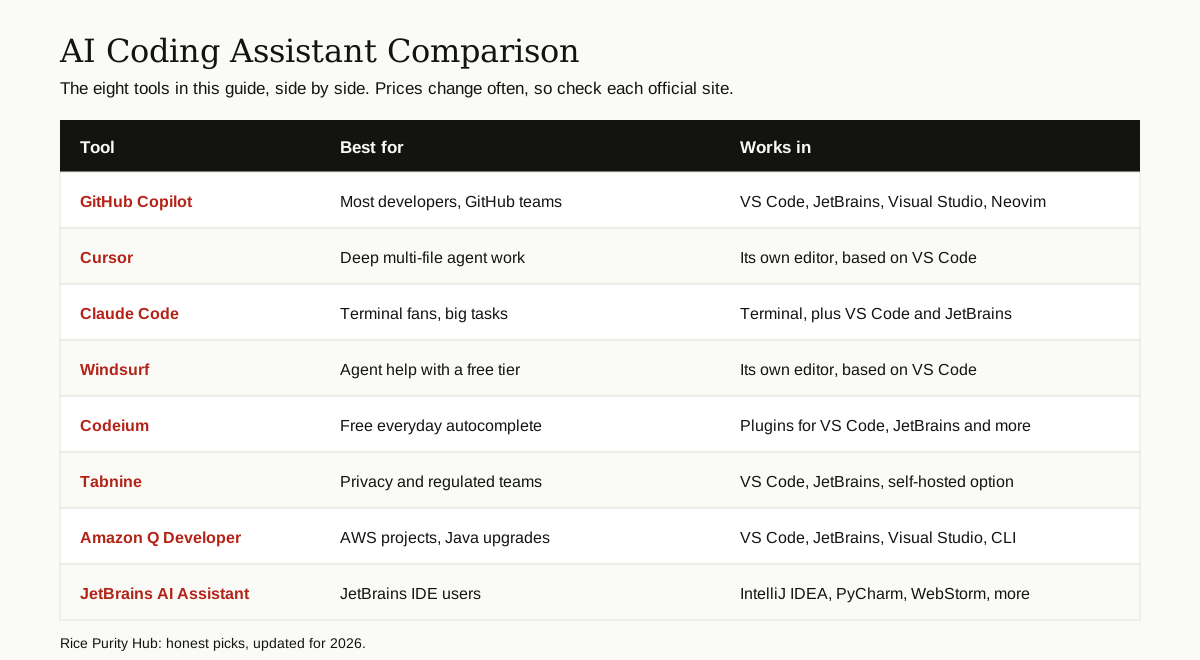
| Tool | Best for | Works in | Free option |
|---|---|---|---|
| GitHub Copilot | Most developers | VS Code, JetBrains, Visual Studio | Yes, limited tier |
| Cursor | Multi-file agent work | Its own editor | Yes, hobby tier |
| Claude Code | Terminal power users | Terminal, VS Code, JetBrains | Limited free use |
| Windsurf | Agent help on a budget | Its own editor | Yes, generous tier |
| Codeium | Free autocomplete | Many editor plugins | Yes, for individuals |
| Tabnine | Privacy and compliance | VS Code, JetBrains, self-hosted | Yes, basic plan |
| Amazon Q Developer | AWS and Java teams | VS Code, JetBrains, Visual Studio | Yes, free tier |
| JetBrains AI Assistant | JetBrains loyalists | IntelliJ, PyCharm, WebStorm | Trial quota |
Which One Fits You?
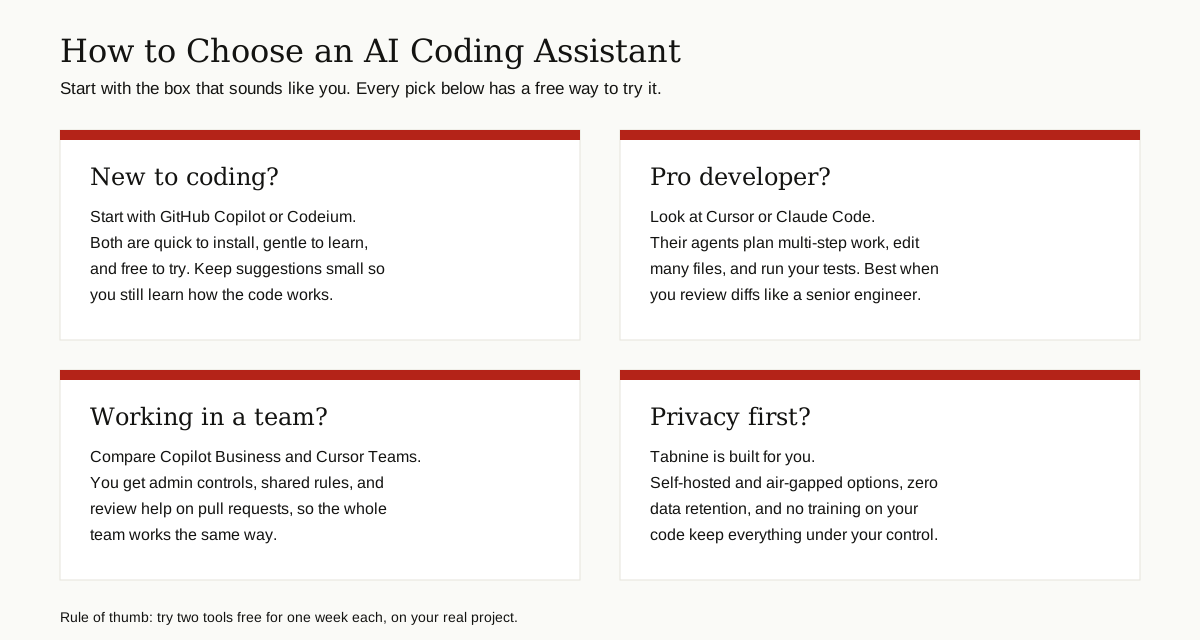
Beginners. Start with GitHub Copilot or Codeium. Both install in minutes, work inside editors you may already know, and cost nothing to try. Keep the suggestions small at first, and read every line the tool writes. You are building judgment, not just software.
Professionals. If you ship code all day, look at Cursor or Claude Code. Their agents handle the boring multi-file work, like renames, test updates, and refactors, while you review the diffs. That reviewer mindset is exactly what makes them pay off.
Teams. Compare the business plans of Copilot and Cursor, or the JetBrains AI plan if your shop already runs on JetBrains IDEs. Shared rules, admin controls, and review help on pull requests matter more at team scale than any single feature.
Privacy focused. Tabnine is the clear pick when code cannot leave the building, thanks to self-hosted and air-gapped options and zero data retention. JetBrains users can also look at running Junie with local models for sensitive projects.
The Honest Limits of AI Coding Help
They make confident mistakes. These tools can invent a function that does not exist, miss an edge case, or write code that runs but solves the wrong problem. The output often looks polished, which makes the errors easy to miss. Review every diff, and run your tests like you would for a junior teammate’s work, because that is the right mental model.
Security is still your job. An assistant can suggest weak patterns, repeat an unsafe trick it saw in training data, or talk you into pasting real passwords and keys into a chat box. Never share secrets with any of these tools, and use the built-in security scanning where it exists.
They can slow your learning. If you accept every suggestion, you can ship code you do not understand, and that debt comes due during the first hard bug. Write some code by hand, ask the chat to explain its answers, and treat the tool as a tutor as well as a typist.
Conclusion: Our Top Picks
If you want one answer, here it is. For most people, GitHub Copilot is the best starting point: cheap to try, easy to live with, and strong at everything. For agent-heavy professional work, Cursor leads today, with Claude Code right beside it for terminal fans. When privacy rules your world, Tabnine stands alone. And when the budget is zero, Codeium and Windsurf give you the most for free.
Try two of them, free, on your real project, for one week each. The best ai coding assistants reveal themselves in daily work, not in feature lists. For more plain English guides like this one, browse our AI, ML and Data Science section.