
Every office has a version of the same slow chore. Invoices arrive by email. Forms come in as scans. Someone on the team opens each file, reads it, and types the important details into a spreadsheet or an accounting program. It takes hours, it is boring, and one small typo can send a payment to the wrong place. Multiply that by hundreds of documents a week, and the chore quietly eats whole workdays across a company.
Intelligent document processing, often shortened to IDP, is the technology built to take over that chore. It reads documents the way a careful clerk would, pulls out the details that matter, checks them, and files the data where it belongs. In this guide you will learn what IDP is, how it works step by step, where companies use it, and which tools are worth a look.
What Is Intelligent Document Processing?
Intelligent document processing is software that uses artificial intelligence to read, understand, and sort business documents on its own. Give it an invoice, a claim form, or a delivery note, and it returns the key facts as clean, ready to use data: names, dates, totals, ID numbers, and line items.
The easiest way to picture it is with two workers. A basic reading tool is like a worker who can read letters out loud but does not know what they mean. IDP is like an experienced clerk who knows what an invoice looks like, knows the total sits near the bottom, and knows a date cannot be in the future. That understanding is the whole difference. IDP also sorts each file as it arrives, so an invoice goes to the finance flow while a signed contract goes to storage, without anyone opening either one first.
Wikipedia’s overview of IDP explains how it uses AI methods such as machine learning and natural language processing to handle documents with mixed layouts. That last part matters. Real documents are messy. Every supplier designs invoices differently, forms change, and scans arrive crooked. Older software needed a fixed template for every layout. IDP learns the meaning of fields, so it can handle new layouts without starting over.
The range of documents it can handle is wide: invoices, receipts, purchase orders, bank statements, tax forms, ID cards, contracts, medical forms, and shipping papers. If a person can read a document and point to the important parts, IDP can usually learn to do the same.
IDP vs OCR vs RPA: What Is the Difference?
Three short names come up again and again in this space, and they are easy to mix up. Here is the simple version.
- OCR (optical character recognition) reads letters. It turns a picture of a page into text you can search and copy. It does not know what the text means.
- IDP understands documents. It reads the page, then works out that this number is the invoice total and that word is the customer name, and it checks the results.
- RPA (robotic process automation) moves data. Its software bots copy information between programs, like pasting values from one screen into another.
| Tool | What it does | Plain way to say it |
|---|---|---|
| OCR | Turns images of text into plain text | It reads the letters |
| IDP | Reads, understands, and checks whole documents | It understands the document |
| RPA | Copies data between apps and screens | It moves the data |
In practice, the three often work as a team. IDP reads and understands the document, then an RPA bot carries the clean data into older software that has no easy connection. Under the hood, IDP leans on the same machine learning algorithms that power many other AI tools, trained on millions of sample documents.
Plenty of offices already own a piece of this puzzle. A scanner with basic OCR can read letters, but until software understands the document itself, a person still has to do the thinking in the middle. IDP fills exactly that gap.
How IDP Works, Step by Step
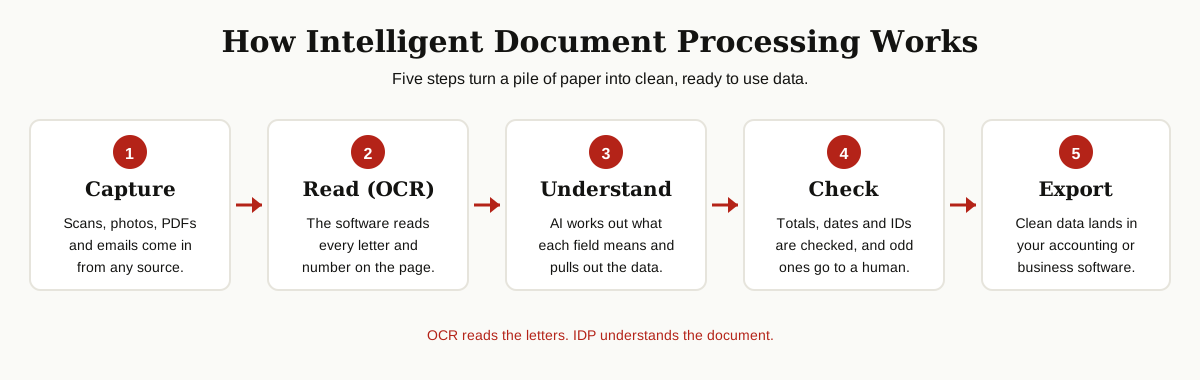
The exact tools differ, but almost every IDP system follows the same five steps.
Step 1: Capture. Documents arrive from scanners, email inboxes, phone photos, and upload forms. The system collects them in one place and straightens crooked scans so they are easy to read.
Step 2: Read. OCR turns the page into text. This is where computer vision applications earn their keep, spotting characters even on faded or stamped pages.
Step 3: Understand. AI models sort out what kind of document this is, then find and label each field. Because the models read context, they can tell a billing address from a shipping address, and they use ideas from natural language processing to make sense of sentences on forms and letters.
Step 4: Check. The system tests the data against simple rules. Do the line items add up to the total? Is the date real? Is a required field empty? Anything odd is flagged for a person to review, and every human fix teaches the system, so it makes the same mistake less often.
Step 5: Export. Clean data flows into accounting software, a customer database, or a spreadsheet, ready for the next step in the work.
One detail makes the whole flow safe: every field gets a confidence score. When the system is sure, the data moves on alone. When it is not sure, the page lands in a review queue with the doubtful field highlighted, so a person only checks the parts that need eyes. Most teams find that after a few weeks of corrections, the queue gets shorter and shorter.
Intelligent Document Processing Use Cases by Industry
IDP shows up anywhere paper or PDFs slow a team down. These are the most common places it earns its keep today.

Insurance Claims
Claims arrive with forms, photos, police reports, and repair bills, all in different shapes. IDP reads the claim number, the date, and the amounts, then matches the claim to the right policy. Adjusters start with the facts already gathered instead of typing them in.
Banking and Lending
Banks process loan forms, pay stubs, tax papers, and ID cards for every application. IDP pulls income figures and names from these files and checks that the same person appears across all of them. That speeds up approvals and helps catch files that do not line up.
Health Care
Hospitals and clinics handle referral letters, lab results, and insurance forms every day. IDP sorts incoming faxes and scans, reads the patient details, and files each document into the right record, so staff spend less time hunting for paperwork.
Logistics and Shipping
Delivery notes, bills of lading, and customs forms follow every shipment. IDP reads weights, addresses, and tracking numbers as goods move, which keeps records accurate and helps teams spot a missing or wrong document before it becomes a delay.
Invoices and Accounting
This is where most companies start. IDP reads supplier invoices, matches them to purchase orders, and flags any amount that does not agree. Finance teams stop typing totals by hand and only look at the exceptions.
These five areas share one thing: high volume, layouts that repeat with small changes, and real money lost when a detail is typed wrong. That mix is exactly where IDP pays off fastest.
Benefits of Intelligent Document Processing
The payoff is not just speed. These are the gains managers mention most after switching.
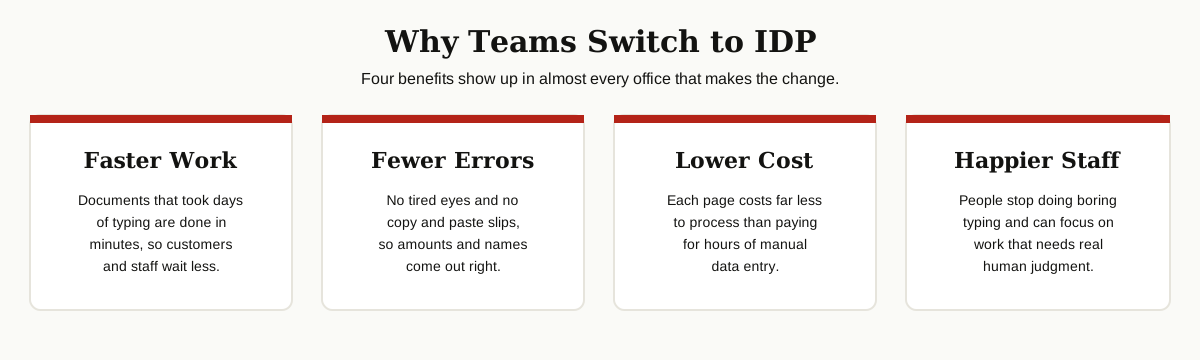
- Faster work. A document that waited days for manual typing can move through in minutes. Customers get answers sooner, and payments go out on time.
- Fewer errors. Machines do not get tired at 4 p.m. on a Friday. Reading the same field the same way every time cuts the typos that cause wrong payments and awkward phone calls.
- Lower cost. Processing a page with software costs far less than paying for hours of data entry, especially as volume grows.
- Happier staff. Few people enjoy copying numbers from PDFs all day. With the boring part handled, teams can spend their time on work that needs real judgment.
There is one more quiet benefit: every document becomes searchable data. Once invoice and form details live in a database instead of a filing cabinet, reports and audits get much easier. It also creates a clear trail: every value the system pulls can be traced back to the exact spot on the page it came from, which auditors love.
Best Intelligent Document Processing Software
There is no single winner for every team, but a few names lead almost every shortlist. The right pick usually depends on what your company already uses.
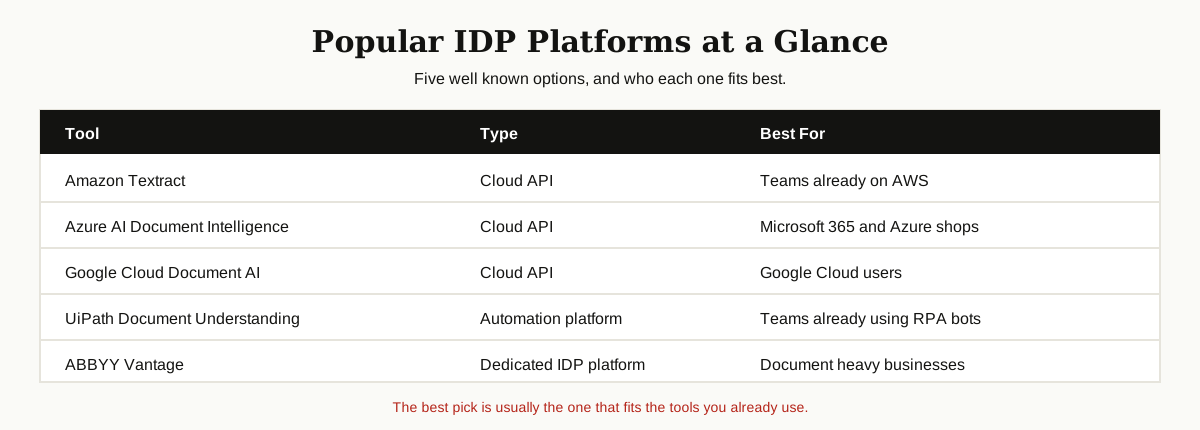
Amazon Textract. The document reading service inside Amazon Web Services, and usually the first stop for teams building on AWS. It is strong on forms and tables, and AWS presents Textract as a service that pulls text, handwriting, and data from scanned documents without manual setup.
Microsoft Azure AI Document Intelligence. Microsoft’s entry, with ready made models for invoices, receipts, ID cards, and tax forms. Microsoft’s Document Intelligence overview shows how it connects with the rest of the Azure and Microsoft 365 world, which makes it a natural pick for Microsoft shops.
Google Cloud Document AI. Google’s platform offers special processors for invoices, bank statements, and lending papers, plus tools to build your own. It suits teams that already run on Google Cloud and want tight links to its data tools.
UiPath Document Understanding. UiPath is best known for RPA bots, and its document tools plug straight into those bots. If your team already automates work with UiPath, adding document reading is a small step.
ABBYY Vantage. ABBYY has worked on document reading for decades. Vantage is a dedicated IDP platform with a marketplace of ready skills for common document types, popular with document heavy businesses like insurers and logistics firms.
Smaller names like Rossum, Hyperscience, and Nanonets also have loyal fans, especially among startups and finance teams. The five above are simply the safest starting points for a first test.
Most of these tools offer a free trial or a pay per page plan, so you can test with your own real documents before paying anything serious. That test matters more than any feature list.
Limits and What to Check Before You Buy
IDP is powerful, but it is not magic. Honest limits to keep in mind:
- Bad scans stay bad. A blurry photo or a crumpled page will trip up any system. Good input still matters.
- Odd documents need training. Rare layouts and very messy handwriting may need extra examples before the system reads them well.
- Humans stay in the loop. Low confidence results should go to a person. Treat that review step as a feature, not a failure.
- Sensitive data needs care. Documents hold names, incomes, and health details. Check where the vendor stores data and what rules it follows.
- Setup takes some work. Connecting the tool to your software and teaching it your document types is not instant. Plan for a short setup period before the savings show up.
Before you buy, test each tool on your hardest real documents, not the clean samples in a sales demo. Count how many pages come out right without human help. Ask how the tool connects to your current software, and how pricing changes as your volume grows. A short, honest test beats a long feature checklist.
Conclusion
IDP takes one of the dullest jobs in any office, reading documents and typing out the details, and hands it to software that reads, understands, and checks the work. OCR reads the letters, but IDP understands the document, and that difference is why companies are switching. The teams that succeed with it share one habit: they measure before and after, so the value is never a guess.
Start small: pick one document type that eats your team’s time, test two or three tools on real files, and measure the results. From there, growing to more document types is the easy part. For more plain English guides like this one, browse our AI, ML and Data Science guides.