
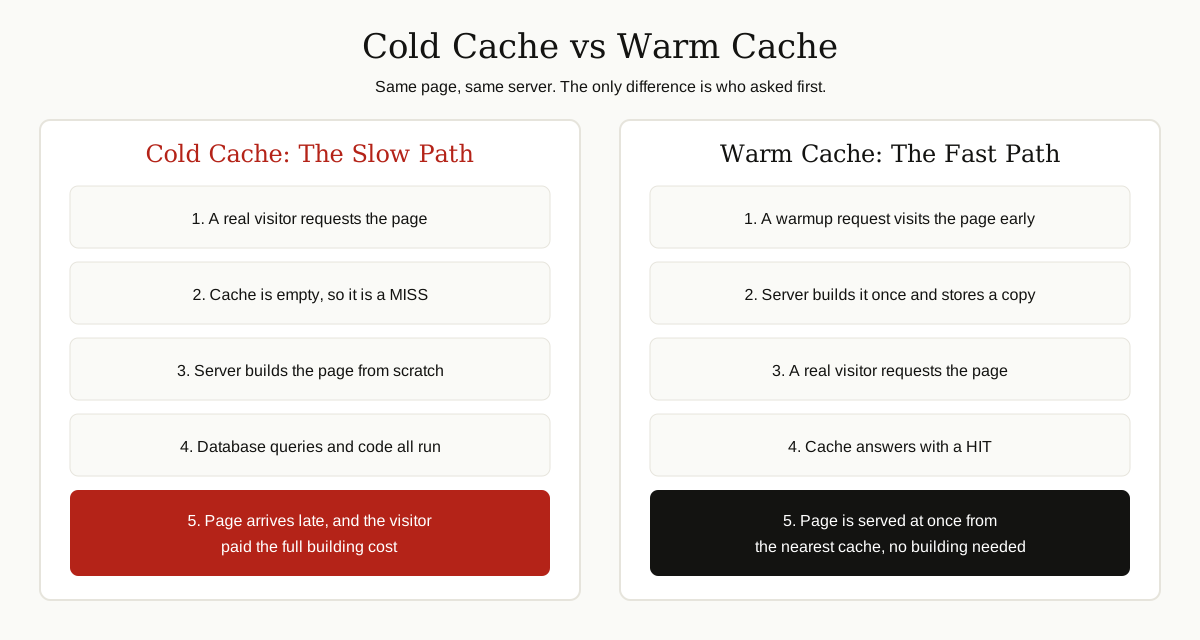
The very first person who visits a page after the cache has been cleared gets the slow version. Everyone after them gets the fast one.
That first visitor waits while the server runs code, asks the database questions and builds the page piece by piece. And it is often the visitor you care about most: the first click on your launch email, the first shopper of a sale.
A warmup cache request fixes this. Instead of letting a real person pay the slow first-visit cost, you send a planned request ahead of time. Your script does the waiting, the cache fills up, and real visitors only see the fast version.
This guide explains the idea in plain English: why cold caches are slow, what a warmup request does, and how to warm a cache without the classic mistakes.
What a Cache Is, in One Minute
A cache is a storage spot that keeps a ready-made copy of something, so the next request can be answered without doing the work again.
Think of a coffee shop that pre-grinds beans before the morning rush. Grinding to order for every cup would be fresher in theory, but the line would crawl. The pre-ground batch is a cache: a small trade of freshness for a big gain in speed.
On a website, the “work” is building a page. Without a cache, every visitor triggers the same routine: run the code, query the database, assemble the HTML. With a cache, the server builds the page once, stores the result, and hands out copies.
Two words matter for the rest of this guide:
- Cache hit: the copy was found and served at once. This is the fast path.
- Cache miss: the copy was not there, so the server had to build the page, then store it for next time.
Cache warming is simply the art of turning tomorrow’s misses into hits before real people arrive.

The Cold Cache Problem
A cache starts out empty, and it returns to empty more often than most people realize: when a site launches, after a deploy clears stored pages, after someone purges it, and every time a stored copy passes its expiry time, called its TTL (time to live).
An empty cache is called a cold cache. On a busy site, a cold cache can cause a pileup:
- The cache clears, usually right after a deploy.
- Visitors start arriving, and every request is a miss.
- Every miss means the server builds pages from scratch, all at once.
- The database gets hammered, pages slow down, and some requests fail.
Developers sometimes call this a cache stampede. The pattern is always the same: the moment your site gets attention is the moment it is least prepared for it. Big systems plan around this, and the same thinking shows up in what a distributed system is and how it handles load.
Somebody always has to be first, and filling a cache has a fixed cost. Cache warming makes sure that somebody is a robot working for you, not a customer.
What a Warmup Cache Request Is
A warmup cache request is a normal request for a page, sent on purpose, before real traffic arrives, with one goal: to make the server build that page once and store the result in the cache.
That is the whole trick. There is no special protocol and no magic header in most setups. The request looks like any other visit. The difference is who sends it, and when:
- A script or cron job can request your key URLs every few hours.
- A crawler tool can walk your sitemap after each deploy.
- A caching plugin can rebuild stored pages each time the cache is cleared.
- A deploy pipeline can finish a release by requesting the top pages.
When people talk about keeping a cache warm, this is what they mean: planned requests keep refilling it before it goes cold. The same idea is also called cache priming.
One honest limit: a warmup cache request only helps if the response is actually cacheable. Personalized, logged in or private pages will not be stored, however often you request them. Warming is for public, shared content.
Where Caches Live
“Warm the cache” sounds simple until you ask which cache. Most sites have several layers, and a page may need warming at more than one of them.
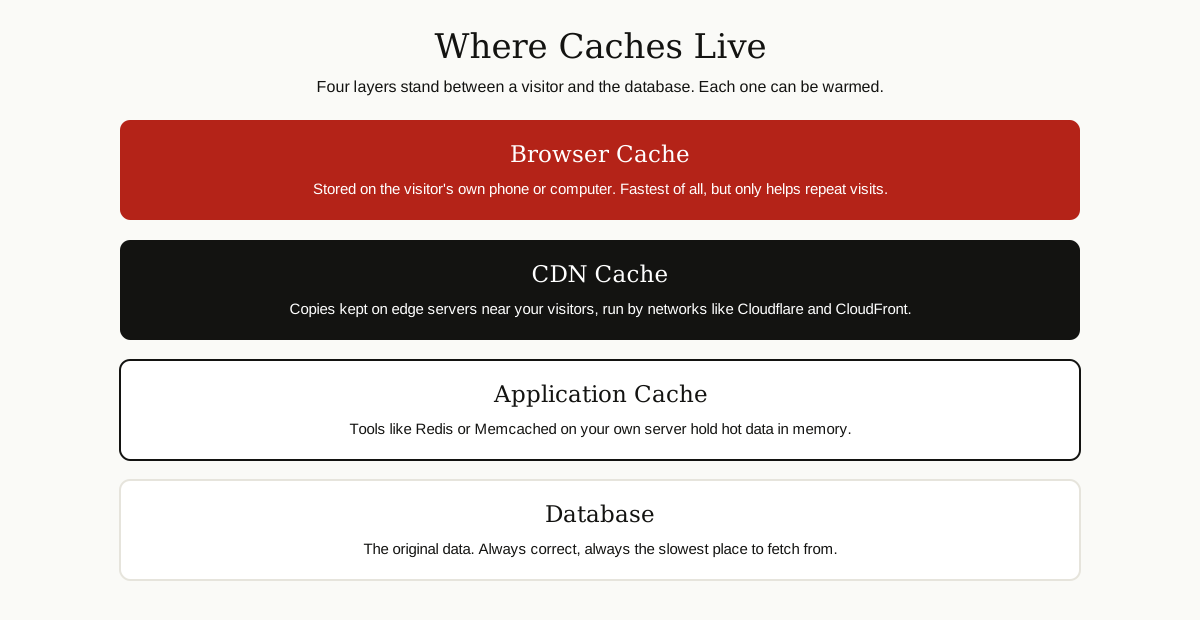
- Browser cache. Stored on the visitor’s own device. You cannot warm this one, because it belongs to the visitor. It fills on their first visit and helps only repeat visits.
- CDN cache. Copies kept on servers around the world, close to your visitors. Networks such as Cloudflare and Amazon CloudFront run this layer. Each location keeps its own copy, which is why warming one region does not warm them all.
- Application cache. Tools like Redis or Memcached hold hot data in memory on your own server, such as popular database results.
- Database. The original data lives here. It is the source of truth, and the slowest place to fetch from.
A warmup cache request usually targets the CDN and application layers, because those are shared by all visitors. When a page feels instant, one of these middle layers answered.
How to Warm a Cache
The methods range from a five line script to fully automatic platform features. Pick based on your site size and how often you ship changes. The shape of your stack matters too, as any software architecture decision shows.
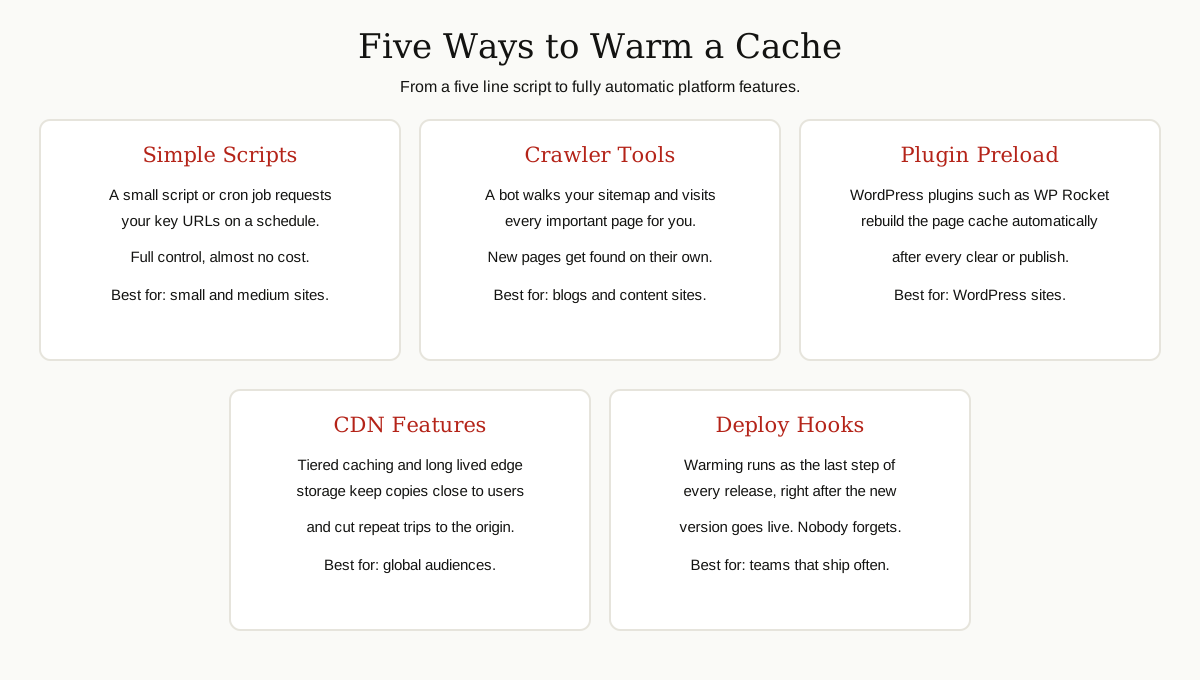
| Method | Effort | Best for |
|---|---|---|
| Simple script or cron job | Low, one short script | Small sites with a short list of key pages |
| Sitemap crawler tool | Low to medium | Blogs and content sites with many pages |
| WordPress plugin preload | Very low, a settings toggle | WordPress sites of any size |
| CDN caching features | Medium, dashboard settings | Sites with a global audience |
| Deploy pipeline hook | Medium, one time setup | Teams that release changes often |
A few notes on each route:
Scripts. The classic approach is a small script that requests a list of URLs one by one, with a short pause between requests. Slow matters: warming should never hit your server harder than real traffic would.
Crawlers. A crawler starts from your sitemap and follows links, warming pages you might forget to list by hand. A scheduled uptime check is, in effect, a tiny warmup request that helps without meaning to. Similar crawler logic powers the tools in our web scraping guide, pointed at your own site this time.
Plugin preload. On WordPress, caching plugins made warming a checkbox. WP Rocket’s preload feature, for example, scans your sitemap and simulates visits to rebuild cached pages after a clear, and it lets you choose which sitemaps to use and in which order. On very large sites, the WP Rocket team itself advises preloading only the most visited pages rather than the whole sitemap.
CDN features. Features like tiered caching reduce how often edge locations must fetch from your origin, and long lived storage keeps copies around longer. These do not replace warming, but they make each warmup request go further.
Deploy hooks. The most reliable warming is the kind nobody has to remember. Many teams add a final step to their release process: once the new version is live, request the top twenty URLs and check each answer.
When to Warm a Cache
Timing is the whole game. Warm too early and the copies expire before the crowd arrives. Warm too late and the crowd is the warming crew.
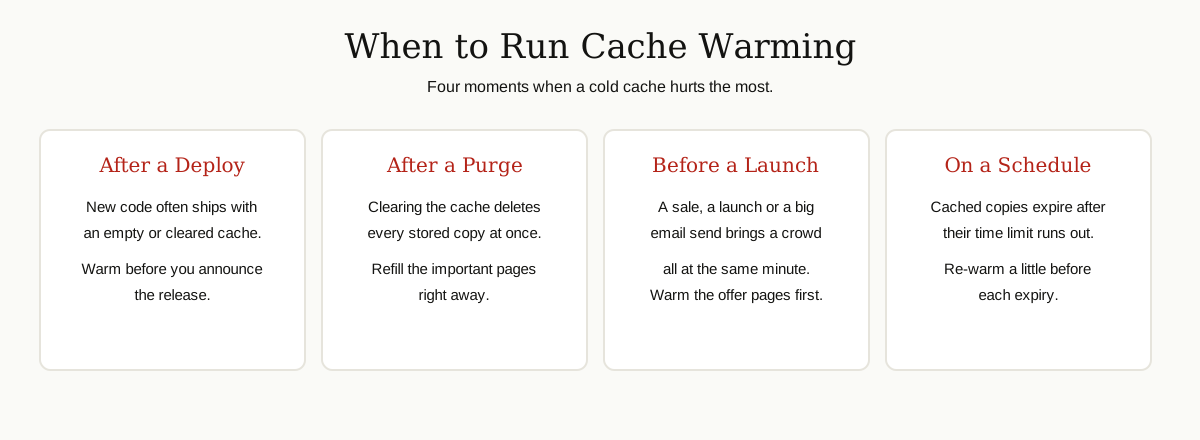
- Right after a deploy. New releases commonly clear or bypass old cache entries. Warm before you announce the release.
- Right after a cache purge. If someone cleared the cache to fix a problem, the site is cold until traffic rebuilds it. Refill the important pages at once.
- Before a launch, sale or campaign. Ads, emails and press send people at the same moment. Warm the pages those links point to, in the regions targeted.
- Before a likely traffic spike. A TV mention, a big social share or a seasonal rush is predictable enough to prepare for.
- On a repeating schedule. If your TTL is six hours, a gentle re-warm every five hours keeps key pages permanently warm on its own.
What to Warm First
You cannot warm everything, and you should not try. Every warmup request is real work for your server. Spend that work where it pays back.

A practical priority order looks like this:
- The home page. The front door for brand searches, direct visits and most campaigns.
- Top landing pages. Check your analytics for the pages with the most search and ad traffic.
- Money pages. Pricing, signup and best selling product pages, where a slow first visit loses revenue.
- Key API responses. If your app depends on a few public API calls, warming them helps every screen that uses them.
- Every variant you serve. A page can exist in several languages, currencies and regions, and each variant is a separate cache entry. The warm English page does nothing for the German one.
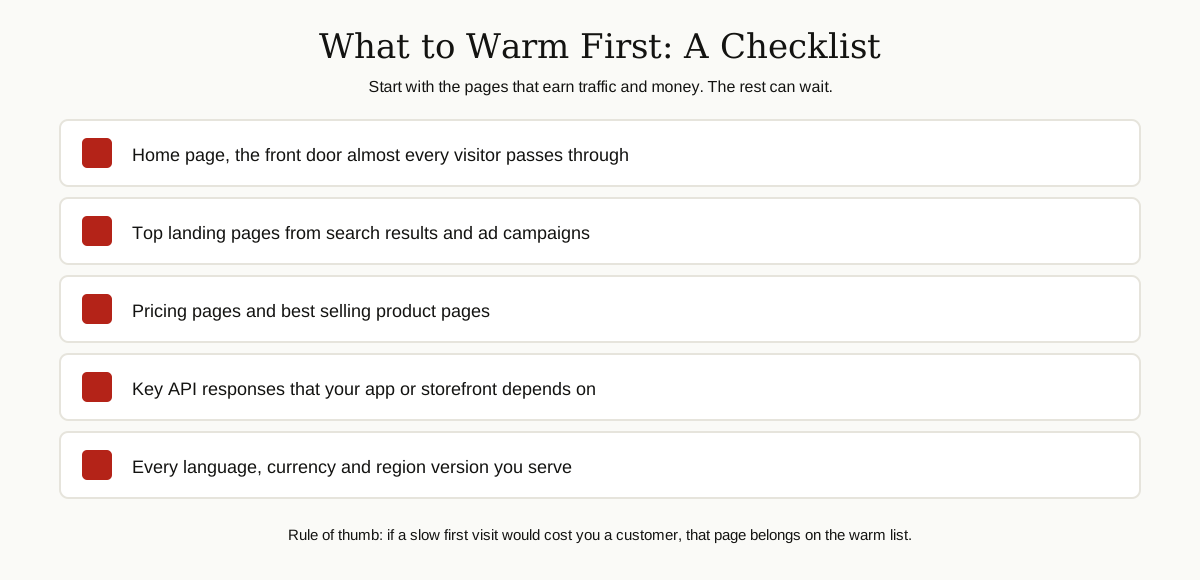
How do you build the list? Your sitemap gives the full menu, your analytics give the ranking. The overlap is your warm list. Review it every few months, because traffic habits change.
Common Mistakes That Waste the Warming
Warming is simple, which is why the mistakes are always the same four:
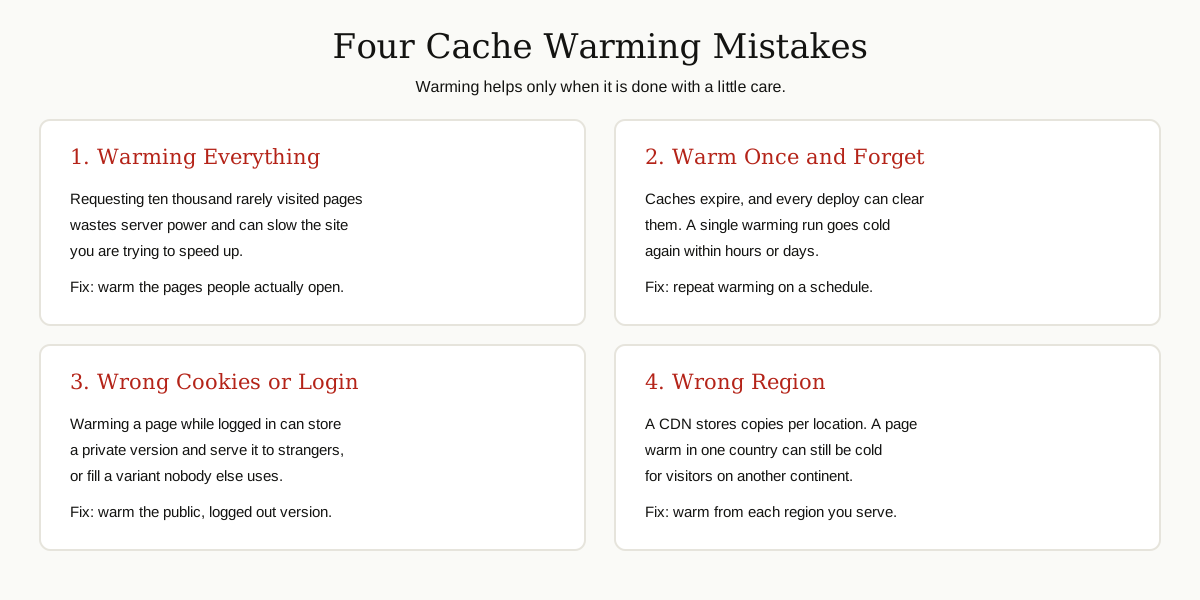
Warming everything. A sitemap with fifty thousand URLs is not a warm list. Crawling all of it can overload a modest server and push out the copies that matter. Small, deliberate lists win.
Warming once and forgetting. Caches expire and deploys clear them. A one time warmup is a photo, not a system. If it is not scheduled or hooked into your deploys, it is already out of date.
Warming the wrong version. If your script sends cookies, a logged in session or a test user agent, you may fill the cache with a version real visitors never get, or worse, one they should never see. Warm exactly what an anonymous visitor receives.
Warming the wrong place. A CDN stores copies per location. A script in one country warms that country’s edge servers and leaves the rest cold. Warm from the regions your audience lives in, or lean on tiered caching to share the work.
A quieter fifth mistake: warming pages that can never be cached. If a page’s headers forbid storage, a thousand warmup requests change nothing. Check that key pages are actually cacheable before building a routine around them.
How to Tell If Warming Worked
Do not guess. Three simple signals confirm whether warming did its job:
- Cache status headers. CDNs report whether each response was a hit or a miss. With Cloudflare, for example, the CF-Cache-Status header reads HIT when a copy was served from cache. After a warming run, request your key pages and look for hits.
- Cache hit ratio. The share of requests answered by the cache instead of your origin. If 950 of 1,000 requests were hits, your hit ratio is 95 percent. A rising ratio after warming means more visitors get the fast path.
- TTFB. Time to first byte is how long the server takes to send the first byte of the answer. A cold page can take a second or more while the database works. The same page from an edge cache answers in a small fraction of that. Compare TTFB before and after warming; the gap is your proof.
Test like a stranger: use a fresh browser profile or a simple command line request, from the regions your visitors live in. Your own laptop, with its warm browser cache, will lie to you kindly.
Cache Warming vs Preloading vs Prefetching
These three words get mixed up constantly, and they are cousins, not twins:
- Cache warming fills server side and CDN caches ahead of time, so the first real request is fast. It happens before the visitor shows up.
- Preloading tells a browser to fetch a file early because the current page will need it soon, like the main image or a font. It happens during a visit, inside the browser.
- Prefetching quietly downloads pages a visitor is likely to open next, such as the link they are hovering over. If they never click, the work was wasted, so browsers treat it as a low priority hint.
WordPress users meet all three inside one plugin, which adds to the confusion: WP Rocket’s Preload is really cache warming for your page cache, while its link preloading is browser prefetching. When someone says “preload the cache,” they almost always mean warming.
Conclusion
A warmup cache request is a small act of hospitality: your server does the slow work early, in private, so no customer has to watch it happen. It takes an afternoon to set up with a short URL list, a gentle script or a plugin toggle, and a schedule tied to your deploys.
Start small. Warm your home page, top landing pages and pricing page after every deploy, then check the hit ratio and TTFB to prove it worked. Once the habit is in place, growing the list is easy.
Your first visitor deserves the same fast page as your thousandth. Warming is how you make that true. For more, browse the software development category.