
Every phone app has the same expensive problem behind it. The world runs on two kinds of phones, iPhones and Android phones, and the old way of building apps means building everything twice: once in Apple’s language, once in Google’s language, with two teams, two budgets and two sets of bugs.
That is the problem cross platform mobile programming solves. Instead of writing the app twice, a team writes it once and runs it on both platforms. This guide explains how that works, what the main frameworks are, where the honest limits sit, and how to pick the right tool for your team and your app.

What Is Cross Platform Mobile Programming?
Cross platform mobile programming means writing one codebase, one set of app code, that produces a working app for both iOS and Android. The screens, the logic and the data handling are written a single time. A framework then turns that shared code into real apps that each phone can install and run.
Think of it like a recipe cooked in two kitchens. The recipe is written once. Each kitchen has its own oven and its own habits, so the cook makes small adjustments at serving time, but nobody writes the recipe twice.
The promise is simple: lower cost, faster launches and one team to maintain. The catch, which honest guides should state early, is that “one codebase” never means “zero platform work.” More on that below, in the section about how much code is really shared.

The Three Approaches: Native, Cross Platform and Hybrid Web
Before the frameworks, it helps to see the three roads every app project chooses between.
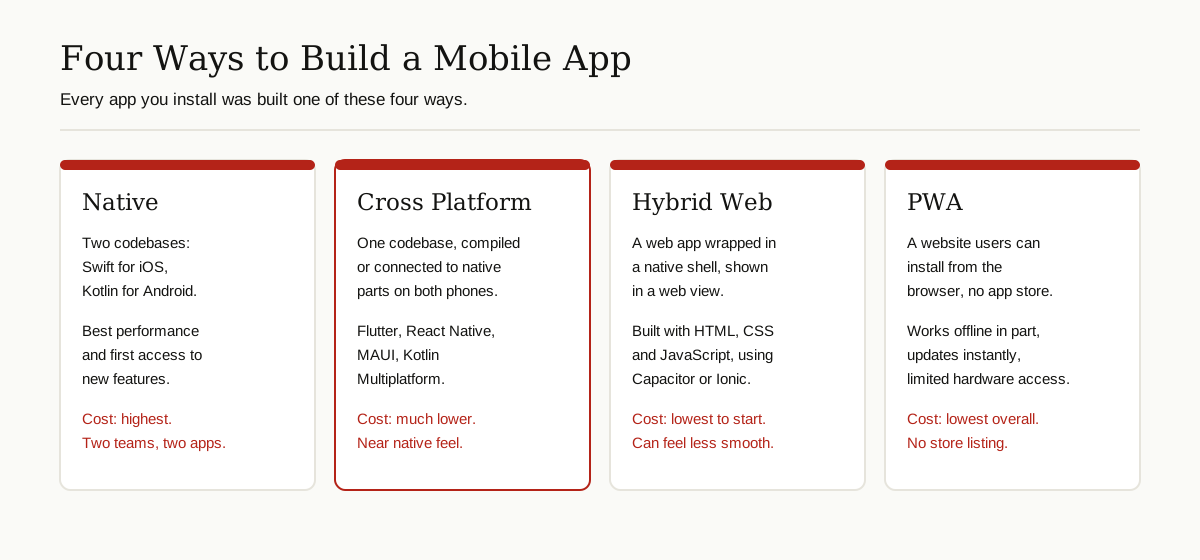
Native development means building two separate apps with the tools each platform owner provides: Swift for iOS, Kotlin for Android. It gives the best possible performance and instant access to every new feature Apple or Google releases. It also costs the most, because everything is built and maintained twice.
Cross platform development means one shared codebase using a framework like Flutter or React Native. The framework either compiles your code into native machine code or connects it to the phone’s real native controls. You lose a little of the native ceiling and gain a lot of speed and savings.
Hybrid web development means building the app like a website, with HTML, CSS and JavaScript, then wrapping it in a thin native shell so it can live in the app stores. Tools like Capacitor do the wrapping. A close cousin is the PWA, a progressive web app, which is simply a website users can install from the browser with no app store at all.
The Main Frameworks, One by One
A framework is a ready-made toolbox that does the hard platform work for you, so your team writes features instead of plumbing. If the word itself is new to you, start with what a framework is and come back. Here are the five options that cover almost every real project in cross platform mobile programming today.

Flutter: One Design That Looks the Same Everywhere
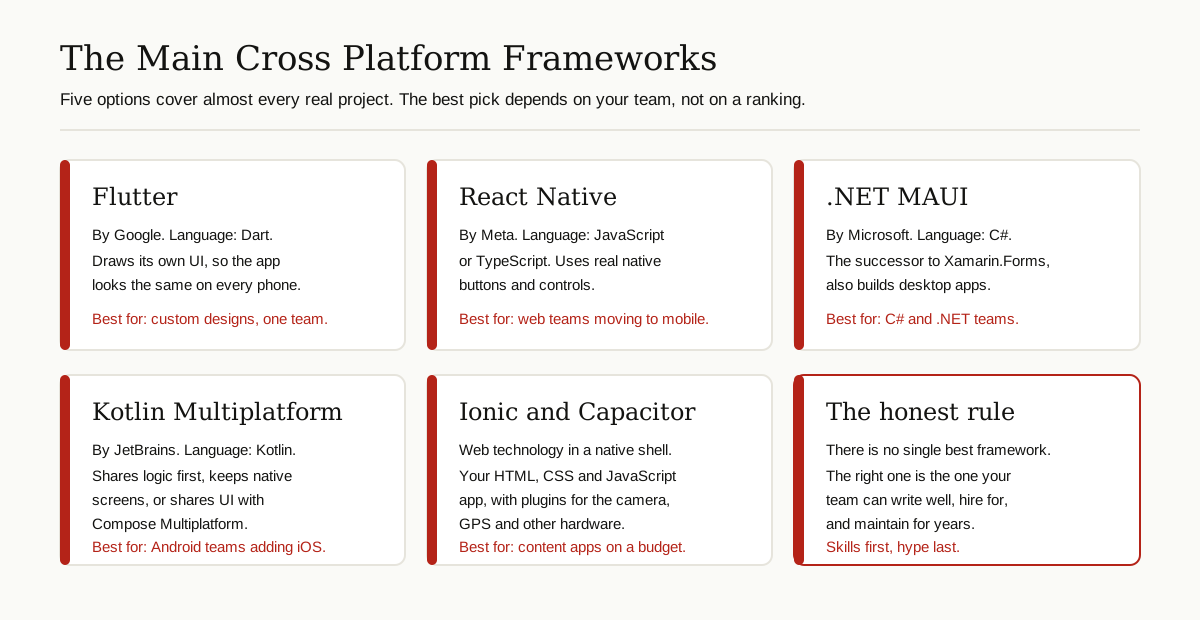
Flutter is Google’s framework, and apps are written in the Dart programming language. Its big idea is that it draws every pixel of your app itself, using its own rendering engine, instead of borrowing the phone’s built-in controls. Because Flutter paints the screen itself, a button looks identical on an old Android phone and the newest iPhone.
That consistency is why design-heavy apps love Flutter. The trade is that your app can look slightly less like a stock iOS or Android app, and you must learn Dart, a language used almost only for Flutter. Google is a committed user of its own tool: Flutter powers the Google Pay app, which Google rebuilt on the framework and shipped to users in many countries.
React Native: Web Skills, Real Native Controls
React Native comes from Meta, the company behind Facebook, and it uses JavaScript or TypeScript, the languages of the web. Unlike Flutter, it does not draw its own controls. It uses the phone’s real native buttons, lists and switches, driven by your JavaScript code. The result tends to feel at home on each platform.
React Native is the natural landing spot for web teams, because React is the most common way to build web interfaces, and the skills carry over. Meta has also rebuilt its internals in recent versions, and the New Architecture became the default in late 2024, which removed much of the old slowness between JavaScript and native code. Shopify is a famous public user: the company has written openly about moving its mobile apps to React Native. If you are deciding between React on the web and React Native on mobile, our React vs React Native guide walks through that exact choice.
.NET MAUI: The C# Route
.NET MAUI, short for Multi-platform App UI, is Microsoft’s framework. Apps are written in C# with XAML for layouts, and the same project can also produce Windows and macOS desktop apps, which no other tool on this list does as directly.
Microsoft describes MAUI on its official learning site as the evolution of Xamarin.Forms, and it is the official successor to Xamarin, the older cross platform system many companies still run. Microsoft ended support for Xamarin itself in May 2024, so new C# mobile work belongs on MAUI. For the large number of businesses built on Microsoft tools and Azure cloud services, MAUI is the obvious fit: one language, one team, and shared code with their existing .NET systems.
Kotlin Multiplatform: Share the Brain, Keep the Native Face
Kotlin Multiplatform, or KMP, is made by JetBrains and takes a different, more gradual road. Instead of forcing one UI on both phones, it first shares the invisible brain of the app: the data handling, the network calls, the business rules. Each platform keeps its own native screens, written in the normal way. A team can share a little or a lot, and adopt it inside an existing app without a rewrite.
JetBrains declared Kotlin Multiplatform stable in November 2023, and Google announced official support for it at Google I/O 2024 as a way to share business logic between Android and iOS. If a team also wants to share the interface, JetBrains offers Compose Multiplatform, which reached stable status for iOS in May 2025. Cash App is a well known user of the logic-sharing approach for its payment code. The Kotlin Multiplatform documentation explains the model in detail.
Ionic, Capacitor and PWAs: The Web in an App Costume
The last group is the web route. Ionic provides ready-made mobile-style UI components built from web technology. Capacitor, from the same team, wraps your web app in a native shell and gives it access to the camera, GPS, files and other hardware through plugins. Your app is, underneath, a website running in a full-screen web view.
This is the cheapest and fastest way to ship something that behaves like an app, and for content apps, internal tools and simple shop fronts it is often enough. The honest limit is smoothness: heavy animation, long lists and game-like screens can feel less fluid than the compiled frameworks above. A PWA goes one step further and skips the stores entirely, which saves store fees and review waits, but gives up some hardware access and visibility.
The Frameworks Compared
| Framework | Language | Made by | How the UI works | Best for |
|---|---|---|---|---|
| Flutter | Dart | Draws its own UI with its own engine | Custom designs, startups, one team | |
| React Native | JavaScript / TypeScript | Meta | Drives real native controls | Web teams, content and social apps |
| .NET MAUI | C# | Microsoft | Maps to native controls | .NET shops, business apps, desktop too |
| Kotlin Multiplatform | Kotlin | JetBrains | Native UI by default, shared UI optional | Android teams adding iOS, gradual moves |
| Ionic with Capacitor | HTML, CSS, JavaScript | Ionic team | Web view inside a native shell | Budgets, content apps, quick launches |
Cross Platform vs Native: The Honest Pros and Cons
Sales pages for cross platform mobile programming list only the wins. Here is the balanced version.
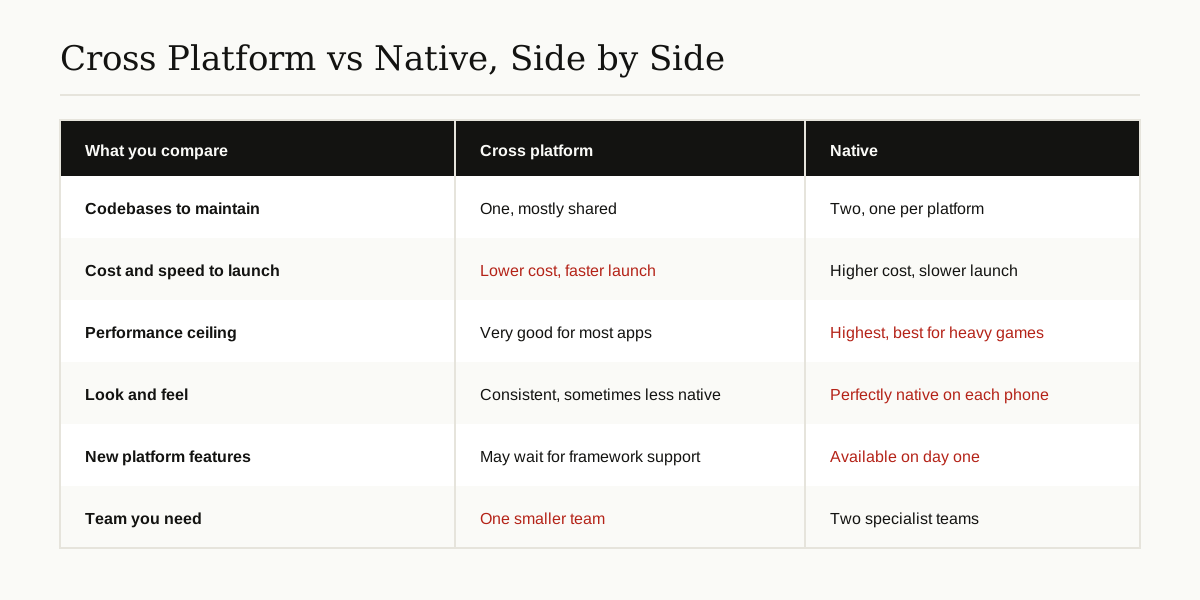
Where cross platform wins. One team and one codebase usually means a meaningfully lower build cost and a faster first launch. Fixes and features ship to both platforms at the same time, so iPhone users stop waiting weeks behind Android users, or the other way around. Hiring is simpler too, because one skill set covers both stores.
Where native still wins. Top-end performance belongs to native code. High-end 3D games, pro video editors and apps that squeeze the camera or AI chips in unusual ways still belong in Swift and Kotlin. Native apps also get brand new platform features on day one, while cross platform apps may wait until their framework adds support. And when something breaks in a cross platform app, debugging can cross three layers: your code, the framework and the platform.
The middle truth. For the large majority of real apps, shops, bookings, banking, news, health, social and business tools, modern cross platform performance is comfortably good enough that users cannot tell the difference. The decision is rarely about raw speed anymore. It is about your team, your budget and how custom your app needs to be.
How Much Code Is Really Shared?
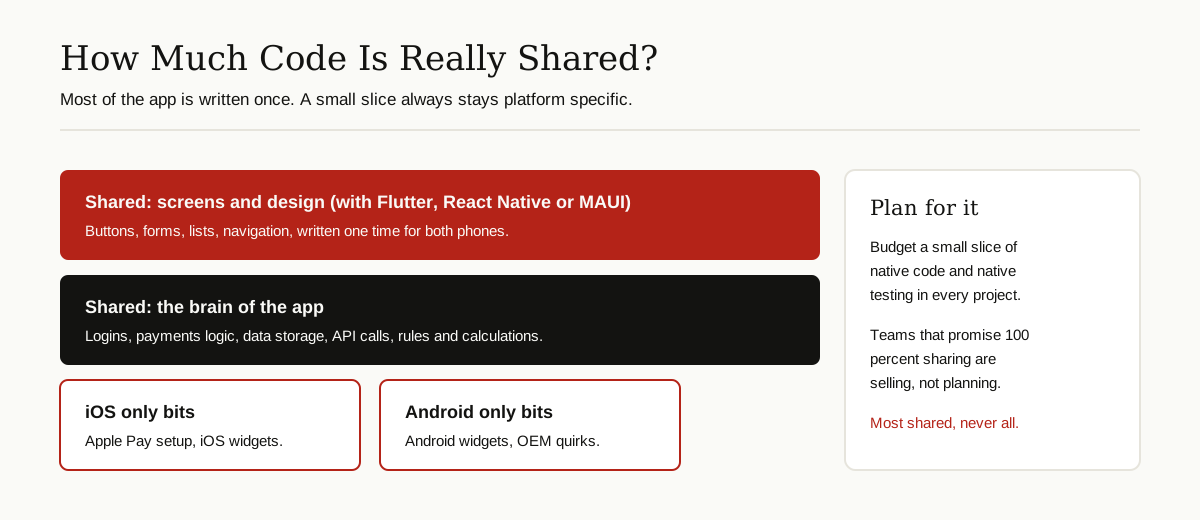
Vendors love to promise 100 percent code sharing. Plan for less. In cross platform mobile programming, the realistic picture looks like this: the business logic, data code and API calls can be shared almost completely. With Flutter, React Native or MAUI, the screens are shared too. What stays platform specific is the small print: payment setup for each store, permission flows, widgets, push notification details, and any feature where you deliberately drop to native code for one special screen.
JetBrains, for example, cites an app called Respawn that shares 96 percent of its code between iOS and Android with shared UI, which shows the top of the range is real. But a normal project should budget for a slice of platform-specific code and testing from the start. Teams that plan for most, not all, sharing are the ones that finish on time.
How to Choose the Right Framework
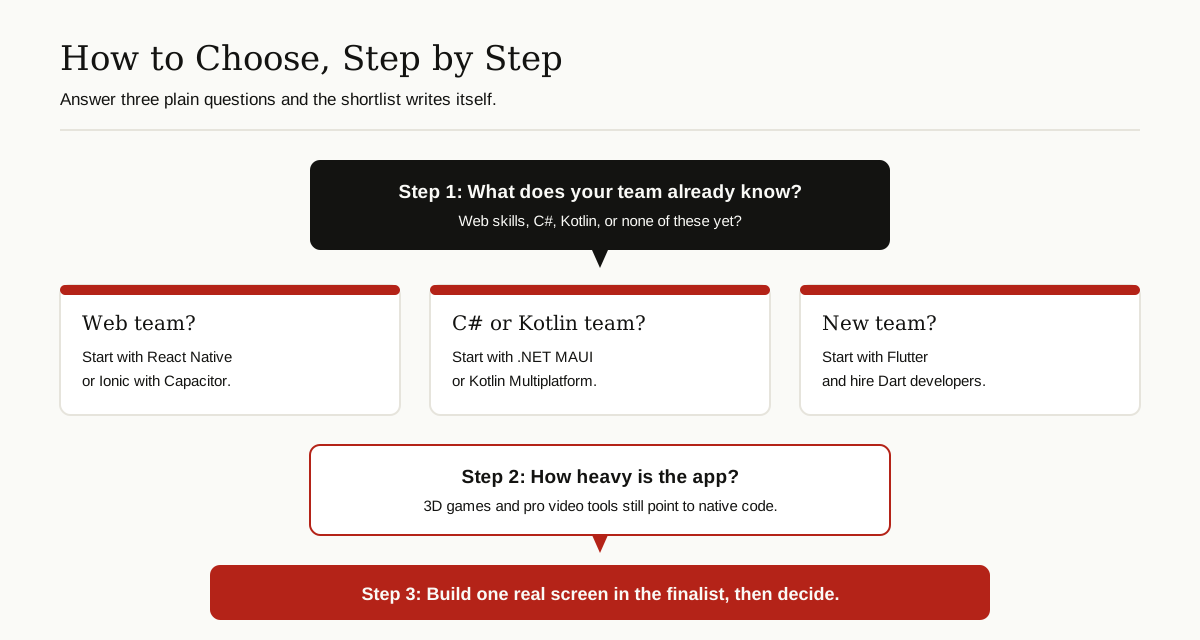
Start with your team, not with benchmarks. If your developers write JavaScript or TypeScript for the web, React Native or the Ionic route will feel like home. If your company runs on C# and .NET, MAUI is the natural pick. If you have a strong Android team in Kotlin and an iOS version to add, Kotlin Multiplatform lets you share the brain first and keep your native screens. If you are hiring fresh and want one consistent design everywhere, Flutter is the cleanest start.
Then look at the app itself. Heavy graphics or unusual hardware pushes you toward native code, or toward Flutter among the cross platform options. A simple content or commerce app can be served by any of the five. Also check the boring things that decide long projects: how easy it is to hire for the framework in your city, how active its plugin library is, and whether the company behind it is committed for the long term. All five options here have serious backing: Google, Meta, Microsoft, JetBrains and a long-running open source team.
Finally, prototype. Build one real screen, with a real login and a real API call, in your top two candidates. Two days of prototyping teaches more than two weeks of reading comparison articles, including this one.
Common Mistakes to Avoid
The first mistake is choosing by hype. The loudest framework of the year is not automatically the right one for a five-year product. The second is assuming shared code means no native skills are needed at all. Sooner or later every cross platform team meets a bug or a feature that requires reading Swift or Kotlin, so keep at least some native knowledge within reach.
The third mistake is neglecting structure. A shared codebase grows twice as fast as a single-platform one, and without clear organization it turns into a tangle that slows every change. Methods like feature sliced design exist to keep large front ends organized by feature, and the same discipline pays off in mobile apps. The fourth mistake is testing only on one platform until the end. Test on real iPhones and real Android phones from the first week, because each platform hides its own surprises.
Where Cross Platform Is Heading
The direction is steady convergence. React Native has rebuilt its engine room, Kotlin Multiplatform has gone stable and gained a stable shared UI for iOS, and Flutter keeps expanding beyond phones to desktop and web. The gap between cross platform and native keeps shrinking for everyday apps, while native keeps its crown for the extremes.
Cross platform mobile programming has grown from a budget shortcut into the default way many serious apps are built. Pick the framework that fits your team’s skills and your app’s real needs, plan honestly for the small platform-specific slice, and one codebase really can serve both phone worlds well. For more guides like this one, browse our software development category.