Almost every frontend starts out tidy. A few components, a couple of pages, everything easy to find. Then the product grows. The components folder passes one hundred files. A single feature, like checkout, ends up spread across components, hooks, services and store folders at the same time. Changing one small thing breaks something in a different corner, and new developers spend their first week just learning where things live.
This slow slide into a jungle is not a talent problem. It is a structure problem, and it is exactly the problem feature sliced design was created to solve. In this guide you will learn what the methodology is, how its layers, slices and segments fit together, the rules that keep the structure clean, and how to adopt it in a real project without stopping development. If you are still building your mental map of code structure in general, our overview of software architecture is a good companion read.
What Is Feature Sliced Design?
Feature Sliced Design (FSD) is a methodology for organizing frontend code. A methodology is a shared set of rules and habits, not a library you install. Instead of grouping files by their technical kind (all components here, all helpers there), FSD groups code by what it does for the business, and then controls how those groups may talk to each other.
The official Feature-Sliced Design documentation describes it as an architectural methodology for building scalable frontend applications. It grew out of community discussions among frontend developers, mainly in the React world, who found that folder-by-type stops working once an app gets big.
Here is the core thought in one sentence: the structure of the code should mirror the structure of the product. A shop has products, a cart and a checkout, so the code should have product, cart and checkout areas too, each one self-contained.

That sounds simple, and the idea is simple. What makes FSD more than a naming trick is the strict set of dependency rules it adds on top of the grouping. Those rules are the real product, and the next sections explain them.
The Three Building Ideas: Layers, Slices and Segments
Every FSD project is organized with the same three ideas. Learn these three words and the rest of this guide will make sense.
Layers
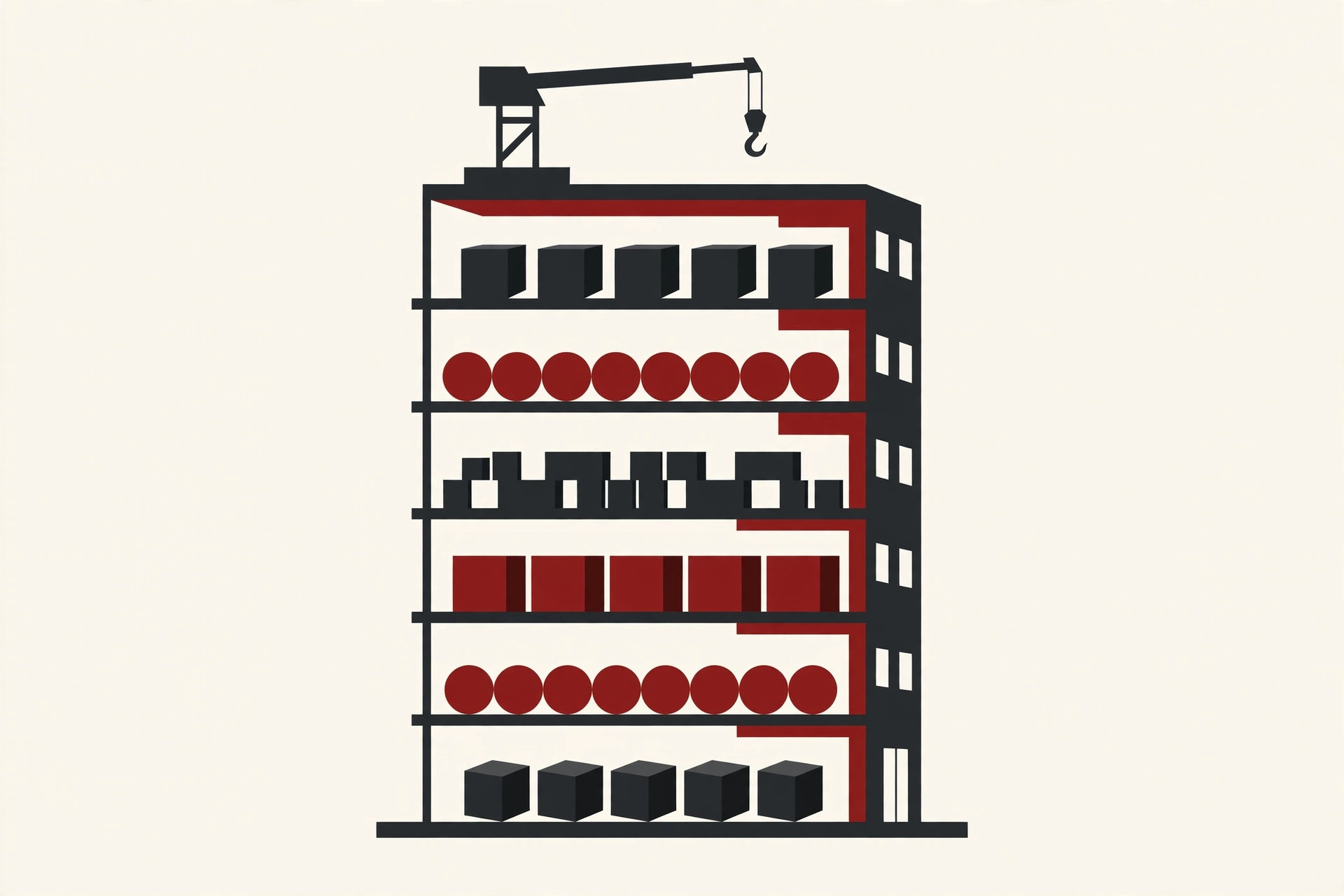
A layer is a level of responsibility. FSD defines a standard set of layers, stacked from the top (app) down to the bottom (shared). Code on a higher layer is allowed to use code on lower layers, and never the other way around. Think of floors in a building: the top floor can look down at everything below it, but the ground floor never reaches up.
Slices
A slice is a group of code for one business area inside a layer. On the features layer, each user action gets its own slice, such as sign-in or add-to-cart. On the entities layer, each core business thing gets a slice, such as user or product. Slices are how FSD keeps related code together instead of scattering it by file type.
Segments
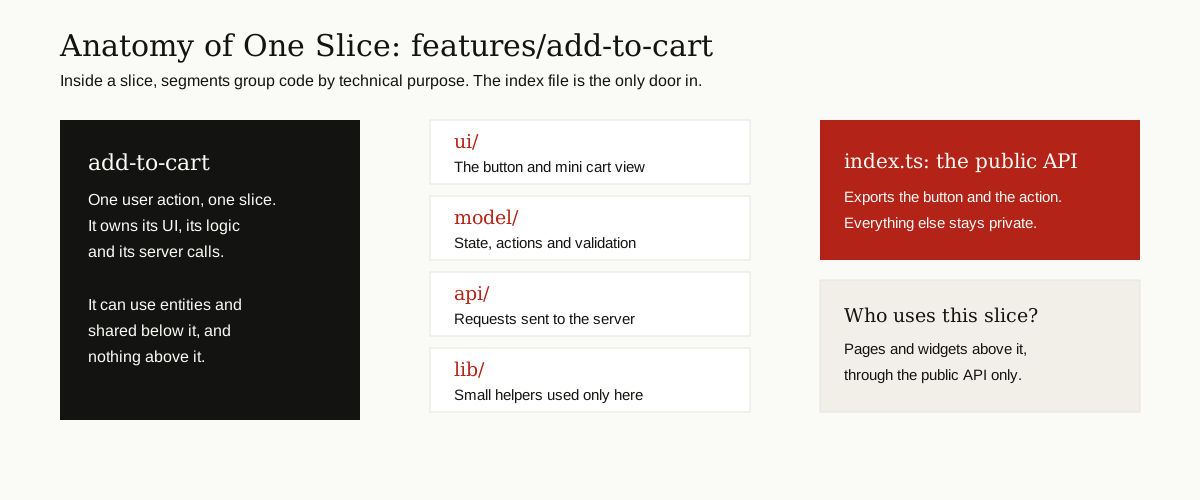
A segment is a folder inside a slice that groups code by technical purpose. The standard segment names are ui (what the user sees), model (logic and state), api (calls to the server), lib (small helpers for this slice only) and config (settings and feature flags). You do not need every segment in every slice. Use only the ones the slice actually needs.
The Feature Sliced Design Layers, One by One
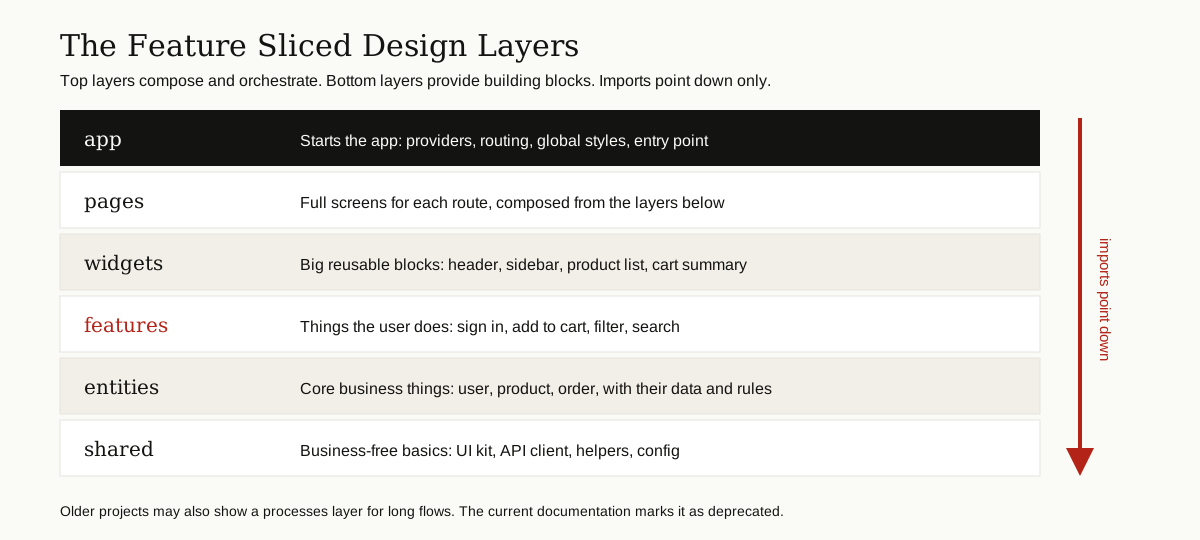
There are seven layers in the standard. Six are in daily use. The seventh, processes, still shows up in older projects, and the current documentation marks it as deprecated, so new projects skip it. The docs also stress that you do not have to use every layer. Most projects start with app, pages and shared, and add the rest only when they bring value.
| Layer | What lives there | Plain example |
|---|---|---|
| app | Everything that starts the app: providers, routing, global styles | The entry point that wraps the whole app |
| pages | One slice per route, composed from widgets and features | The checkout page |
| widgets | Large reusable blocks that combine features and entities | The site header, the product list |
| features | User actions and interactions | Sign-in form, add-to-cart button, filters |
| entities | Core business things with their data, logic and small UI | User, product, order |
| shared | Code with no business meaning, reused everywhere | Button kit, API client, date helpers |
A few notes that save arguments later:
- App and shared are special. The documentation treats them as both a layer and a slice at the same time, so they contain segments directly, with no slices inside. Shared has no business domains to split by, and app combines all of them.
- Feature or entity? An entity is a thing (a product). A feature is an action on things (adding a product to the cart). If the name is a noun from the business, it is probably an entity. If it is a verb a user performs, it is probably a feature.
- Widget or page? A page is one route. A widget is a big block that several pages can share, like the header or a cart summary panel.
- What happened to processes? It held long flows that crossed several pages, like an old-style checkout or onboarding wizard. Current FSD composes those flows on the pages layer or in app instead, which is why the layer is deprecated.

The Rules That Keep It Clean
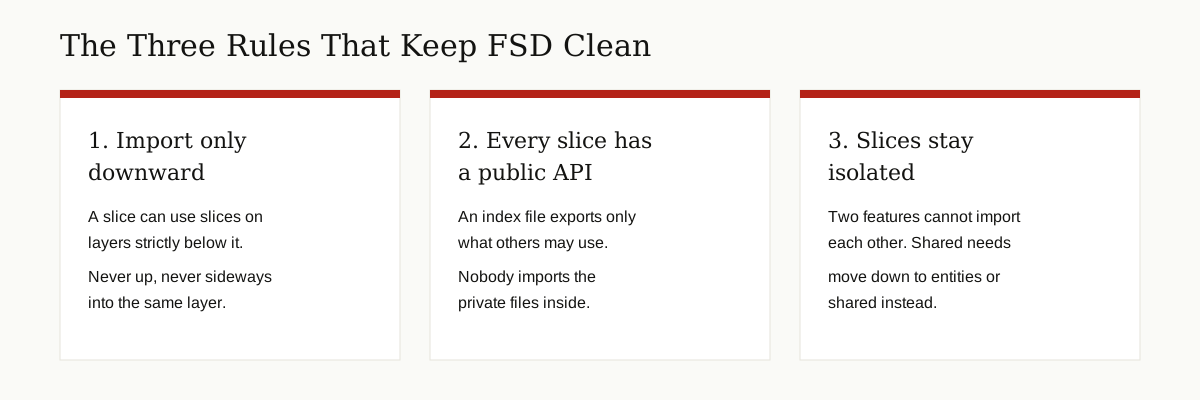
Grouping alone does not protect a codebase. Plenty of feature-folder projects still rot, because any file can import any other file. The feature sliced design approach stays clean because of three rules.
Rule 1: Imports Point Down Only
The official layers reference states the import rule on layers like this: a module in a slice can only import other slices when they are located on layers strictly below. A feature can import entities and shared. It can never import a widget or a page. This one rule kills most circular dependencies, and it makes the effect of any change predictable, because changes flow down and never back up.
Rule 2: Every Slice Has a Public API
Each slice has an index file at its root that re-exports only what other code is allowed to use. Other slices import from that index file, never from deep paths inside the slice. Think of it as a shop counter: customers use the counter, they do not walk into the stockroom. Inside the slice you can reorganize files freely, because nobody outside depends on the internal layout.
Rule 3: Slices on the Same Layer Stay Isolated
Two slices on the same layer cannot import each other. The add-to-cart feature cannot reach into the auth feature, even though both live on the features layer. If two slices genuinely need the same logic, the shared part moves down into entities or shared, where both can reach it legally. The docs allow one controlled exception for entities that must reference each other: a special @x folder inside a slice acts as a narrow public API built for one specific other slice. It is a deliberate door, not an open wall.
An Example Structure
Enough theory. Here is a small shop frontend in FSD shape:
src/
  app/
    providers/
    routing/
  pages/
    home/
    checkout/
  widgets/
    header/
    product-list/
  features/
    add-to-cart/
      ui/
      model/
      api/
      index.ts
    auth-by-email/
  entities/
    product/
    cart/
    user/
  shared/
    ui/
    api/
    lib/
    config/
Read it from the top down. The pages are thin: the checkout page mostly places a cart summary widget and a payment feature on the screen. The features do the user-facing work. The entities hold what a product and a cart are, including how their data is fetched, stored and validated. Shared holds the plain buttons, inputs and the HTTP client that everything else builds on.
Zoom into the add-to-cart slice and the same anatomy repeats at small scale: its button lives in ui, its state and actions in model, its server calls in api, and the index file is the only door other code may enter through.
How to Adopt FSD Step by Step
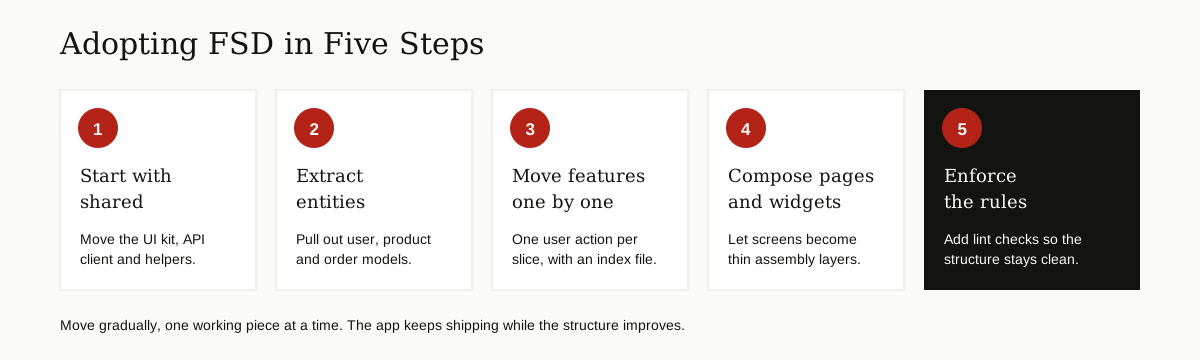
You do not need a rewrite or a frozen roadmap. The documentation and community experience agree on a gradual path, and a community walkthrough of FSD basics shows the same route in practice. Move one working piece at a time:
- Start with shared. Move the UI kit, the API client, global helpers and config into shared. This layer has no business code, so it is the safest first move.
- Extract entities. Pull the core business things (user, product, order) into entities, each with its model and API code, and give each one an index file.
- Move features one by one. Take a single user action, like add-to-cart, and gather its UI, logic and API calls into one slice. Working in small, safe steps matters here, and a good version control system is what makes each step easy to undo.
- Compose pages and widgets. Once the lower layers exist, thin the pages down to assembly: place widgets and features on the screen and let the slices do the work.
- Enforce the rules. Add lint checks (next section) so new code cannot quietly break the boundaries you just built.
Tooling and Framework Notes
FSD is framework agnostic. It grew up in the React ecosystem, but the documentation covers React, Vue, Svelte and other stacks, because the layers and import rules are about responsibility, not about any one library. The same slice thinking even carries into mobile code, as our comparison of React vs React Native shows for shared business logic.
For enforcement, the feature-sliced project maintains an official ESLint config, @feature-sliced/eslint-config, which flags imports that break the layer and slice rules, plus a dedicated architecture checker called Steiger. Most teams also add path aliases (for example @/ for the src folder) so imports stay short and readable. Rules that a linter checks tend to survive. Rules that live only in a wiki page tend to fade.
Benefits and Drawbacks, Honestly
What FSD Gives You
- A predictable address for everything. New code has an obvious home, and finding existing code stops being detective work.
- Safer refactoring. Public APIs limit the blast radius of a change. You can rebuild the inside of a slice without touching its users.
- Parallel teamwork. Different developers or teams can own different slices and collide far less often.
- Controlled reuse. Putting code into shared is a deliberate step, so shared stays small and honest instead of becoming a junk drawer.
- Code that reads like the product. Managers and new hires can map the folder tree to real features, which speeds up onboarding.
What It Costs You
- A learning curve. Thinking in layers and slices takes most developers a few weeks, and the first project will involve wrong guesses.
- More folders and boilerplate. Every slice wants its segments and its index file. On a small codebase that ceremony is easy to feel.
- Overhead on tiny apps. A five-page marketing site or a weekend prototype gains little. The structure pays off as the app grows, not before.
- Discipline is required. Without lint rules and code review, teams slowly drift back to cross-imports and the benefits leak away.
- Boundary debates. Is this a feature or an entity? Expect these discussions. The noun-or-verb test settles most of them.
FSD vs Other Approaches
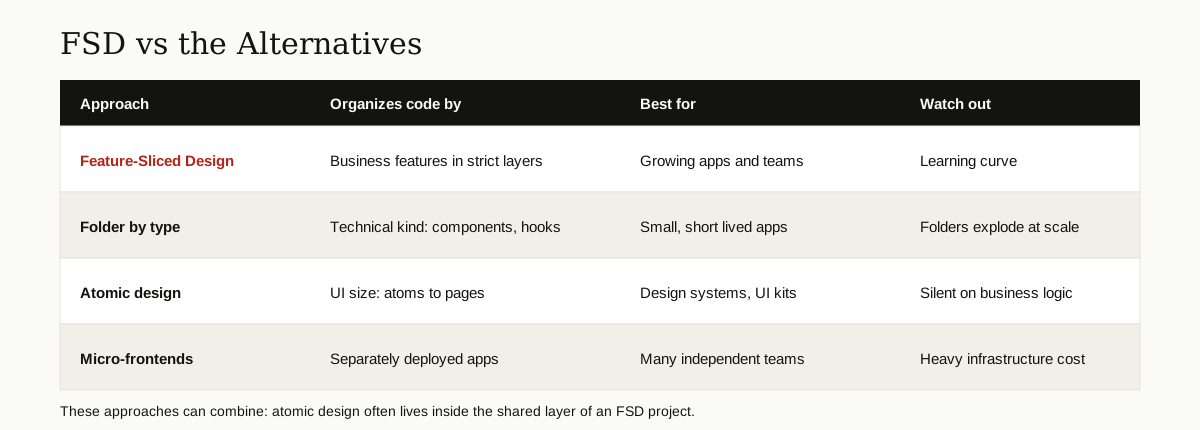
| Approach | Organizes code by | Strength | Weak spot |
|---|---|---|---|
| Feature-Sliced Design | Business features inside strict layers | Scales with product and team | Learning curve, boilerplate |
| Folder by type | Technical kind (components, hooks, services) | Simple to start | Folders explode as the app grows |
| Atomic design | UI size (atoms, molecules, organisms) | Consistent design systems | Says nothing about business logic |
| Micro-frontends | Separately deployed mini apps | Independent teams and releases | Heavy infrastructure and complexity |
Two of these are not real rivals. Atomic design is about UI pieces, so teams often run it inside the shared layer of an FSD project, where the design system lives. Micro-frontends solve a different problem, splitting one product into separately deployed apps. That is powerful for very large organizations and heavy overkill inside a single app. FSD structures the inside of one frontend, whatever hosts it.
When Feature Sliced Design Is and Is Not a Good Fit
Reach for FSD when the product will live for years, when more than a couple of developers touch the frontend, and when features keep stepping on each other. Admin panels, dashboards, marketplaces and SaaS products are the classic fit.
Skip the full setup for prototypes, hackathons and tiny sites. A middle path works well there: keep just app, pages and shared, insist on index files as public APIs, and add features and entities only when the app earns them. You get most of the clarity with a fraction of the ceremony.
Conclusion
Feature sliced design is not magic, and it is not a library. It is a deal a team makes with itself: layers give the code direction, slices give it ownership, segments keep each slice tidy inside, and the import rules keep all three honest. Start with the layers you need, move one slice at a time, and let the linter guard the result. Your future self, hunting a bug at midnight, will be grateful. For more guides like this one, browse our Software Development category.