Two weeks after a project meeting, two teammates remember the launch date differently. A third is sure the budget was approved. Nobody can prove anything, because nobody wrote it down.
Scenes like this are why meeting minutes exist, and why learning how to write meeting minutes is one of the most useful office skills you can pick up. Good minutes end arguments before they start. They turn a one hour conversation into a clear record of what was decided, who is doing what, and by when. This guide walks through the whole job: what minutes are, what to do before, during, and after the meeting, a template you can copy, and a short example of the finished product.
What Are Meeting Minutes?
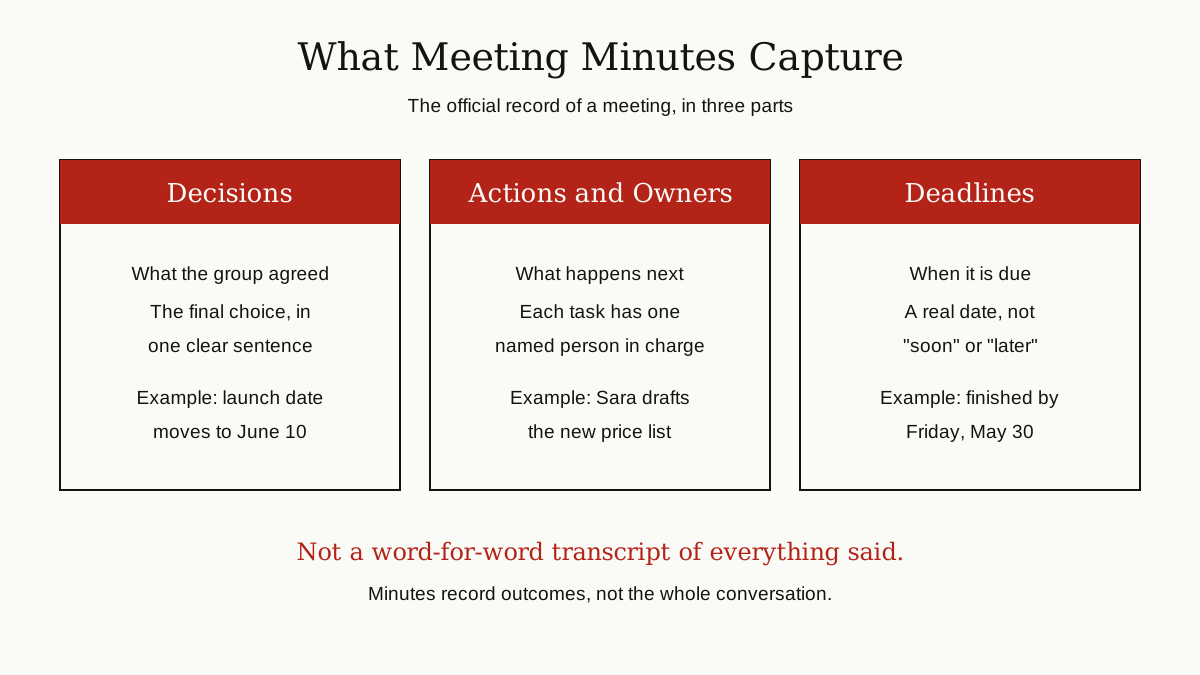
Meeting minutes are the official written record of a meeting. Asana’s meeting minutes guide describes them as a record of the key decisions, discussion points, and action items from a meeting. That short list is the whole job. Minutes capture outcomes, not conversations.
Despite the name, minutes have nothing to do with how long a meeting lasted. And they are not a transcript. A transcript tries to preserve every word. Minutes do the opposite: they leave out the long debate and keep the result. If the team argued for twenty minutes about a launch date and then agreed on September 8, the minutes need one line: the launch date is September 8.
Why does this short document matter so much?
- Proof of decisions. Months later, when memories differ, the minutes settle what was actually agreed.
- A catch-up for absent people. Anyone who missed the meeting can read the minutes and know exactly where things stand.
- Follow-through. An action written down with an owner and a deadline is far more likely to happen than one that was only spoken out loud.
So who writes them? One person, agreed before the meeting starts. In formal settings, that person is often a secretary or the meeting organizer. In regular teams, the job often rotates. The key rule is simple: minute taking is a real task, so it should belong to a named person, not to whoever happens to open a notebook.
Before the Meeting: Do the Easy Half Early
Good minutes start before anyone sits down. A little preparation makes the live note taking much easier. Atlassian’s guide to board meeting minutes opens with the same advice: prepare first, review the agenda and any supporting documents, and record as many details as you can before the meeting begins. What works for a board works for a Tuesday team sync too.
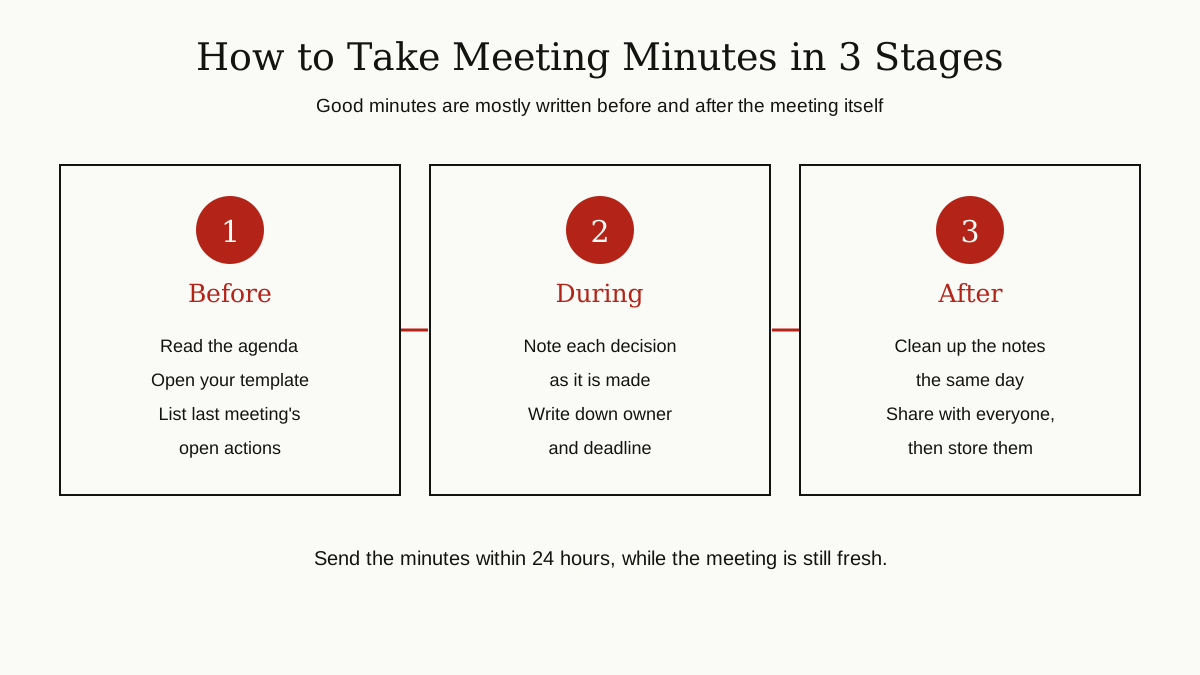
- Read the agenda. Know the topics, the order, and who leads each one. If there is no agenda, ask the organizer for the meeting’s purpose and the decisions it needs to produce.
- Open your template and fill in the header. The meeting title, date, start time, and attendee list can all be written before the meeting begins.
- Bring the last meeting’s minutes. Start with a quick check of the open actions from last time. Which ones are done, and which ones need a new deadline? This two minute review is where follow-through actually happens.
- Skim the supporting documents. The slides, reports, or proposals being discussed. You do not need to master them, just enough background that unfamiliar terms do not slow your writing down.
During the Meeting: Listen for Outcomes
Your job in the room is not to type fast. It is to listen for the moments when talk turns into a decision or a task.
At the start, note the basics: the actual start time, who is present, and who is absent. Then work down the agenda in order, and give each topic its own short section in your notes.
For every topic, you are listening for three things:
- The decision. Phrases like “so we are going with option B” or “let us lock that date” mark the spot. Write the decision down as one plain sentence.
- The actions. Every task needs three parts: what will be done, one named owner, and a deadline. If any part is missing, ask out loud: “Who is taking that, and by when?” People expect the question, and asking it makes the meeting clearer for everyone.
- The open points. If a topic ends without a decision, say so honestly: “No decision yet. The team needs the cost figures first.” An honest open point is useful. A blank space is not.

Disagreements need care. Summarize them briefly and neutrally: who proposed what, and what the group finally chose. Do not record sarcasm, side comments, or your own view of who argued best. Minutes are a record, not a review.
One practical tip: do not try to write polished sentences live. Capture rough notes and key words during the discussion, mark each decision with a star, and clean everything up right after the meeting. Trying to produce the final document in real time is exactly how important details get missed.
What a Good Minutes Document Contains
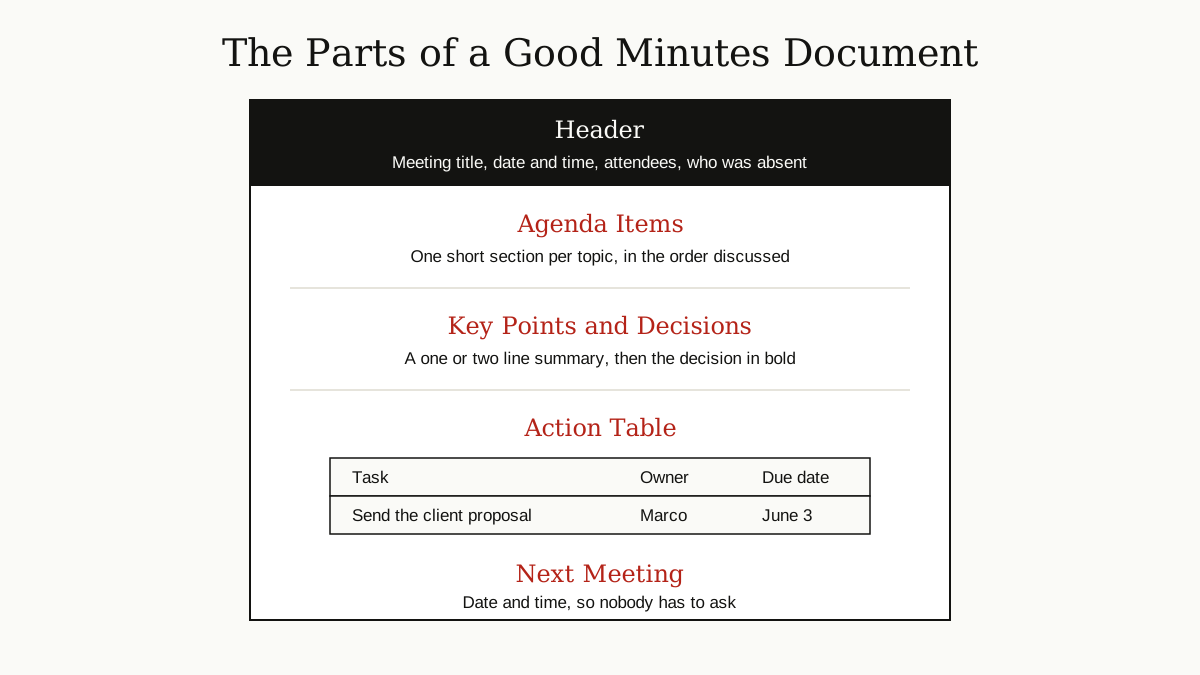
Whether the meeting was formal or casual, the finished document needs the same core parts:
- Header: meeting title, date and time, attendees, and anyone absent
- Agenda items: one short section per topic, in the order they were discussed
- Key points: a line or two of neutral summary per topic
- Decisions: stated plainly, ideally in bold, so they are easy to scan
- Action table: every task, with an owner and a due date
- Next meeting: the date and time, if one was set
That matches the short list Notion gives for meeting notes: agenda topic, key points, decisions, and action items with owners and due dates. Notice what is not on the list: long explanations, personal opinions, and chat that led nowhere. If a detail does not help someone act, or help them remember a decision, it does not belong in the minutes.
A Meeting Minutes Template You Can Copy
The easiest way to learn how to write meeting minutes is to stop starting from a blank page. Copy this structure into a document or a note-taking app, and reuse it for every meeting. Consistency is the point: when every set of minutes looks the same, your team learns exactly where to find things, in seconds.
Meeting title:
Date and time:
Attendees:
Absent:
Minutes taken by:

1. [Agenda item]
   Key points:
   Decision:

2. [Agenda item]
   Key points:
   Decision:

Actions
Action | Owner | Due date
...    | ...   | ...

Next meeting:
A Short Example of Finished Minutes
The example below is fictional, written for this guide. It shows the right shape: short, clear, and focused on decisions and actions.
Website Redesign Weekly Sync Date: Tuesday, August 18, 2026, 10:00 to 10:40 a.m. Attendees: Priya (lead), Marco, Sara, Tom. Absent: Lena
1. Homepage designs Sara presented two homepage designs. The team compared them and chose design B, because the pricing section is easier to find. Decision: Design B approved. Sara prepares the final files.
2. Launch date The original launch date clashes with a company event. The team agreed to move the launch by one week. Decision: New launch date is Tuesday, September 8.
| Action | Owner | Due date |
|---|---|---|
| Write the final homepage copy | Tom | August 21 |
| Book a user testing session | Priya | August 24 |
| Send the updated timeline to the client | Marco | August 19 |
Next meeting: Tuesday, August 25, 10:00 a.m.

Notice how little of the actual conversation appears. That is the point. A reader who was not in the room still knows what was decided, who owes what, and when it is due.
After the Meeting: Write It Up, Share It, Store It
The meeting ends, but the minutes are not finished. This last stage decides whether they get used or ignored.
Write them up the same day. Your rough notes make sense to you right now. In three days, half of your abbreviations will be a mystery. Clean the notes into the template while the discussion is still fresh, and double-check names, numbers, and dates. Asana’s guide sets a clear target for this: share the minutes within 24 hours, while the conversation is still fresh in everyone’s mind.
Send them to everyone, including the people who were absent. Do not just file the document and hope. A short message with the minutes attached or linked is enough. Share them where the team actually works, inside the team collaboration tools your group already uses, not buried in a private email thread. If someone spots an error, they can say so, and corrections made in the first day are painless.
Store them where the team can find them later. Minutes earn their keep months after a meeting, so save them in the shared space the team uses for project files, not in your personal folder. Keeping records findable is the same discipline we cover in our guide to technical documentation: a decision nobody can find later might as well not have been recorded.
Turn the actions into tracked tasks. Copy every action out of the minutes and into your project plan or task list, where it stays visible until it is done. The action table in your minutes pairs naturally with the project planning templates your team uses to run the wider project.
Formal Board Minutes vs Informal Team Minutes
Not every meeting needs the same level of ceremony. Minutes come in two broad styles, and picking the right one is mostly about the stakes.
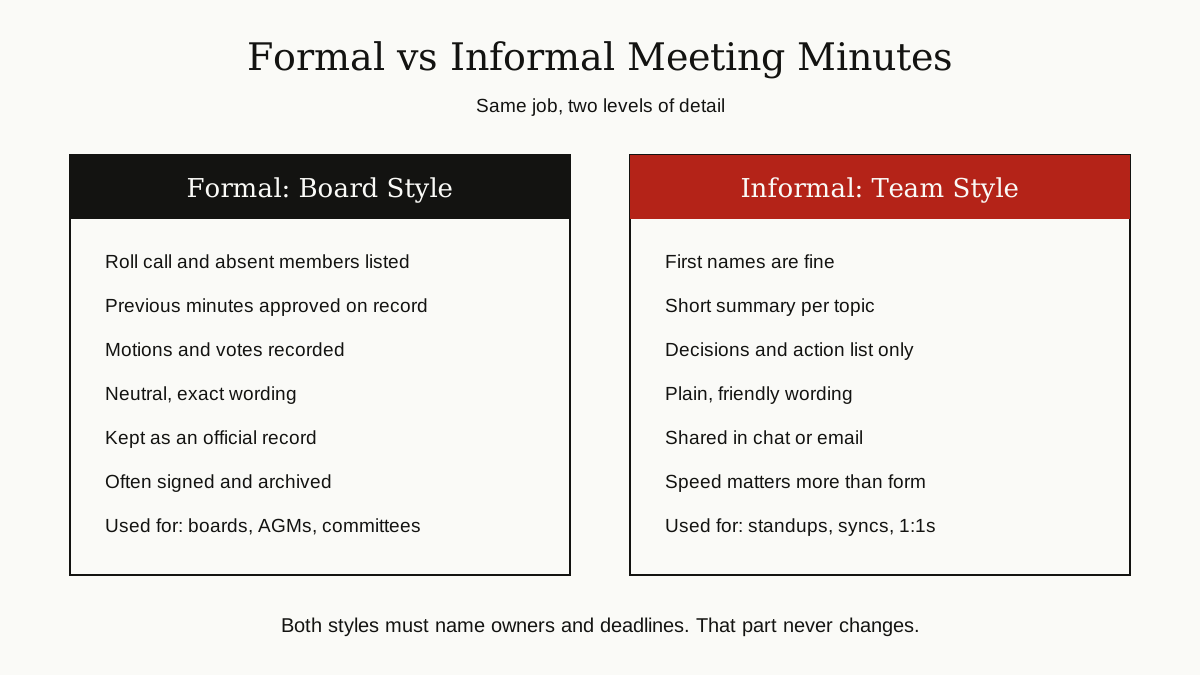
Formal, board style minutes are used for board meetings, annual general meetings, and official committees. They include a roll call of who is present and who is absent. They record the previous minutes being approved. They note motions, who proposed them, and the results of votes. The wording stays careful and neutral, because these documents are kept as official records and can carry legal weight.
Informal, team style minutes are what most of us need most of the time: standups, weekly syncs, project check-ins, one-on-ones. First names are fine. Bullet points are fine. All the record really needs is the decisions and the action list, shared quickly in the team channel or by email.
Match the detail to the stakes. If a decision spends company money, changes a contract, or might be questioned later, write it formally. If it is a Tuesday sync about a blog calendar, keep it light. And when in doubt, record it as if it matters, because the one meeting you treat casually is usually the one people argue about later.
4 Common Mistakes That Ruin Meeting Minutes
Plenty of advice on how to write meeting minutes covers the format and skips the failure modes. These four small errors are the ones that quietly make people stop reading, and stop trusting, the record.
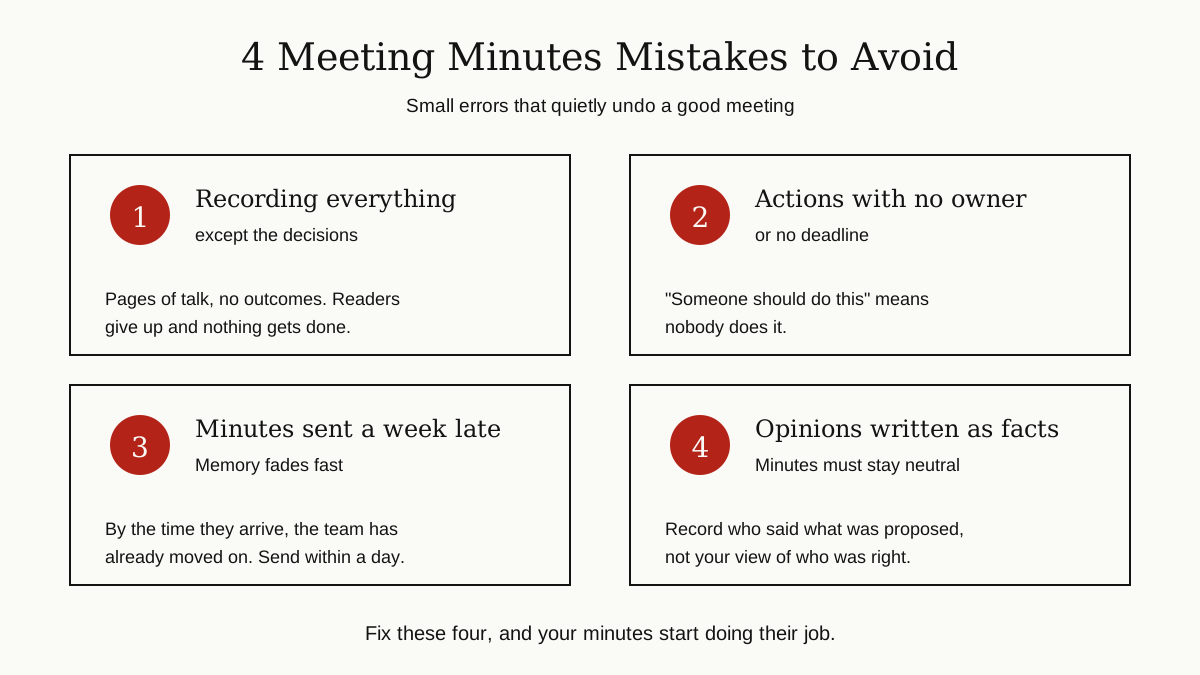
- Recording everything except the decisions. Pages of discussion with no outcomes are worse than a short record, because readers give up before they find the one line that matters. Summarize the talk. Feature the result.
- Actions with no owner or no deadline. “Someone should look into this” is not an action, it is a wish. Every task in the minutes needs one named person and a real date attached to it.
- Sending the minutes a week late. Memory fades fast, and people quietly make their own versions of what was agreed. Minutes that arrive a week later confirm almost nothing. Same day is best, within 24 hours at the latest.
- Writing opinions as if they were facts. “The team foolishly rejected the cheaper option” is your view, not a record. Write it neutrally instead: “The team chose option B. Cost concerns about option A were discussed.” Future readers should learn what happened, not what the minute taker thought about it.
A Quick Note on Recordings and AI Note Tools
Many meetings now come with a recording, or an AI note taker that produces a full transcript and a draft summary on its own. These tools are genuinely useful. They capture exact wording when it matters, and they free the minute taker to listen and think instead of typing nonstop.
But a transcript is not minutes, and an AI summary is a draft, not a record. Software can mishear names and numbers. It can miss the moment a decision changed halfway through a discussion. It can present a suggestion as if the group had agreed to it. A person still has to read the draft, fix the decisions, confirm every owner and deadline, and take responsibility for the final document. Two habits keep this safe: tell everyone when a meeting is being recorded, and treat the human-checked minutes, not the raw transcript, as the official record. That is the honest answer to how to write meeting minutes in the age of AI note takers: let the software capture everything, and let a person decide what the record says.
The Bottom Line
Learning how to write meeting minutes comes down to one habit: record outcomes, not conversations. Prepare with the agenda and a ready template. During the meeting, chase every decision, every owner, and every deadline. Afterward, write the minutes up the same day, share them with everyone, and store them where the team can find them again.
Do that consistently, and your meetings stop evaporating. Every decision has a home, every task has an owner, and nobody has to rely on memory. For more guides like this one, browse the business productivity category.