Every product ships with two things: the product itself, and the words that explain it. When those words are missing or confusing, people get stuck, guess, or give up. Technical documentation is those words, written on purpose: the guides, references, and instructions that explain how a product or system works and how to use it well.
This guide explains technical documentation in plain English. You will learn what it is, the main types with a simple example of each, who writes it and who reads it, and how to write technical documentation that people can actually follow. You will also see what a good design document looks like, where documentation should live, and how to stop it from going stale.
What Is Technical Documentation?
Technical documentation is written content that explains how a product, tool, or system works and how to use it. It answers two kinds of questions: how do I do this, and what does this mean?
The help page that shows you how to set up email on a new phone is one everyday example. So is the page a developer reads to connect an app to a payment service, and the checklist an engineer follows at 2 a.m. when a website goes down.
The key idea is purpose. Marketing copy tries to persuade you. Technical documentation tries to help you finish a task or understand a system. It passes one simple test: after reading it, can the reader do the thing?
Good documentation is accurate, short, and written for one specific reader. Bad documentation is usually the opposite: out of date, written for everyone and no one, or packed with jargon. Jargon means insider words that only specialists know, and every unexplained insider word is a small door closing in the reader’s face.
The Main Types of Technical Documentation
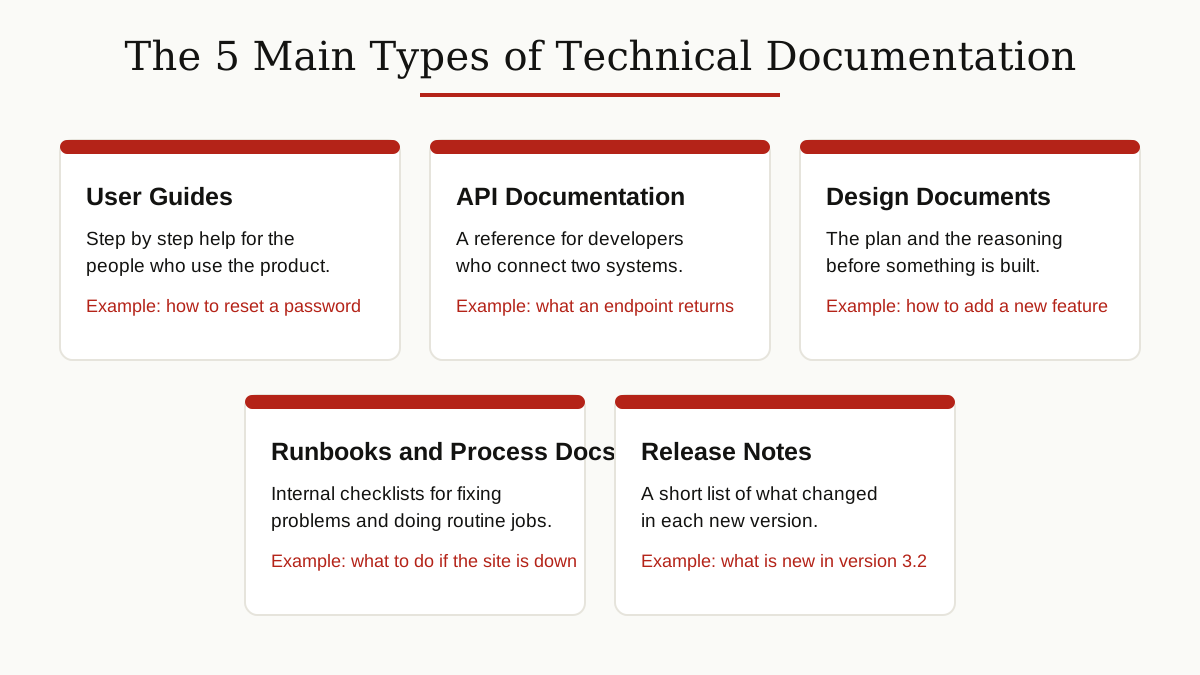
It is a family of documents, not a single document. These are the types you will meet most often.
User Guides and Manuals
User guides walk a reader through tasks step by step: install this, set up that, fix this problem. This is the type most people know, because one comes with almost every product and app. If you want to go deeper on this format alone, our user manual guide covers manuals in detail.
API Documentation
API documentation is written for developers. An API is a set of rules that lets two pieces of software talk to each other. Its documentation lists what you can ask for, what you need to send, and what you get back, usually with one small working example for each request. A simple technical documentation example: a page that shows the exact request to list all customers, and the exact reply the system sends back.
Technical Design Documents
A technical design document, often shortened to design doc, is written before a feature is built. It records the problem, the planned solution, and the reasons behind the plan, so the whole team can agree before any code is written. We break down its template section by section later in this guide.
Runbooks and Internal Process Docs
A runbook is a checklist for a known situation, most often a failure: if the database is down, do these steps in this order. Process docs are close cousins. They record how a team does its routine work, from onboarding a new hire to writing up meeting minutes after a decision call, so the knowledge does not live in one person’s head.
Release Notes
Release notes are the short list of what changed in a new version: what is new, what is fixed, and what readers need to do differently. They are the smallest type here, and often the one readers check first.
Who Writes It and Who Reads It
Some companies hire technical writers, specialists whose whole job is clear, accurate documentation. In smaller teams, the people who build the product write the docs themselves: engineers, product managers, and support staff. Support teams are often the best source of all, because they hear the same confused questions every single day.
The readers are just as varied. They include brand new users setting something up for the first time, developers connecting two systems, new employees learning how the team works, and support agents looking up an answer mid-conversation. Your most loyal reader of all is often your future self, returning to a page in six months and hoping it still makes sense.
How to Write Technical Documentation, Step by Step
You do not need a writing degree to write good documentation. You need a clear process. Here is one that works.

1. Know Your Reader
Before you write a word, decide who the page is for and what they already know. A page for first-time users and a page for system administrators are two different pages. Start from the task your reader is trying to finish, not from the feature list you want to describe.
2. Cover One Topic Per Page
If a page answers two unrelated questions, split it in two. Small, focused pages are easier to find in search, easier to link to, and far easier to keep up to date when the product changes.
3. Use Headings That Name the Task
Write headings the way readers search: “How to export a report” beats “Exporting functionality overview.” Readers scan headings to decide in seconds whether your page will help them. Give them a clear answer.
4. Write in Plain Words and Talk to the Reader
Use short sentences, everyday words, and the active voice, where the subject does the action: “Click Save” instead of “The Save button should be clicked.” Microsoft asks its own documentation contributors to use a conversational tone, second person, and active voice, and that advice travels well to any team. When you must use an insider term, explain it in plain words the first time it appears.
5. Show a Real Example
One short, real example is worth a paragraph of theory. Show the actual request and the actual result, the actual settings and the actual outcome. Readers trust examples because they can compare their screen with yours.
6. Add Screenshots and Diagrams Where They Save Words
A picture of the settings screen beats three sentences describing where a button sits. Keep images honest: crop them to the part that matters, and update them when the screen changes. A screenshot of an old screen is worse than no screenshot at all.
7. Test Your Own Instructions
Finally, follow your own steps exactly, from a clean start, the way a fresh reader would. Better still, hand the page to someone else and watch them follow it. Every place they pause, scroll back, or guess is a place your page needs one more sentence.
What a Good Page Looks Like
Pull those habits together and a strong how-to page has a simple, familiar shape, as this technical documentation sample shows.
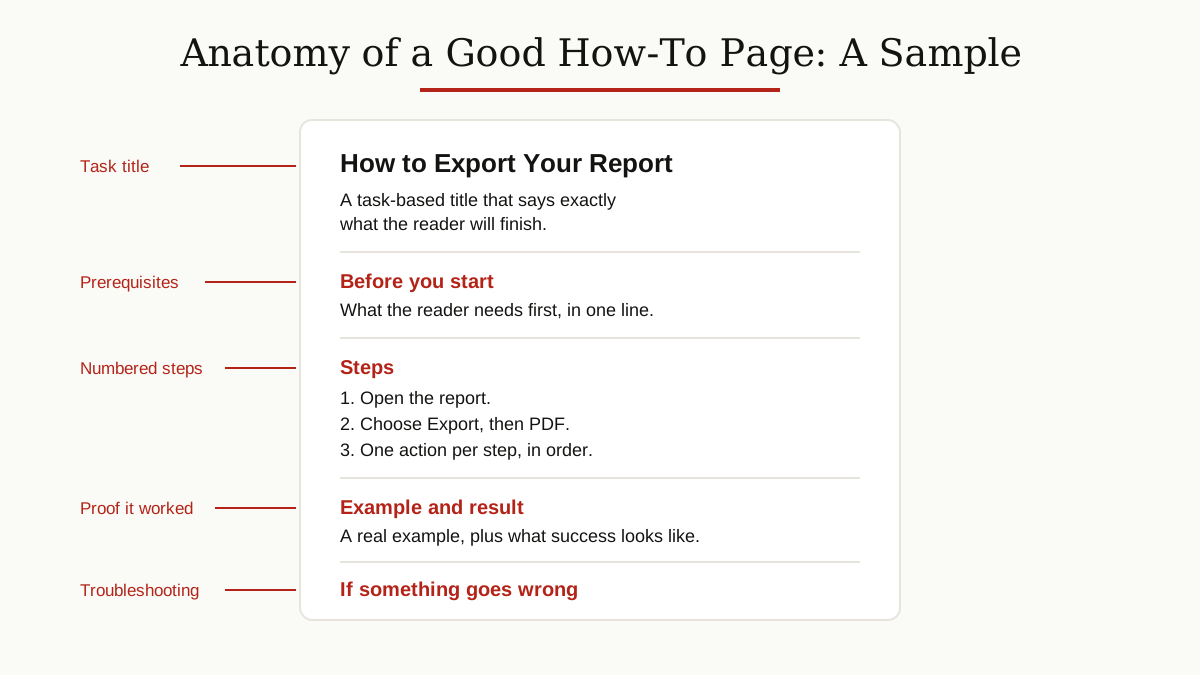
The title names the task. A short “before you start” line lists what the reader needs. The steps are numbered, one action per step. An example shows what success looks like. And a short troubleshooting note rescues the readers whose screen does not match. Once readers learn this shape on your site, every new page feels familiar.
The Technical Design Document, Section by Section
The design doc deserves a closer look, because it is the type teams most often get wrong, usually by making it long and vague. A good technical design document template has five short sections.
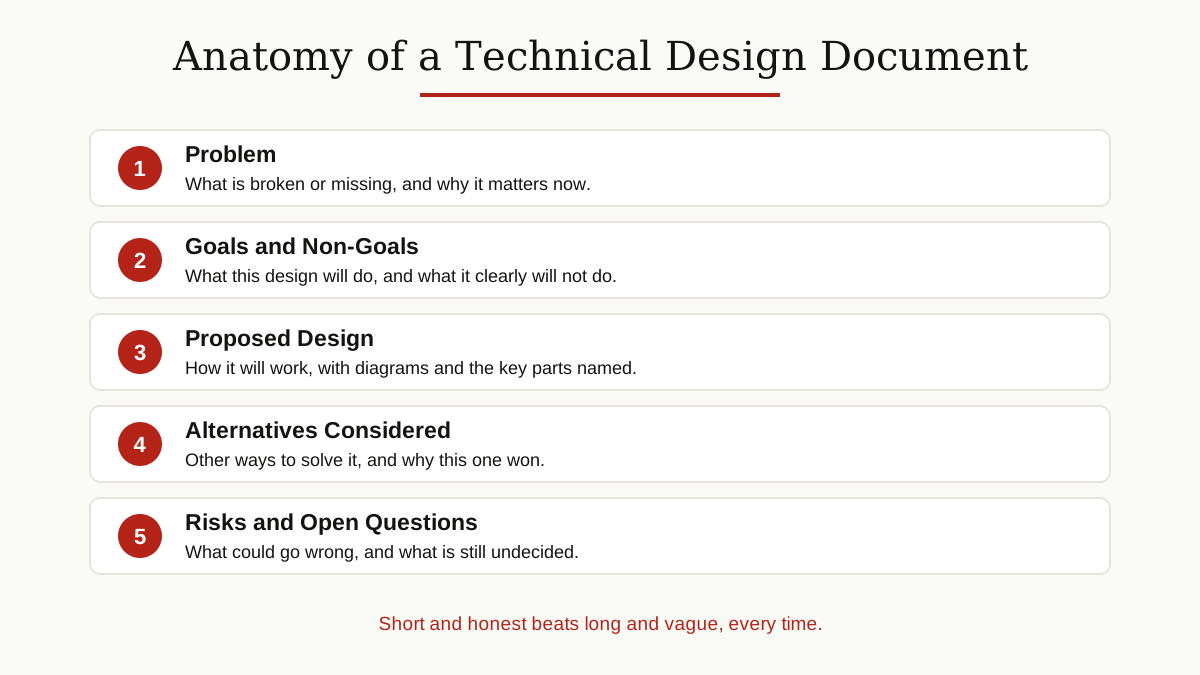
- Problem. What is broken, missing, or too slow today, and why it matters now. One short paragraph is enough.
- Goals and non-goals. What this design will do, and just as important, what it clearly will not do. Non-goals stop arguments later, because everyone agreed on the edges up front.
- Proposed design. How the thing will work: the main parts, how they connect, and a simple diagram if it helps. Name the parts the way the team will name them in code.
- Alternatives considered. The other serious ways to solve the problem, with one honest line each on why they lost. This section proves the chosen design was a decision, not a habit.
- Risks and open questions. What could go wrong, what it would cost, and what is still undecided. Naming risks early is a strength, not a weakness.
Keep the whole document short enough to read in one sitting. A design doc is a discussion tool, not homework: its job is to get smart people to agree, or to disagree usefully, before the expensive building starts.
Where Documentation Lives
Good writing in the wrong place is still lost writing. In practice, documentation lives in three homes, one per audience.
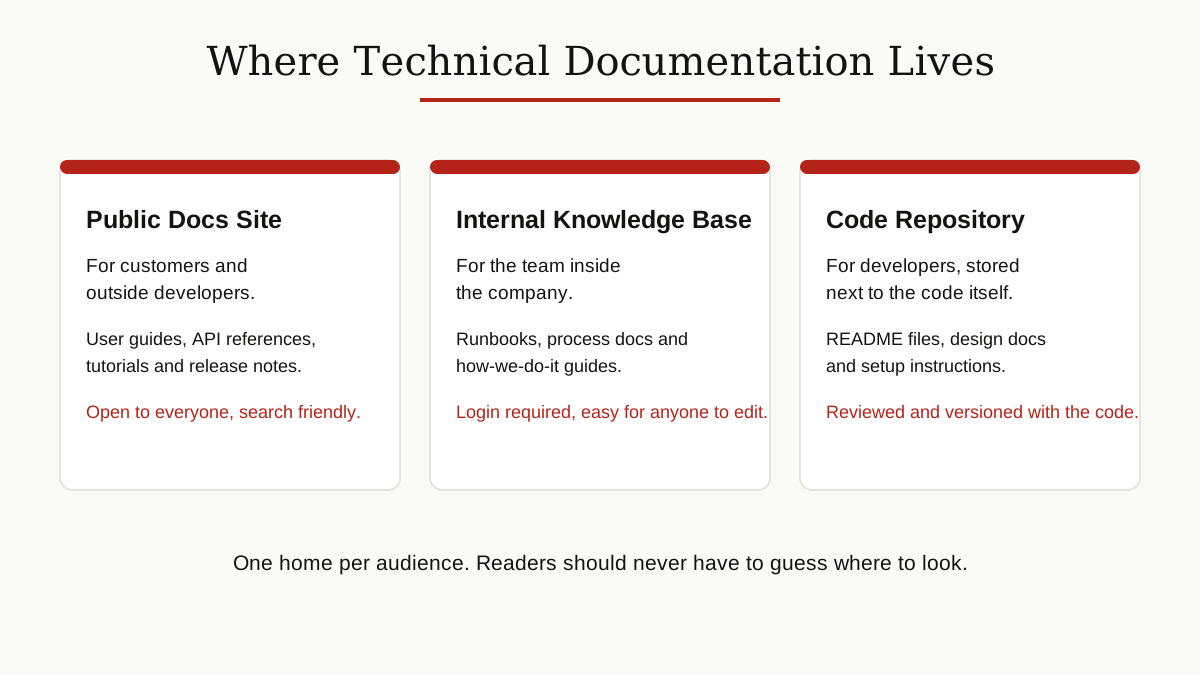
A public docs site holds what customers and outside developers need: user guides, API references, tutorials, and release notes. An internal knowledge base holds what the team needs: runbooks, process docs, and how-we-do-it guides behind a login. Choosing the right knowledge base software makes this side easy to search and easy to edit. And a code repository, the storage place where the code itself lives, holds README files, setup instructions, and design docs, stored as plain text files right next to the code. This last approach is often called docs as code, because the docs are reviewed and updated with the same tools as the software.
The rule is simple: one home per audience, and no reader should ever have to guess where to look.
Keeping Documentation Alive
The real enemy is not bad writing. It is docs rot: pages that were correct once and quietly became wrong as the product changed around them. An outdated page is worse than a missing page, because it sends readers down the wrong path with full confidence.
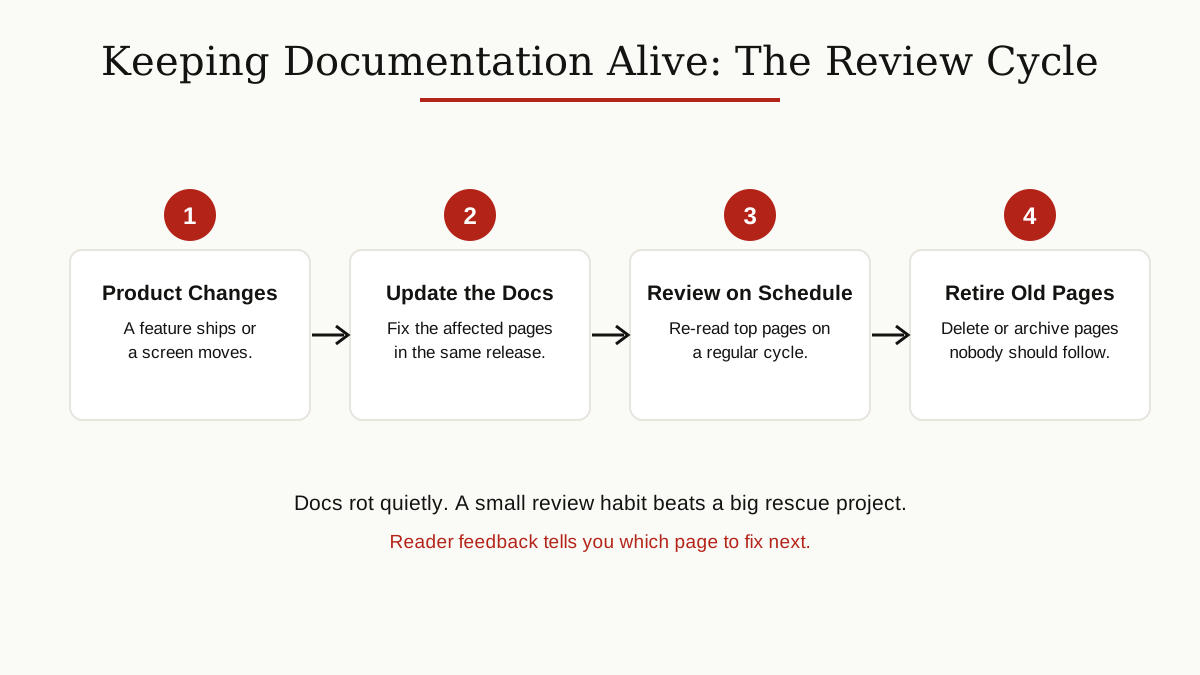
A few habits keep rot away. Update the docs in the same release as the product change, not “later.” Give every important page an owner, a named person who answers for it. Re-read your most visited pages on a regular schedule, the way you would service a car. Listen to support tickets and reader feedback, because they point straight at the pages that confuse people. And delete or archive dead pages instead of leaving them as traps. Small, steady care beats a heroic cleanup once a year.
Where to Learn More
If you want to sharpen these skills, two free resources stand out. Google offers free technical writing courses aimed at engineers and similar roles: Technical Writing One covers the basics, Technical Writing Two covers intermediate skills, and the self-paced material is free to start at any time. The Write the Docs community is a global network of people who care about documentation, with conferences, meetups, and a beginner guide that is a friendly first read for new writers.
Conclusion
Technical documentation is not decoration on a product. It is the part of the product that teaches, rescues, and explains, long after the builders have gone home. Write it for one clear reader, one task per page, in plain words with real examples. Keep each type in its proper home, review it like it matters, and it will quietly do its job for years. For more guides like this one, browse the business productivity category.