Every product creates the same moment. Someone opens the box, or opens the app for the first time, gets stuck within ten minutes, and reaches for help. What they find in that moment decides whether they love the product or quietly give up on it.
That help is usually a user manual. This user manual guide explains what a good manual contains, how to write one step by step, and how to avoid the habits that make manuals useless. Whether you are documenting software, a machine, or a household gadget, the rules below are the same.
What Is a User Manual?
A user manual is the book, booklet, or web document that teaches a person how to set up, use, and fix a product. It is written for the owner of the product, not for the people who built it.
A good manual answers three kinds of questions. How do I start? How do I do the everyday jobs? And what do I do when something goes wrong? If a manual answers all three, it is doing its job, whatever it looks like.
A manual is also just one piece of a bigger picture. It sits inside the world of technical documentation, next to help centers, training material, and reference docs for developers. The manual is the piece written for the end user, in the end user’s own words.
User Manual vs User Guide: Is There a Difference?
Honestly, the two names overlap so much that arguing about them wastes time. Companies use them loosely, and the same document is called a manual by one team and a guide by another.
When teams do draw a line, it usually looks like this:
- User manual: the complete reference. It covers setup, every main task, settings, troubleshooting, and care or safety notes. It is the full book.
- User guide: a shorter, friendlier document. It often covers getting started and the most common tasks, and points to the manual or help center for the rest.
Think of it this way. The guide gets you moving. The manual stays on the shelf, or in a bookmark, for everything after that. Many products ship both: a slim quick start guide in the box and the full manual online.
What a Good User Manual Contains
Whatever the product, good manuals are built from the same parts. Use this list as your contents plan.
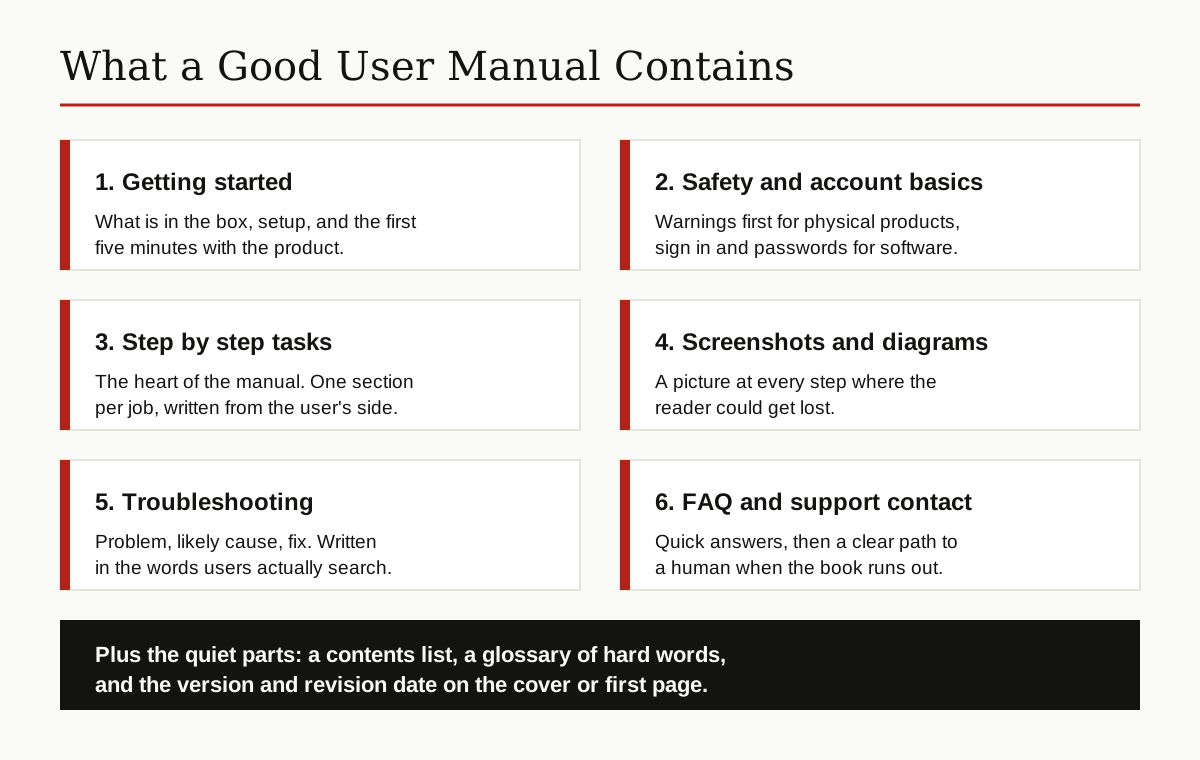
- Getting started. What is in the box, what you need before you begin, setup, and the first job done end to end. Early success keeps readers calm.
- Safety or account basics. For physical products, warnings come before everything else. For software, this slot holds signing in, passwords, and who can see what.
- Step by step tasks. The heart of the manual. One section per job, titled the way a user would say it, like “Change the filter” or “Export your report,” not the way an engineer would name it.
- Screenshots and diagrams. A picture at every point where words alone could send the reader the wrong way.
- Troubleshooting. A plain table of problems, likely causes, and fixes. Write the problem lines in the words users type into search boxes.
- FAQ and support contact. Short answers to the questions support hears every week, plus a clear way to reach a human.
- Version and revision info. The product version the manual covers, and the date it was last updated, on the cover or first page.
Short is not the goal here. Complete and findable is the goal. A reader with a problem should reach the right page in under a minute.
How to Write a User Manual, Step by Step
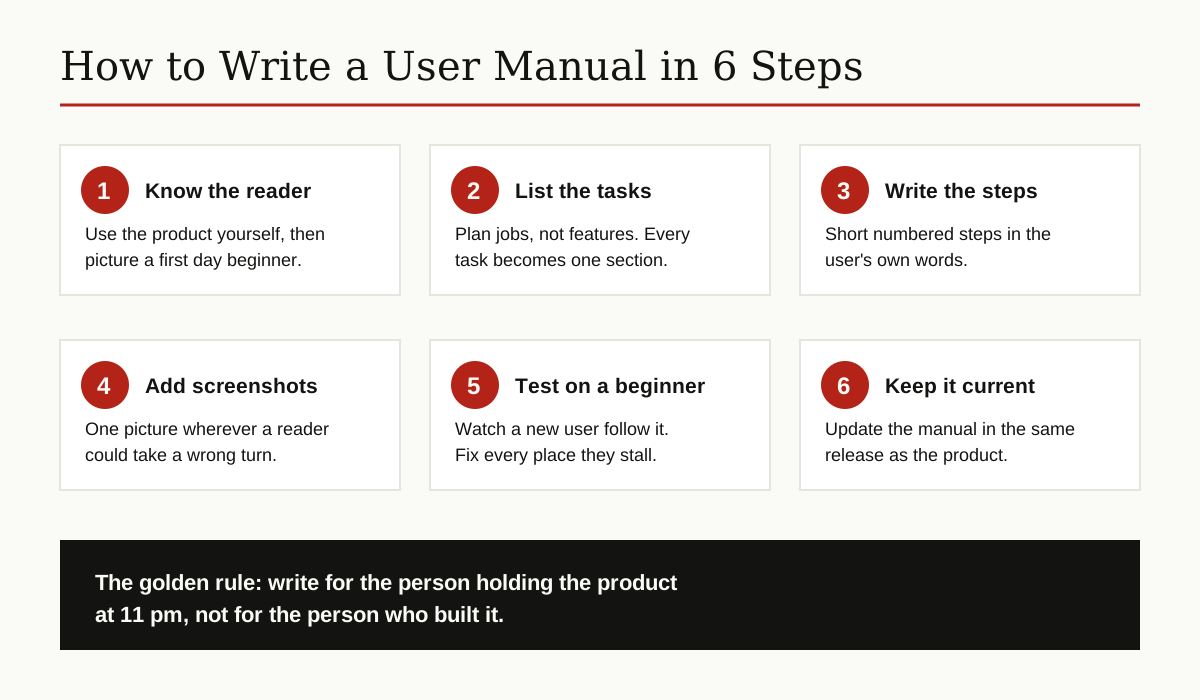
Step 1: Use the product like a beginner
Before writing a word, use the product yourself, slowly, and write down every place you hesitate. Then picture your real reader: how much do they know, what words do they use, and what are they trying to get done? Every later choice depends on this picture.
Step 2: Plan the task list, not the feature list
List the jobs users actually do, in the order they meet them: set up, first task, daily tasks, occasional tasks, fixing problems. Each job becomes one section. Features that support a job get explained inside that job’s section, where the reader needs them.
Step 3: Write each task as numbered steps
One action per step, in the order it happens, starting with a verb: open, choose, type, press, wait. Say where to look and what should happen next, so the reader can check they are on track. Keep drafts, screenshots, and review comments together in the productivity tools your team already uses, so nothing gets lost between versions.
Step 4: Add screenshots and diagrams
Capture the screen or photograph the part at the exact step where it matters. Crop tightly, circle the button or part in a bright color, and keep the picture next to its step, not pages away.
Step 5: Test the manual on a real beginner
Hand the draft and the product to someone who has never used either, and watch in silence. Every place they stall, reread, or guess is a place the manual failed, not the reader. Rewrite those spots and test again.
Step 6: Keep it updated with the product
A manual is a living document. When the product changes, the manual changes in the same release, and the revision date moves with it. An out of date manual is worse than none, because it gives wrong orders with total confidence.
Writing Rules That Make Manuals Easy to Follow
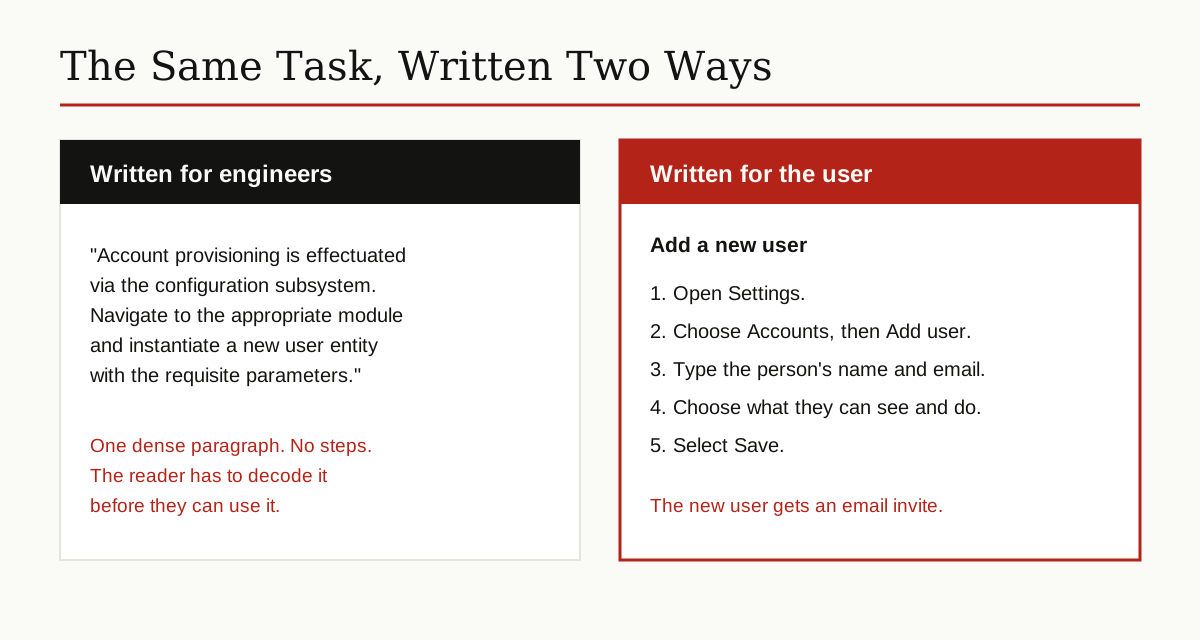
One rule runs through this whole user manual guide: the writing style matters as much as the contents. The Microsoft Writing Style Guide asks writers to aim for a voice that is warm and relaxed, crisp and clear, and that advice fits manuals perfectly. The reader is often frustrated already. Sound like a helpful person, not a legal department.
Google’s documentation style guide gives matching rules for instructions: write in second person, use active voice, use numbered lists for sequences, and put conditions before instructions, so “If the light is red, wait” comes before the step, not buried after it.
The example below shows what these rules do to one task.
A few more rules that separate good manuals from bad ones:
- Use the reader’s words. If users call it the “basket,” do not insist on “filtration receptacle.”
- Keep sentences short. One idea per sentence, one action per step.
- Use the same name for the same thing everywhere. A button called Save in the product is Save in the manual, on every page.
- Lead with the result. Tell readers what a section helps them do before the how.
A User Manual Template You Can Copy
Here is a simple outline that works for most products. Copy it, replace the brackets, and delete the sections your product does not need.
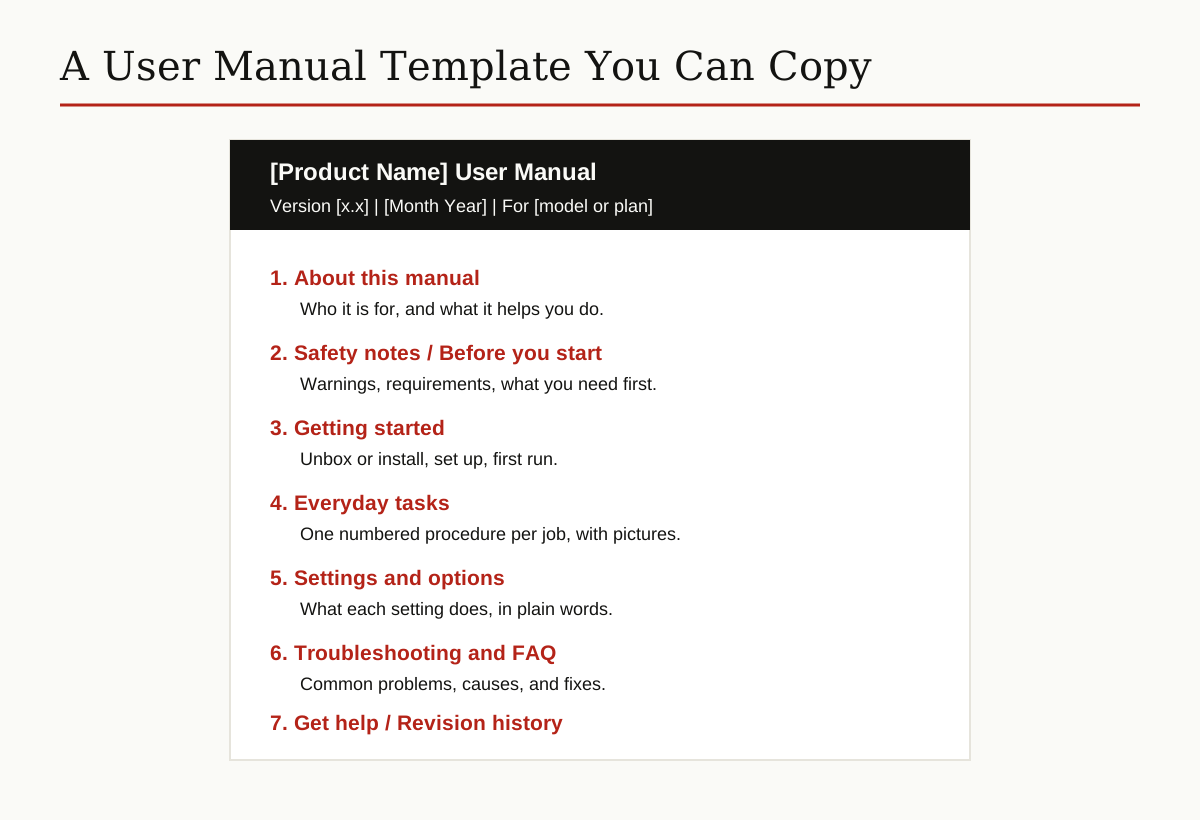
- [Product Name] User Manual. Version number, date, and the models or plans it covers.
- About this manual. Who it is for and how to use it.
- Safety notes, or before you start. Warnings, requirements, and what to have ready.
- Getting started. Setup and the first task, done in full.
- Everyday tasks. One numbered procedure per job, with screenshots.
- Settings and options. Each setting explained in one or two plain lines.
- Care and maintenance for physical products, or data and backups for software.
- Troubleshooting and FAQ. Problems, causes, fixes, and quick answers.
- Get help. Support contact, hours, and what to have ready when you call.
- Revision history. Version, date, and what changed.
Why Most Manuals Fail
Most bad manuals fail in the same few ways, and none of them is bad grammar.
- Written by engineers, for engineers. The people who built the product write down how it works inside, which is not what the owner needs. The owner needs to know which button to press, not how the button works.
- Organized by features, not tasks. A chapter per menu or module forces readers to translate. Readers think in jobs: send, print, clean, reset.
- Never tested. Nobody watched a beginner use it, so the missing step, the one everyone trips on, stayed missing.
- Never updated. The product moved on, the screenshots show an old screen, and readers stop trusting every page, even the right ones.
- Answers buried in walls of text. No headings, no contents list, no search. The answer exists, somewhere, which is the same as not existing.
The Write the Docs community guide puts the standard well: good documentation is skimmable, consistent, current, and easy to find. Most failing manuals fail at least two of those four.
What Changes in a Software User Manual
A software user manual follows the same rules, with three twists. First, part of it lives inside the product itself: help panels, guided first runs, and small hints on the screen do the getting started job before the reader ever opens a document. Second, screenshots carry more weight, because software screens change often, and one old screenshot can make a whole page feel wrong. Third, the safety section becomes an account section: signing in, passwords, permissions, and what happens to the user’s data.
Search also matters more for software. Most readers never open the manual at the first page. They type their problem into a search engine and land in the middle, so every task page has to stand on its own, with its own context and its own “before you start” notes.
Print vs Online Manuals Today
The thick printed book is fading, but it is not dead. The two formats now split the work.
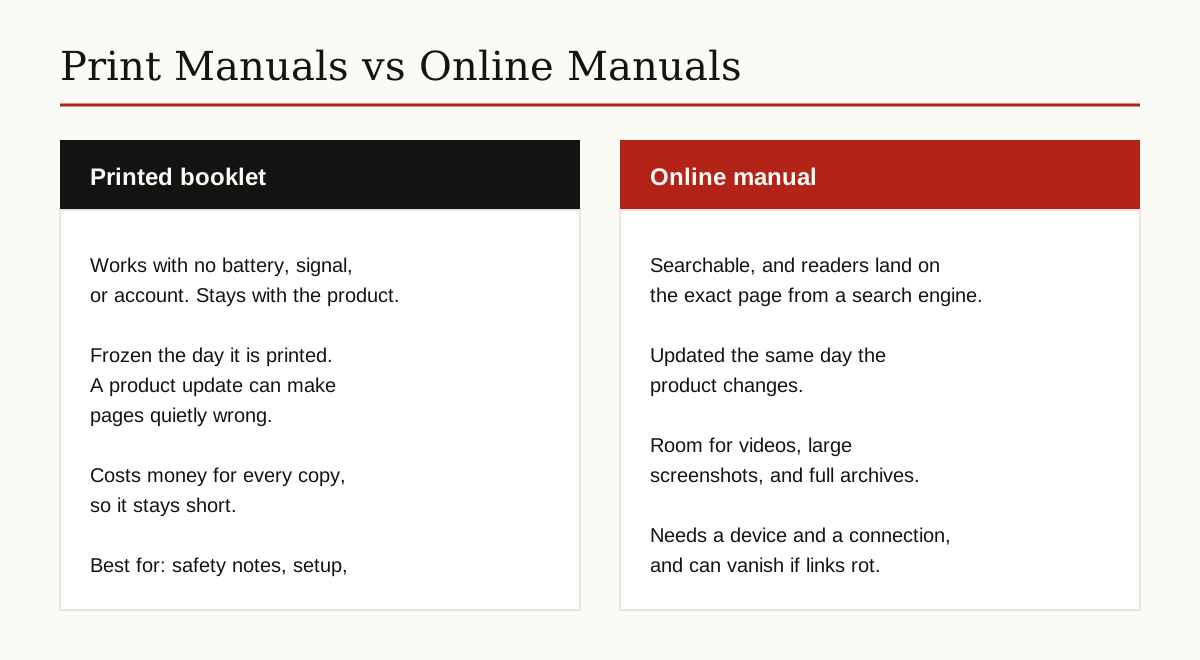
Print still wins for the first ten minutes and for safety. A booklet in the box works with no battery, signal, or account, and warnings stay physically attached to the product. Its weakness is time: print is frozen, and a product update can make a printed page quietly wrong.
Online manuals carry everything else. They are searchable, readers land on the exact page from a search engine, and the team can fix a mistake the same day it is reported. Many teams now keep the full manual inside their knowledge base software, where articles can be updated in minutes and support can link readers straight to the right answer. The trade off is that an online manual needs a device and a connection, and old pages can vanish when links rot.
The common pattern today: a short printed quick start guide in the box, pointing to the full manual online, often by a code printed on the cover that the reader scans with a phone.
Why Companies Still Ship Manuals
If manuals are so often ignored, why does every serious product still come with one?
Part of the answer is legal. For many products, safety warnings and correct use instructions are required, and the manual is the official place they live. When something goes wrong, the manual is also the record of what the user was told.
The bigger reason is support. A clear manual quietly answers the same beginner questions thousands of times, at any hour, without a support ticket. Every task the manual handles well is a call that never happens, and the calls that do come in start further along, because the basics are already covered.
And there is simple trust. A product with a careful manual feels like a product made by careful people.
The Short Version
If this user manual guide leaves you with one idea, let it be this: a user manual is not paperwork. It is the part of the product that speaks for the product when no one from the company is in the room. Plan it around tasks, write it in the reader’s words, picture every hard step, test it on a beginner, and update it every time the product changes. Do those things, and your manual becomes the rare one people actually read. For more guides like this one, browse the business productivity category.