If you have worked in IT for a while, you have probably inherited old documentation that mentions a tool called Corporate Software Inspector. The name still shows up in patching guides, audit reports, and firewall rules written years ago. Yet if you search for it today, you will not find it for sale under that name.
So what was it, and where did it go? This article explains, in plain words, what Corporate Software Inspector did, how it worked under the hood, and what replaced it. If you found the term in an old report and just need to know what it means for your network today, you are in the right place.
What Corporate Software Inspector Was
Corporate Software Inspector, usually shortened to CSI, was a security tool for company networks. It was built by Secunia, a Danish company founded in Copenhagen in 2002 that specialized in vulnerability research, meaning the study of flaws in software that attackers can abuse.
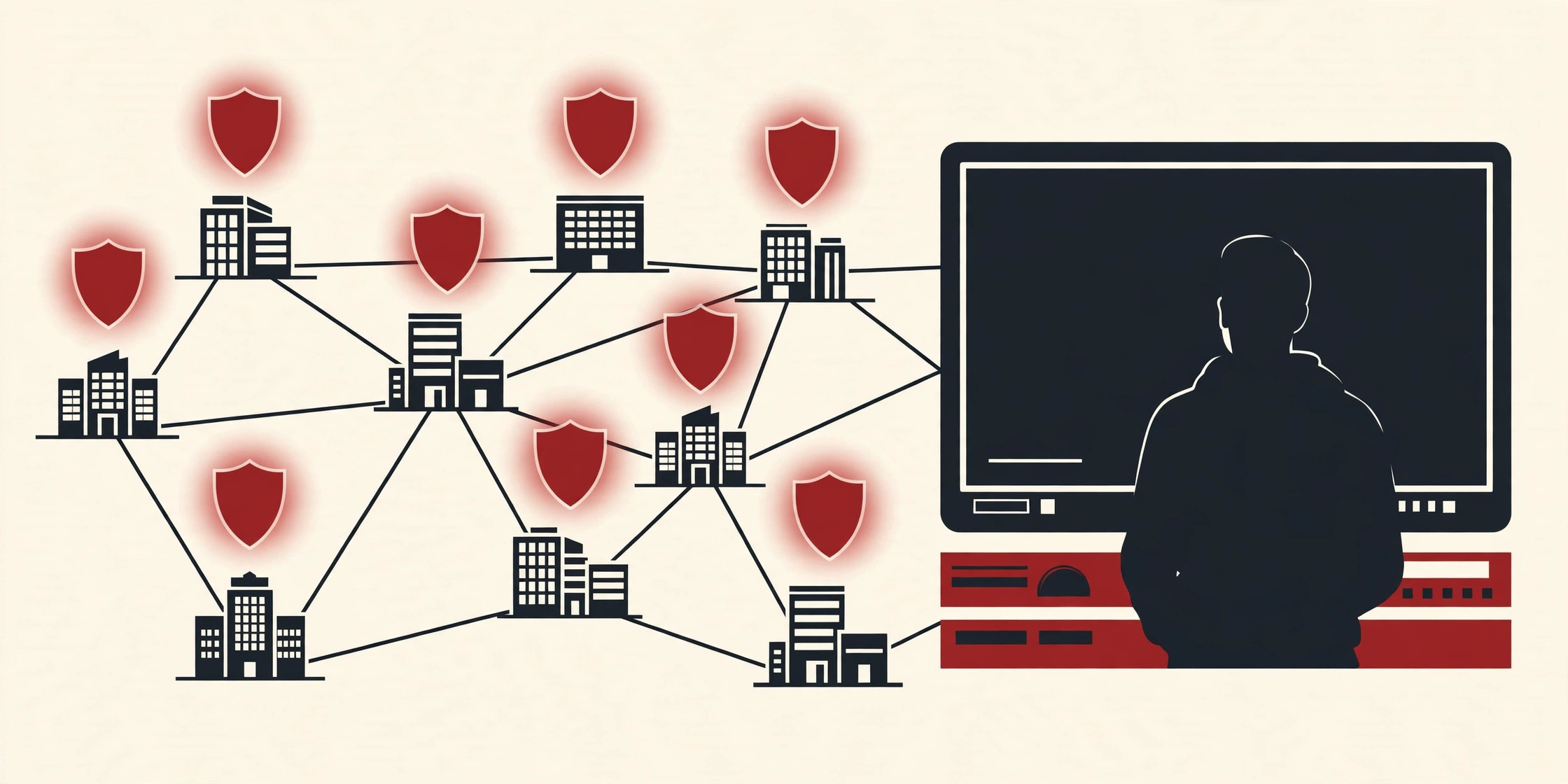
The job of CSI was simple to describe and hard to do by hand: scan the computers in a company, find every program that was out of date or known to be vulnerable, and help the IT team fix those programs before an attacker found them first.
Its users were IT administrators and security teams, mostly in mid-size and large organizations. Secunia described its customer base as including many Fortune 500 and Global 2000 companies, the kind of organizations with thousands of PCs to look after.
Two things are worth clearing up early. First, CSI was not antivirus software. It did not hunt for malware already on a machine. It hunted for missing updates, the open doors that malware and attackers walk through. Second, it had a famous sibling: Personal Software Inspector, or PSI, a free scanner for home PCs. The two tools shared research data but served very different audiences, and they had very different endings, as you will see below.
What It Did: Scan, Assess, Patch, Report
Many scanners can tell you something is wrong. Corporate Software Inspector earned its place by covering the whole job, from finding a problem to proving it was fixed.
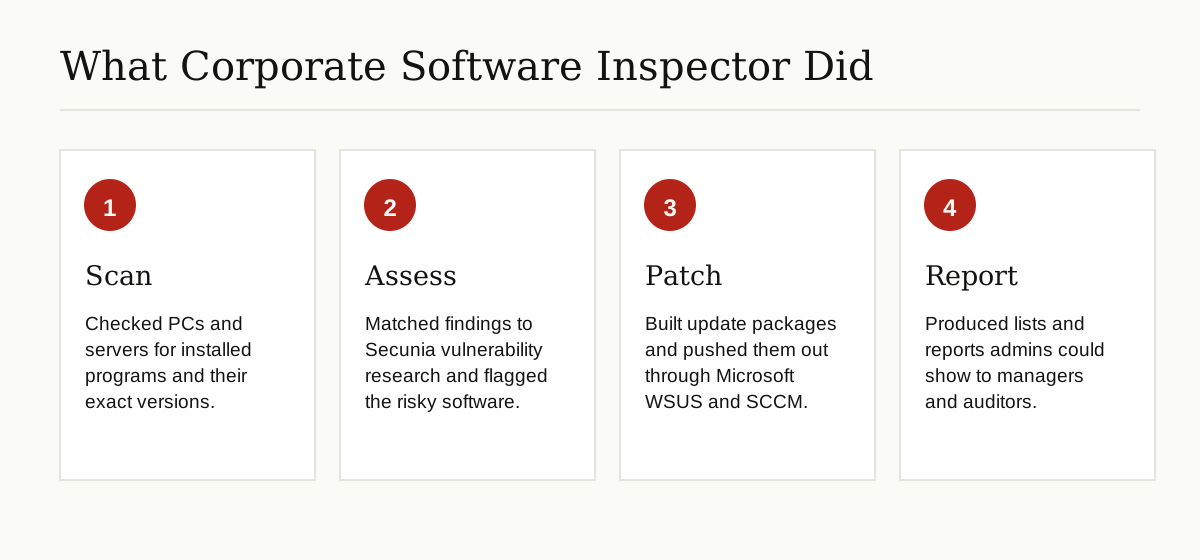
Scan. CSI took an inventory of the software installed across the company and recorded the exact version of each program. That detail mattered, because a vulnerability usually affects only certain versions of a product.
Assess. Every finding was matched against research from Secunia’s own team, which verified vulnerabilities and published advisories about them. CSI rated findings with criticality labels, flagged software that had reached end of life and would never be patched again, and sorted the mess so admins could see the most dangerous items first.
Patch. This was the part that made CSI stand out. Microsoft’s own tools, WSUS and System Center Configuration Manager (SCCM), were good at delivering Microsoft updates but weak on everything else: browsers, PDF readers, Java, media players, and the long tail of third-party programs. CSI could build ready-to-deploy update packages for those programs and publish them into WSUS and SCCM, so admins could push a Flash or Java fix through the same pipeline they already trusted.
Report. Finally, CSI produced the paperwork: lists of the most common insecure installations, patch status per machine or per group, and reports that admins could hand to managers and auditors as proof of work.
How It Worked
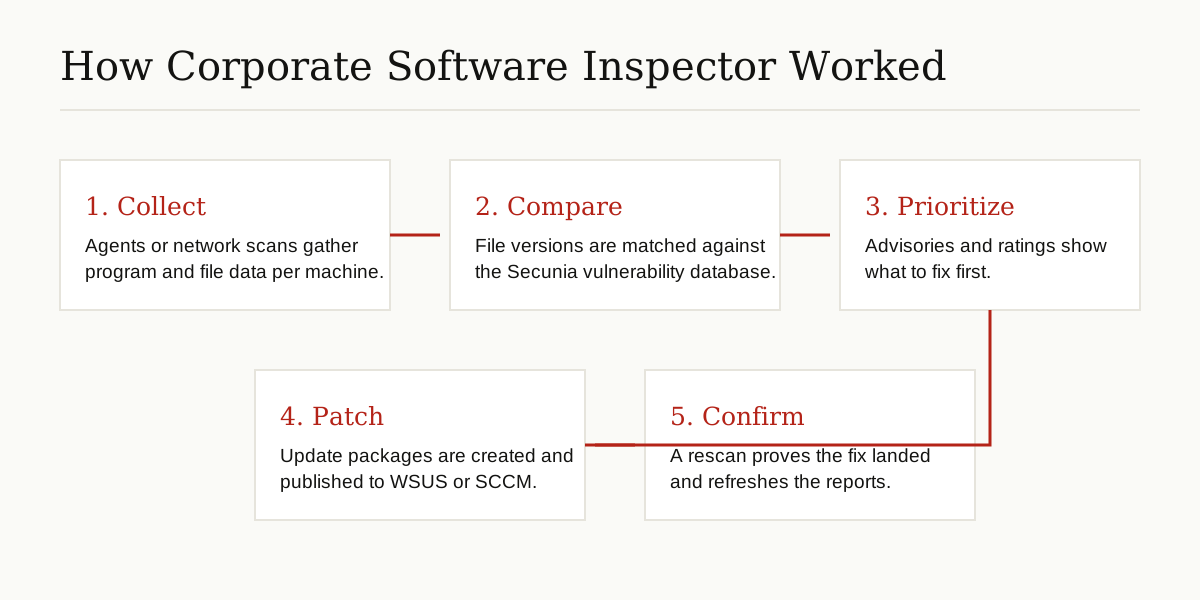
Under the hood, CSI was a signature-based scanner. Instead of guessing from a list of installed program names, it read metadata from the actual program files on each machine, such as executables and library files, and compared the exact file versions against Secunia’s centrally managed vulnerability database. That is why its results were known for precision: it judged the files really on disk, not just what a registry entry claimed.
Admins could collect that data in several ways:
- Install a small, lightweight agent on each computer, which scanned on a schedule and reported back.
- Run one agent in a network appliance mode, where a single machine scanned a whole network segment.
- Start agentless network scans from the console for machines without an agent.
- Import software inventory data that SCCM had already collected, and scan that data instead.
Results flowed into a web-based console, hosted in Secunia’s cloud or, in later editions, on the customer’s own servers. Access was controlled with role-based accounts, so a help desk worker and a security lead did not see the same powers.
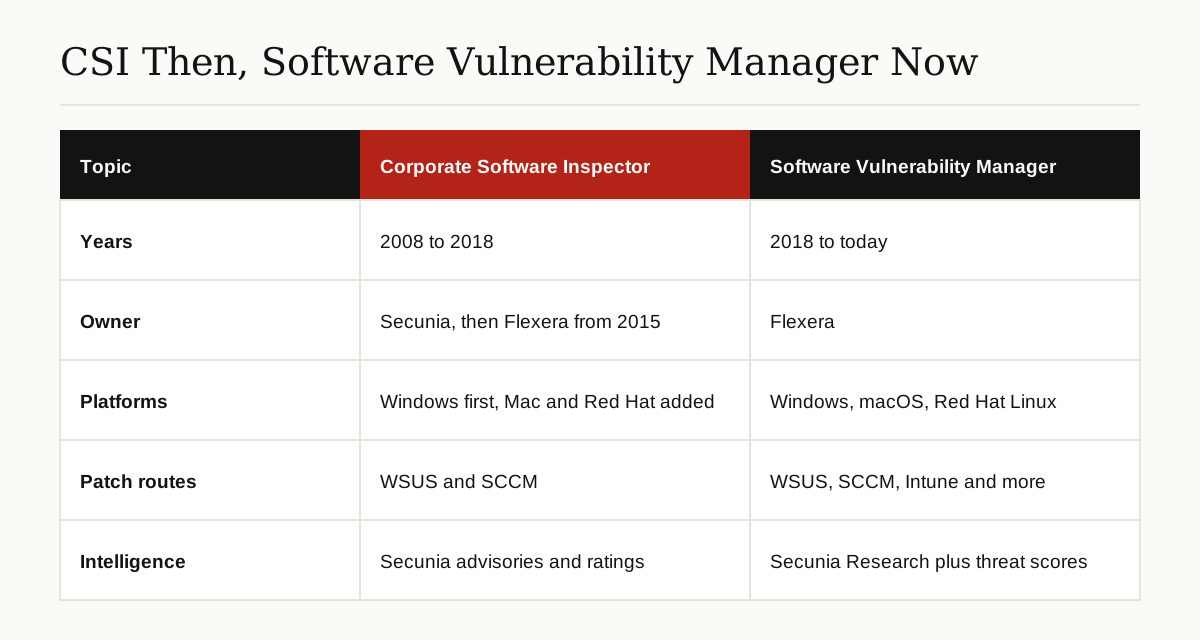
When it was time to fix something, the admin picked a product in the console, created an update package with the built-in packaging system, and published it to WSUS. From there, SCCM deployed it like any Microsoft update. A later rescan confirmed the new version was in place and quietly removed the finding from the reports. Coverage started with Windows, which was the product’s home turf, and Mac OS X and Red Hat Enterprise Linux support were added over time.
A Short History
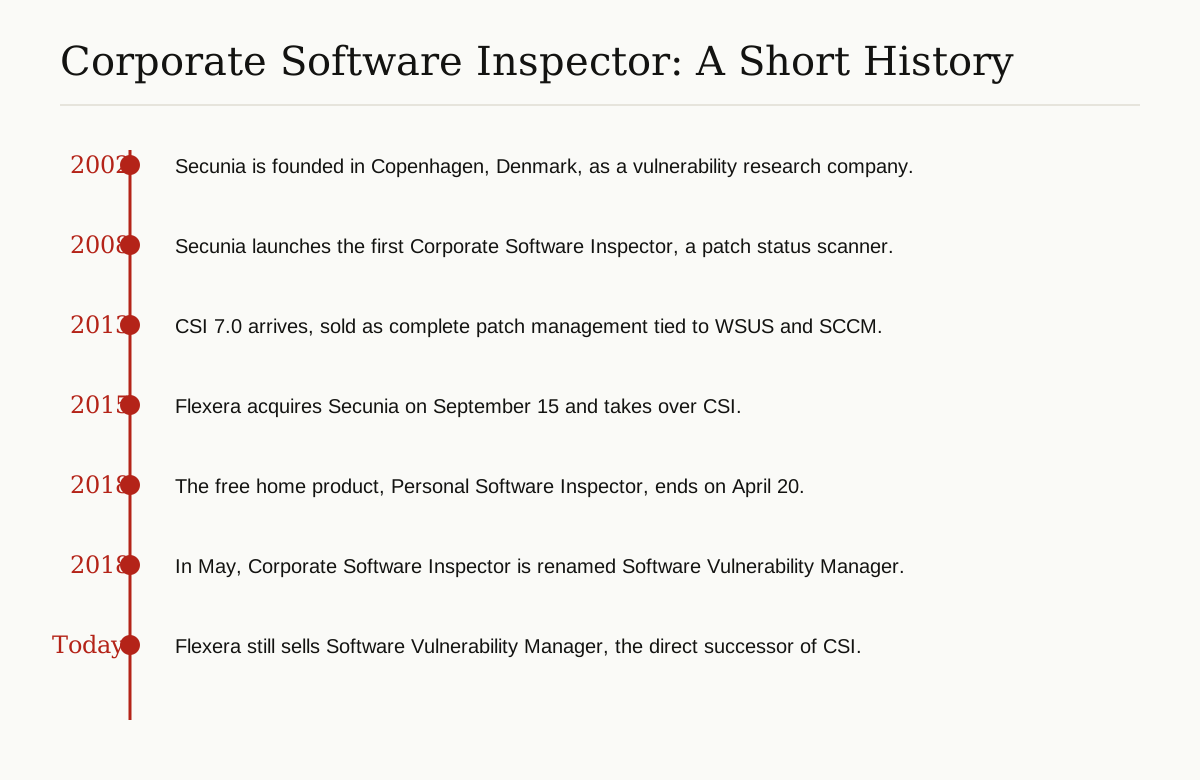
The story starts in 2002, when Secunia was founded in Copenhagen and built its name on careful, independent vulnerability research. The company published advisories that other security firms and even Microsoft treated as a trusted source.
In 2008, Secunia launched the first version of Corporate Software Inspector. Flexera’s own blog later described that first release plainly: it was a scanning engine built to check the patch status of applications on corporate systems. In the years that followed, the patching side grew. Releases such as CSI 5.0 drew coverage for publishing third-party patches directly into WSUS, and CSI 7.0, launched in 2013, was sold as complete patch management rather than just scanning.
The big change came on September 15, 2015, when Flexera acquired Secunia for an undisclosed amount. Flexera, known for software licensing and asset management tools, said at the time that software vulnerability management belonged inside core asset management processes. Secunia brought two products into the deal: Vulnerability Intelligence Manager, an intelligence feed for security teams, and CSI for the operations teams who actually patched machines. Secunia Research kept working under the new owner, which matters because that same research team still powers the product line today.
What Happened to It
Here is the honest answer: the product did not die. The name did.
In May 2018, Flexera renamed Corporate Software Inspector to Software Vulnerability Manager. Flexera explained the change in its announcement that CSI would become Software Vulnerability Manager: over the years the tool had grown from an inspector into a full vulnerability management product, and the old name no longer described it. Release notes from that period list the product as “Software Vulnerability Manager 2018 (formerly Corporate Software Inspector)”, which is about as clear a paper trail as a rename ever leaves.
The same spring brought the end of the free sibling. Personal Software Inspector reached end of life on April 20, 2018, and Flexera told home users to rely on automatic updates instead, since consumer products were not part of its strategy. So if an old forum post sends you looking for PSI, stop: it has been gone for years, while the corporate product carried on.
The successor is still on sale today as Flexera Software Vulnerability Manager, in cloud and on-premises editions. Flexera says it now adds threat intelligence scoring, built from machine learning and human review of thousands of sources, so teams patch the flaws most likely to be attacked first. Its documentation also lists more places patches can be published than CSI ever had, including Microsoft Intune, VMware Workspace ONE, and BigFix alongside WSUS and SCCM, and Flexera says the tool can assess the patch status of more than 20,000 applications. Those are vendor claims, but the direction is easy to verify from the public product pages: same core loop as CSI, broader reach.
What to Use Today
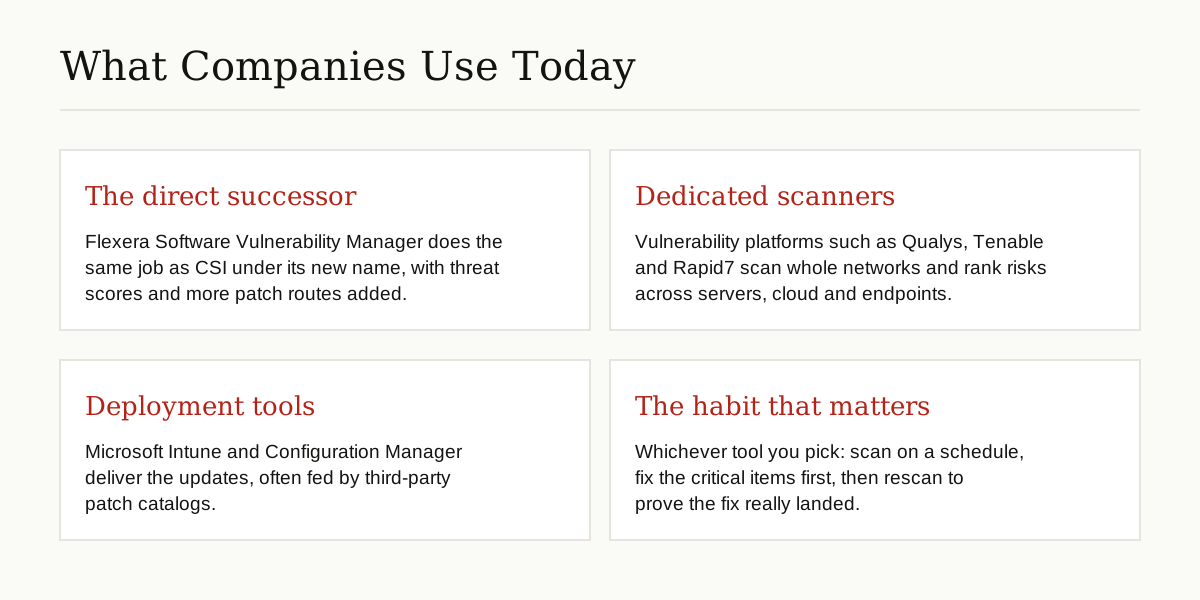
If your company once ran CSI, the natural path is the successor, Software Vulnerability Manager, since Flexera carried CSI customers forward onto it. Your old scan history, watch lists, and patching habits map onto the new product with the least friction.
If you are starting fresh, you are shopping in the vulnerability management category, and the shape of the market looks like this:
- The successor route: Flexera Software Vulnerability Manager, strongest when third-party patching is your main pain.
- Dedicated scanning platforms: Products such as Qualys, Tenable, and Rapid7 focus on scanning whole networks and ranking risk across servers, cloud accounts, and endpoints.
- Deployment-first tools: Microsoft Intune and Configuration Manager deliver updates, and third-party patch catalogs feed extra programs into them, which together cover much of what CSI did.
- Built-in options: Modern Windows and Microsoft Defender tooling now report vulnerable software too, which may be enough for a small estate.
Whichever route you pick, the tool matters less than the loop: keep an inventory, scan on a schedule, test patches before a wide rollout, deploy, and rescan to prove the fix landed. CSI was built around that loop in 2008, and it is still the loop that works. For a very small company, even a simple monthly routine of reviewing built-in update reports beats the blind spot this product family was created to remove.
Reading Old CSI Reports and Documentation
Old CSI material is still useful, once you translate a few terms. Version names like CSI 6 and the CSI 7 series tell you the era of a report, and hostnames such as csi7.secunia.com in old firewall allow lists are leftovers from agents reporting to the Secunia cloud; they can usually be retired once nothing on the network uses them anymore.
Findings in old reports carry Secunia Advisory identifiers and criticality labels that run from Not Critical up to Extremely Critical. Each advisory maps to public CVE identifiers, so search the CVE number to get the current picture of any old finding. If a guide tells you to open SPS, that was the Secunia Package System for building patch packages; in current Flexera documentation the same feature appears as the Flexera Package System.
Keep at least one archived set of old reports. Auditors love a paper trail, and the history of what was vulnerable and when it was fixed is exactly the kind of record that version control systems taught software teams to keep. Admins reading decade-old IT documents will meet other retired terms on the same pages, from WSUS deadlines to things like platform event traps in monitoring notes. Treat them the same way: identify what the term meant, find its modern replacement, and update the document so the next admin does not have to guess.
Conclusion
Corporate Software Inspector was Secunia’s answer to a problem that never went away: ordinary third-party programs quietly going unpatched on company PCs. It scanned precisely, leaned on respected vulnerability research, and closed the loop by pushing fixes through the Microsoft tools admins already had.
The name was retired in May 2018, but the idea is alive in Flexera Software Vulnerability Manager and in the whole vulnerability management category. So when you meet “Corporate Software Inspector” in an old document, read it as the scanning and patching system that now lives on under a new name, and check whether the job it did is still being done by something in your stack today. For more explainers like this one, browse our software development category.