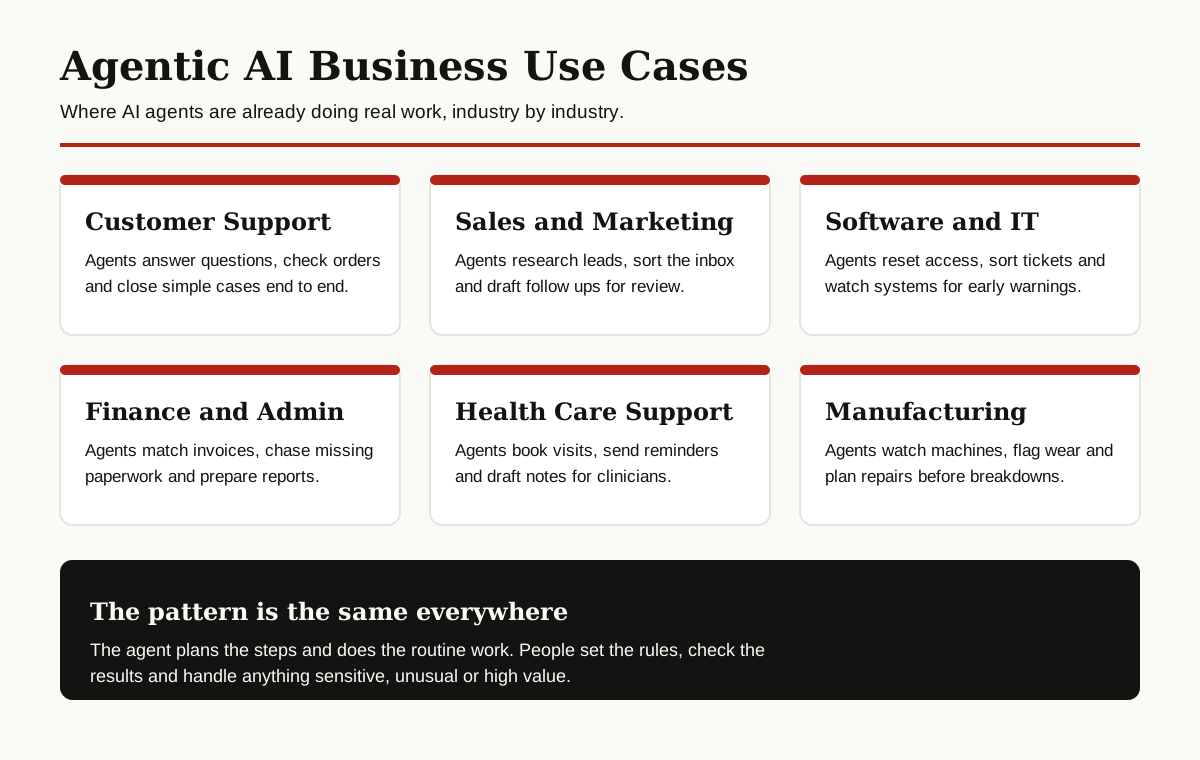
Every company seems to be talking about AI agents, but the honest question is simpler: what are these agents actually doing all day? Not in demos, but in real support teams, sales offices, factories and finance departments.
This guide collects 15 agentic AI use cases that businesses are using right now. For each one, you will see what the agent does, which tools it touches, and what the human still does. Because in every working example below, there is still a human in the loop.
What Counts as an Agentic Use Case?
Here is a simple test. If the AI only answers a question, it is a chatbot. If the AI plans a short list of steps, uses tools like email, a database or a booking system, checks its own work and finishes the job, it is agentic.
Our full explainer on what agentic AI is covers the idea in depth. The short version: an agent gets a goal, breaks it into steps, acts, and reports back. IBM describes agentic AI in much the same way, as systems that can act on their own within limits people define.
The best agentic AI use cases share three traits. The work repeats often. The rules are clear enough to write down. And a mistake is annoying, not dangerous. Keep those three in mind as you read the list.
Customer Support
Support is where agents earned their first real jobs, because the work is high volume and the questions repeat.

1. Resolving Everyday Support Questions End to End
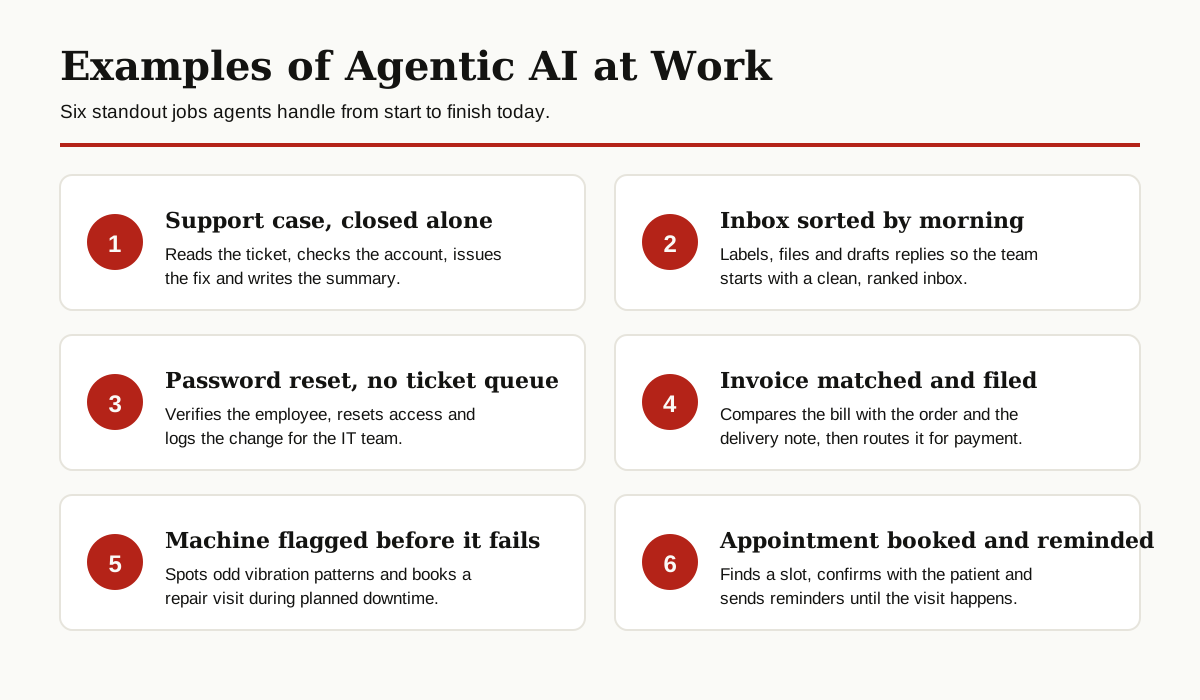
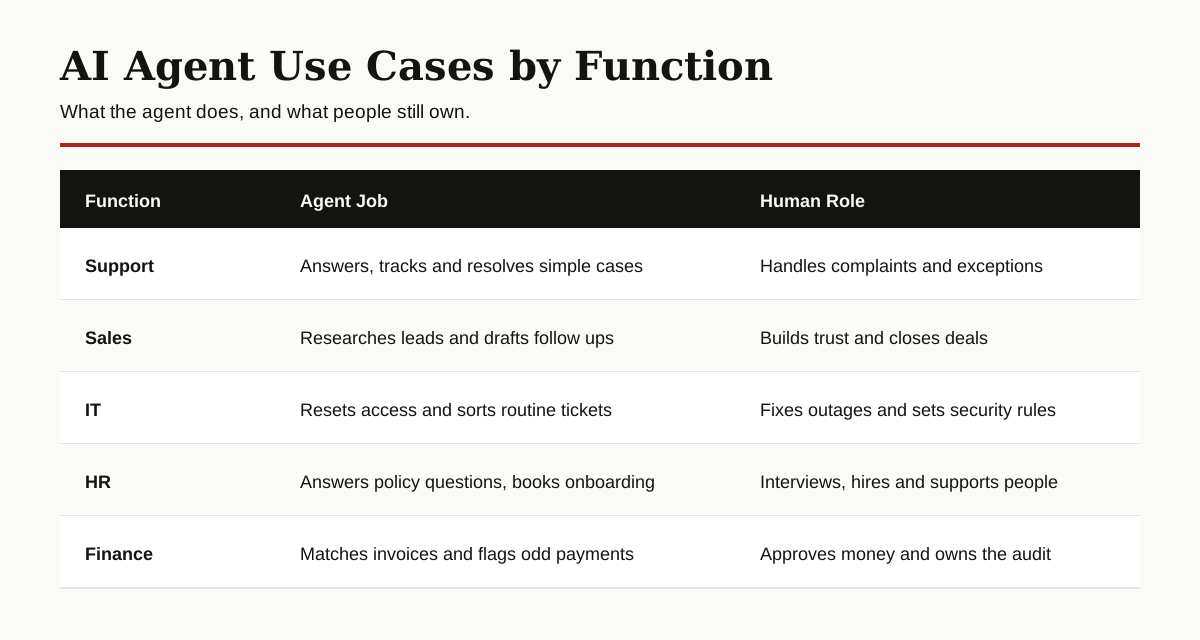
A customer writes in about a late delivery or a billing question. The agent reads the message, checks the order and the account, finds the answer in the help center, and either solves the problem or sends a clear, complete reply. It then updates the ticket and writes a short summary. The human support team handles angry customers, unusual cases and anything involving a large refund. Agents take the routine volume, people take the judgment calls.
2. Order Tracking and Delivery Problem Solving
Instead of a customer asking a person where a package is, an agent can watch deliveries on its own. It checks the carrier, spots a delay, messages the customer with a new arrival time, and offers a reschedule or pickup option. If the package is truly lost, the agent starts the claim process and gathers the details. A person steps in when the customer is upset or the order is high value, so the human conversation happens where it matters most.
3. Returns and Refunds Processing
Returns follow clear rules, which makes them a natural fit. The agent checks the purchase date, confirms the item qualifies, creates the return label, and tracks the package back to the warehouse. When the item arrives, it triggers the refund within a set limit and emails the customer a confirmation. Staff still review returns that look suspicious, items outside the policy window, and refunds above the agent’s limit. The agent handles the paperwork; people handle the exceptions.
Sales and Marketing
Sales teams lose hours to research and admin. Agents are good at exactly that kind of work.
4. Lead Research and Qualification
An agent can prepare a lead before a salesperson ever sees it. It reads the company website, checks size and industry, looks for recent news, and scores the lead against a simple checklist the team wrote. Good leads land in the CRM with a short summary attached. Weak ones get filed away. The salesperson still decides who to call, runs the meeting and builds the relationship. The agent simply makes sure no one wastes a morning on basic research.
5. Inbox Sorting and Follow Up Drafting
Sales and support inboxes fill up fast. An agent can sort incoming mail by topic and urgency, file the routine messages, and draft replies for a person to approve and send. Our step by step guide on how to use an AI agent to sort emails shows this workflow in detail. The human stays in charge of tone and promises, while the agent removes the daily pile up that buries important messages under newsletters and notifications.
6. Campaign Monitoring and Small Adjustments
Marketing agents watch live campaigns so people do not have to stare at dashboards. The agent checks spending and results against targets the team set, pauses an ad set that is burning money with no results, and shifts a small amount of budget toward the ad that is working, all within strict limits. It sends a daily summary of what it changed and why. Strategists still plan the campaign, write the message and make the big calls. The agent just guards the budget between check ins.
Software and IT
IT teams were early adopters, because so many of their tickets follow the same few patterns.

7. Password Resets and Access Requests
Locked out accounts are the most common IT ticket in many companies, and the fix is always the same. The agent verifies the employee’s identity with a few checks, resets the password or grants the approved access, and logs every step for the security team. If any check fails, the request goes straight to a human. IT staff keep control of sensitive systems and admin accounts, which agents should never touch on their own. Everything else moves in minutes instead of hours.
8. Ticket Triage and System Monitoring
An agent can read every incoming ticket, sort it by system and urgency, attach the logs it needs, and route it to the right engineer. At the same time, it watches servers and apps for early warning signs, like rising error rates, and opens a ticket before users notice a problem. Engineers still fix the real faults and decide on big changes. The agent acts like a tireless dispatcher, so no ticket sits unread and no warning sign gets missed at 3 a.m.
Operations and Supply Chain
Operations work is a chain of small updates. Agents are patient enough to follow every link.
9. Inventory Monitoring and Reordering
Running out of a popular product is expensive, and so is a warehouse full of the wrong stock. An agent watches stock levels, compares them with sales patterns, and prepares a reorder when a product crosses a limit the team set. This pairs naturally with predictive analytics in supply chain, where forecasts tell the agent what is likely to sell next. A purchasing manager still approves large orders and negotiates with suppliers. The agent makes sure nothing quietly runs out.
10. Shipment Tracking and Supplier Follow Up
One delayed shipment can hold up a whole production line. An agent tracks orders from suppliers, notices when a delivery slips, and sends a polite follow up asking for a new date. It updates the planning system so the rest of the team sees the change right away. If a supplier keeps missing dates, the agent prepares a short history of the delays for the next review meeting. People still manage the supplier relationship and decide when it is time to switch.
Finance and Admin
Finance work is full of documents and matching exercises, which is patient, detailed work agents handle well.
11. Invoice Processing and Matching
When an invoice arrives, the agent reads it, pulls out the amount, the supplier and the order number, and checks all three against the purchase order and the delivery note. If everything matches, it files the invoice for payment. If a number is off, it flags the invoice with a note about what does not match. This is a close cousin of intelligent document processing, which handles the reading step. Finance staff still approve payments and deal with disputed bills.
12. Expense Checking and Report Preparation
Expense claims take managers a surprising amount of time. An agent can check each claim against the company policy, flag missing receipts, and total everything up by team and category. At month end, it prepares a clean summary for the finance team. Managers still approve the claims and talk to anyone whose spending looks odd. The agent just removes the slow manual checking, so approvals happen in days instead of weeks and the reports are ready on time.
Health Care Support
In health care, agents stay far away from diagnosis. They help with the admin work around care, where clinics lose hours every day.
13. Appointment Scheduling and Reminders
A clinic agent can book visits based on the schedule, match patients with the right type of appointment, and send reminders by text or email. When a patient cancels, the agent offers the open slot to the next person on the waiting list. It also sends simple preparation instructions, like fasting before a blood test. Front desk staff still handle complex cases, insurance questions and patients who need extra help. The agent keeps the calendar full and reduces missed appointments.
14. Clinical Note Drafting and Referral Paperwork
Doctors spend a large part of their day writing notes. After a visit, an agent can draft a summary from the appointment record for the clinician to review, correct and sign. It can also prepare referral letters and check that forms are complete before they are sent. Nothing goes out without a clinician approving it, and that rule should never change. The agent saves typing time, so medical staff can spend more of the day with patients instead of keyboards.
Manufacturing
15. Predictive Maintenance Planning
On a factory floor, a broken machine can stop everything. An agent watches sensor data like vibration, heat and noise, and compares it with patterns that appeared before past failures. When the signs line up, it books a repair during planned downtime and orders the parts that are usually needed. This is one of the clearest agentic AI use cases in manufacturing, because the cost of waiting is easy to see. Engineers still inspect the machine, confirm the fault and do the repair itself.

All 15 Use Cases at a Glance
Here are all 15 agentic AI use cases side by side, with the industry each one serves and how ready it is today.
| Use Case | Industry | Readiness |
|---|---|---|
| Resolving everyday support questions | Customer support | Ready now |
| Order tracking and delivery fixes | Customer support | Ready now |
| Returns and refunds processing | Customer support | Ready now |
| Lead research and qualification | Sales and marketing | Growing fast |
| Inbox sorting and follow up drafting | Sales and marketing | Ready now |
| Campaign monitoring and adjustments | Sales and marketing | Growing fast |
| Password resets and access requests | Software and IT | Ready now |
| Ticket triage and system monitoring | Software and IT | Ready now |
| Inventory monitoring and reordering | Operations and supply chain | Growing fast |
| Shipment tracking and supplier follow up | Operations and supply chain | Growing fast |
| Invoice processing and matching | Finance and admin | Ready now |
| Expense checking and report preparation | Finance and admin | Ready now |
| Appointment scheduling and reminders | Health care support | Ready now |
| Clinical note drafting and referrals | Health care support | Growing fast |
| Predictive maintenance planning | Manufacturing | Growing fast |
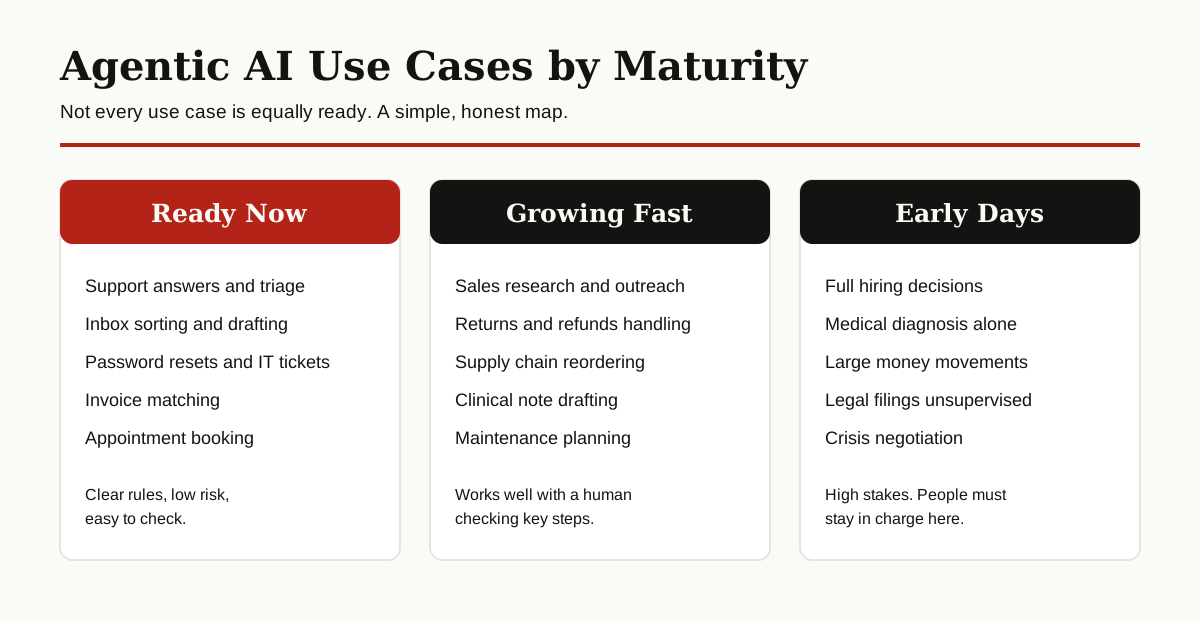
How to Pick Your First Use Case
Do not start with the most impressive demo. Start with the most boring problem that eats your team’s week.
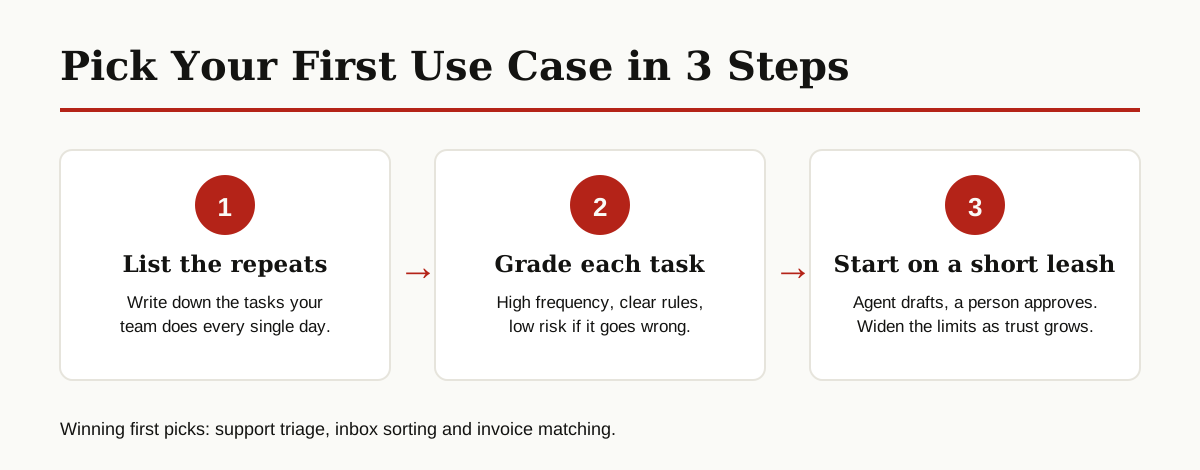
First, list the tasks your team repeats every day and grade each one: how often it happens, how clear the rules are, and how bad a mistake would be. The best first agentic AI use cases score high on frequency, high on clear rules, and low on risk. Support triage, inbox sorting and invoice matching usually win that test, which is why so many companies start there.
Second, keep the agent on a short leash at the start. Let it draft before it sends, suggest before it spends, and flag before it files. Platforms like Salesforce Agentforce are built around this idea of agents working inside guardrails people set. As the results prove steady, you can widen the limits step by step.
Third, measure one thing that matters, like time saved per ticket or invoices processed per day. If the number does not move, the use case was wrong, no matter how clever the agent looks.
Honest Limits You Should Know
Agents still make mistakes, and they make them with confidence. They can misread a message, pick the wrong record, or follow a rule into a situation the rule was never written for. That is why every example above keeps a person checking results, approvals or exceptions.
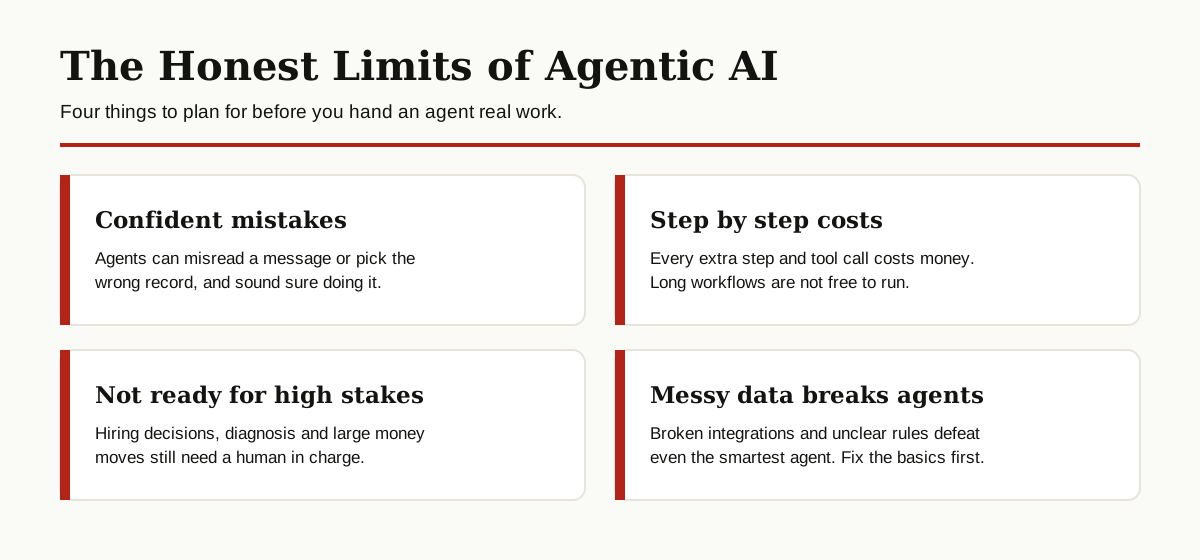
Cost is the second limit. An agent that takes ten steps and calls several tools costs more to run than a simple chatbot reply, so high volume does not always mean high savings. And some agentic AI use cases, like full hiring decisions or medical diagnosis, are simply not ready to run without a human in charge, whatever the sales pitch says.
Finally, agents are only as good as the systems they connect to. Messy data, broken integrations and unclear rules will defeat the smartest agent. Fix the basics first, then automate.
Conclusion
The pattern across all 15 examples is simple. Agents plan steps and do routine, rule based work across tools. People set the goals, own the relationships, and handle anything sensitive or unusual. Teams that respect that split are the ones getting real value today. And new agentic AI use cases keep appearing every quarter, as the tools get cheaper and easier to connect.
If you are exploring where agents fit in your company, browse our other Generative AI and Agentic AI guides for plain English explainers, comparisons and how to guides. And if you want the platform view, Google Cloud’s guide to AI agents is a solid next read.