Somewhere behind every AI chatbot that answers questions from a company’s own documents, there is a quiet piece of software doing the finding. The chatbot gets the glory, but it cannot look things up by itself. It needs a store that understands meaning, not just exact words.
That store is a vector database. The name sounds technical, but the idea is friendly: turn meaning into numbers, store the numbers, and then find items whose numbers sit closest together. This guide explains how it works, why a normal database is bad at the job, and how to pick one, all in plain English.
Start With the Building Block: Embeddings
Before the database makes sense, you need one idea first: an embedding.
An embedding model is a small AI program trained to read a piece of content, a sentence, a photo, a song, and sum up its meaning as a long list of numbers. That list is called a vector. Most modern models produce lists with hundreds or even thousands of numbers in them.
Here is the clever part. Items with similar meanings get similar lists. The vectors for “how do I reset my password” and “steps for recovering your account” end up close together, even though they share almost no words. A vector for “banana bread recipe” lands far away from both, in a different neighborhood of the map.
Think of it as plotting every idea on a giant map. Fruit words gather in one area, animal words in another, car words in a third. Distance on the map means difference in meaning. These models learn where everything belongs by studying enormous numbers of examples, the same learning process we break down in our guide to machine learning algorithms.
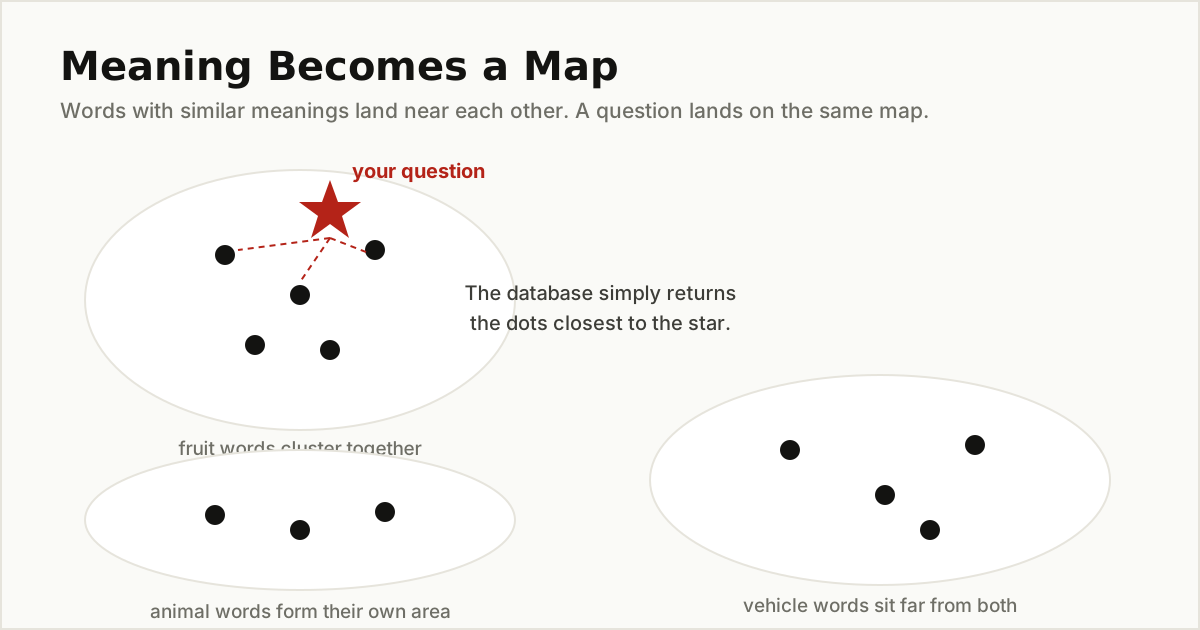
Once meaning becomes numbers, a computer can measure it. And once it can measure, it can search.
So, What Is a Vector Database?
A vector database is a database built to store vectors and search them by closeness. You hand it a new vector, usually your question after the same embedding model has turned it into numbers, and it hands back the stored vectors nearest to yours, along with the content each one came from.
Alongside every vector, the database also keeps ordinary details called metadata: the title of the document, its date, its language, which customer it belongs to. Those labels let you filter results, so a search can mean “the closest matches, but only from the English help pages published this year.”
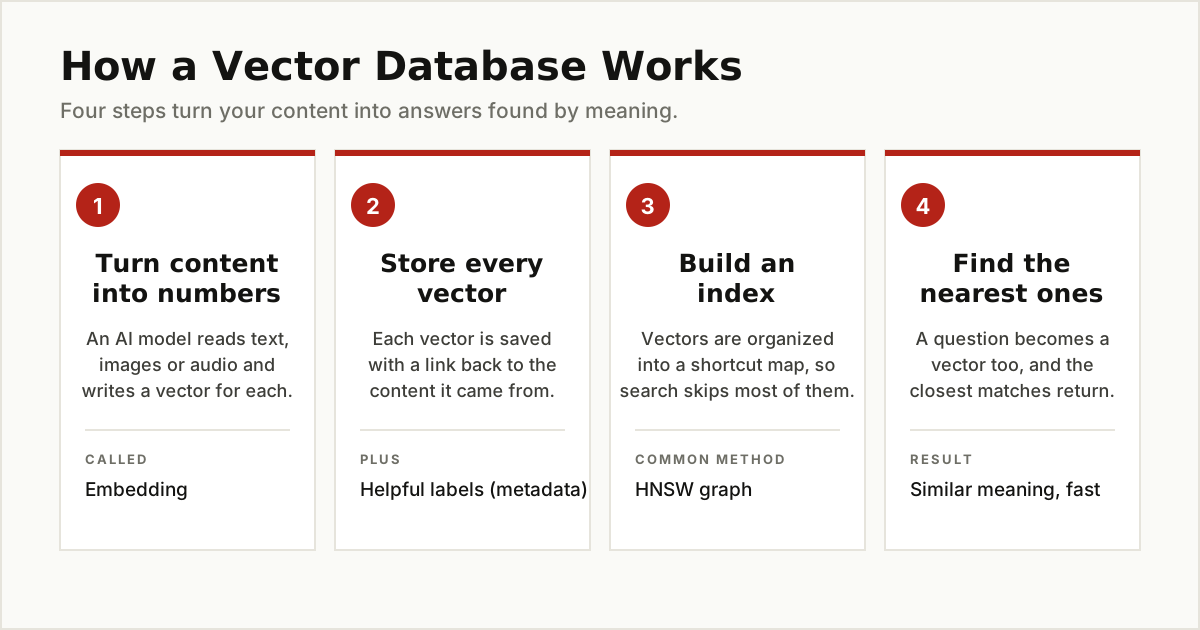
As Pinecone’s learning guide puts it, a vector database indexes and stores vector embeddings for fast retrieval and similarity search. The four moving parts are always the same: make vectors, store them, index them, and search them.
Why a Normal Database Struggles With This
A normal database is a champion of exact questions. Find order number 4471. List every product under fifty dollars. Show the customers who joined in March. Its indexes are like the index at the back of a textbook: perfect when you know the exact word or number you want.
Similarity search breaks that design. Ask a normal database for the help articles whose meaning is closest to a sentence, and it has no shortcut. There is no exact match to look up. Its only option is to compare your question vector against every single stored vector, one at a time, and keep the winners. With a few thousand items, that is fine. With millions of long vectors, every question turns into a slow full scan.
Good database optimization makes a normal database faster at its own job: exact lookups, joins, and reports. But searching by meaning is a different job, and it needs a different design. That design is the vector database.
How a Vector Database Finds Answers So Fast
The speed comes from two tricks working together.
Trick one: a score for closeness. The database needs a way to say how near two vectors are. The most common score for text is called cosine similarity, but the details matter less than the idea: a small distance means a close meaning, a large distance means an unrelated one. Every search is just “return the smallest distances.”
Trick two: an index that skips almost everything. Instead of measuring the distance to every stored vector, the database builds a map of the space ahead of time, so a search only visits the promising neighborhoods. This is called approximate nearest neighbor search, often shortened to ANN. The word approximate is honest: the index might, in theory, skip the single closest match. In practice it returns matches so close that users cannot tell the difference, while running far faster than a full scan. Pinecone’s guide describes this as the central trade-off of the whole field: accuracy on one side, speed on the other.
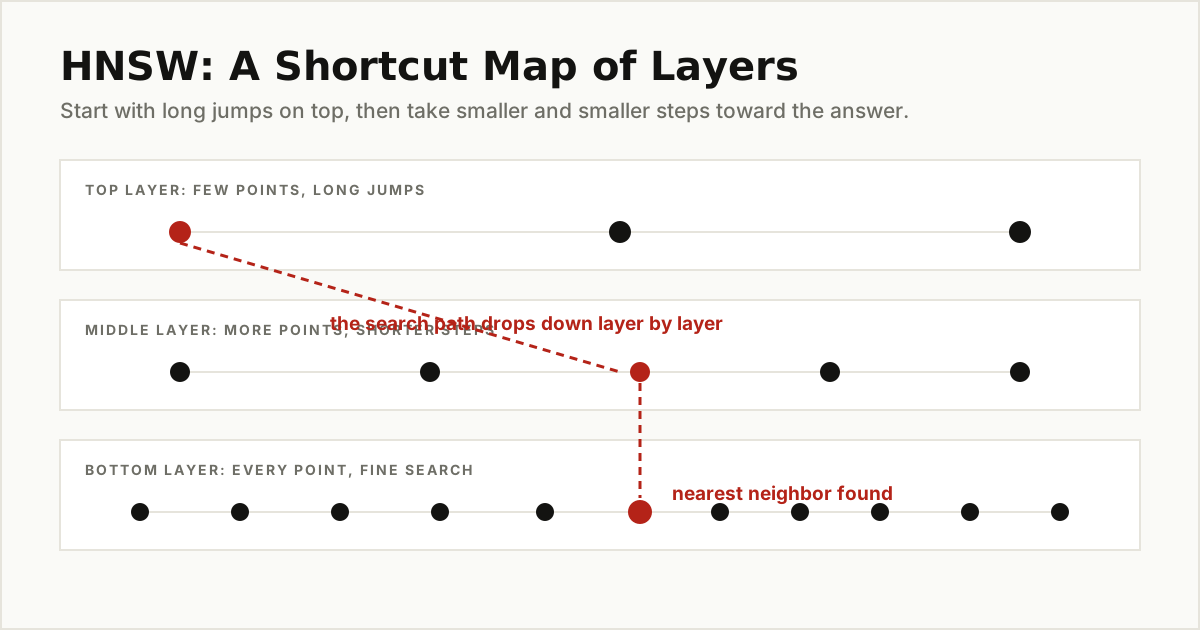
The most common index method is called HNSW, short for Hierarchical Navigable Small World. Forget the name and picture a road trip. The top layer of the map holds a few points joined by long jumps, like express trains between big cities. Each layer below adds more points and shorter hops. The bottom layer holds every point, connected to its true neighbors. A search starts at the top, rides the long jumps toward the target city, then drops down layer by layer, taking smaller and smaller steps, until it lands in exactly the right neighborhood. It never drives down every street in the country, which is why it stays fast with millions of vectors on the map.
HNSW is not the only design. Another common method, called IVF, works more like sorting mail into pigeonholes: vectors are grouped into clusters ahead of time, and a search checks only the few clusters nearest to the question instead of the whole building. pgvector offers both styles, HNSW and a version called IVFFlat, and its documentation is refreshingly honest about the trade-offs: clustering builds faster and uses less memory, while the layered graph usually answers better for the same effort. Different maps, same goal: never scan everything.

A Worked Example: The Support Chatbot
Let us watch the whole thing happen in a place you have probably met: a support chatbot on a software company’s website.
- Before anyone asks anything, the company feeds every help article into an embedding model. Each article becomes a vector, and all the vectors go into the vector database with labels like the article title and the product it covers.
- A customer types a question: “I locked myself out and the reset email never arrives.” Notice that no help article contains those exact words. A keyword search would shrug.
- The question becomes a vector. The same embedding model turns the customer’s sentence into numbers, and that vector lands on the map near one particular article: “Resetting your account password.” The words differ, the meaning matches.
- The database returns the nearest articles, and the chatbot reads them and writes its answer from them: check the spam folder, wait a few minutes, use the backup code, and so on.
This pattern, where an AI looks facts up before answering, is called retrieval augmented generation, or RAG for short. The vector database is the looking-up part. It is the reason the chatbot can answer from your company’s real documents instead of inventing something plausible.
The Main Jobs People Use Them For
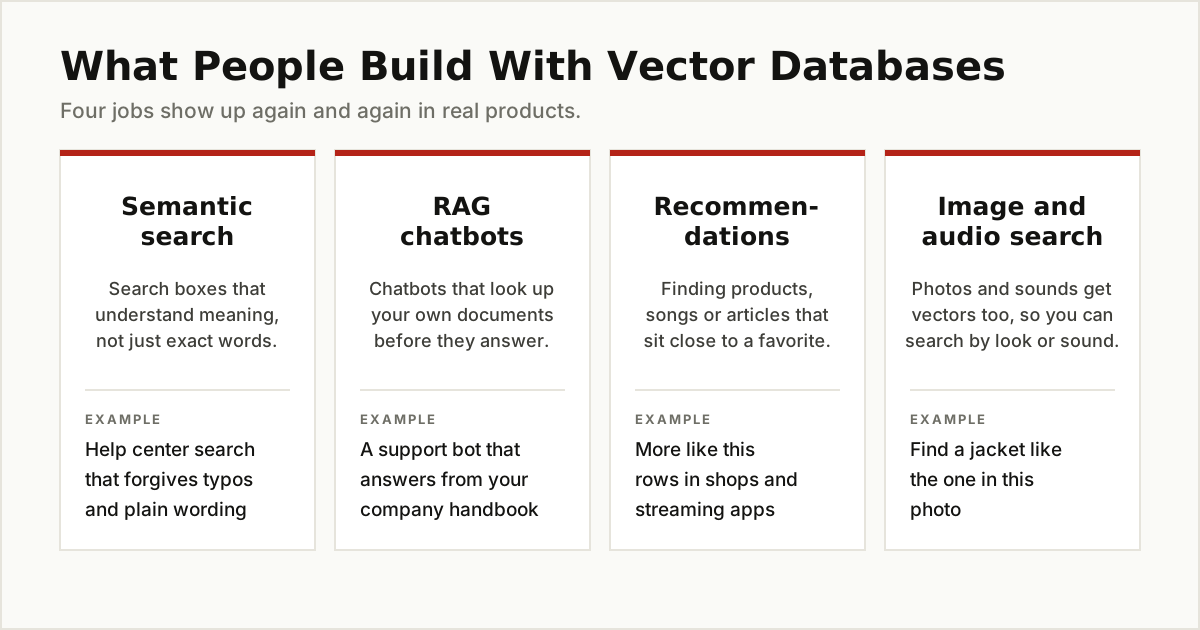
The support bot is one of four jobs that show up again and again.
Semantic search
Search boxes that forgive plain wording, typos, and synonyms. A shopper can type “warm coat for very cold weather” and find the parka, even if the product page never uses the word coat. Anywhere people search in their own words, semantic search beats keyword matching.
Chatbots that answer from your documents
The RAG pattern from the example above, pointed at handbooks, policies, manuals, and wikis. It only works well when the underlying documents are clean and connected, which is why teams usually sort out their AI data integration before they build the chatbot.
Recommendations
If products and shoppers both live on the map, “more like this” becomes easy: find the items nearest to the one you just bought, watched, or loved. Music, video, and shopping apps all use versions of this idea.
Image and audio search
Photos and sounds get vectors too. Upload a picture of a jacket and find jackets that look like it. Hum a tune and find the song. The content changes, the map idea stays the same.
Well Known Options, Without the Hype
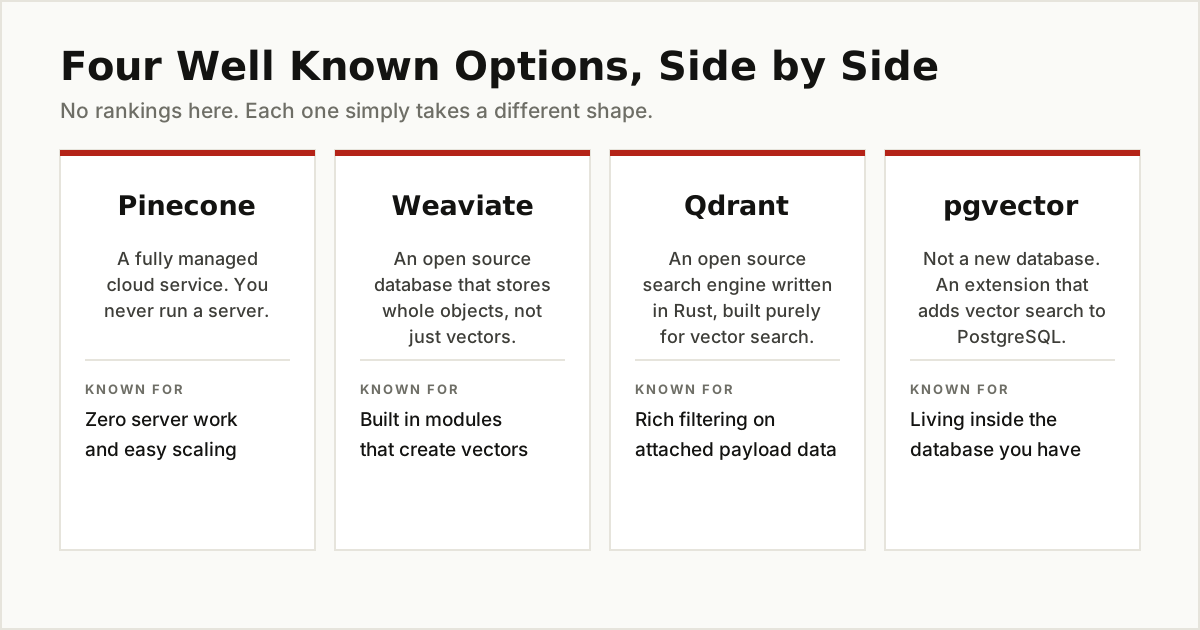
There is no single winner here, because the tools come in different shapes. Four names come up in almost every serious discussion.
Pinecone is a fully managed cloud service. You never install or run a server; you send vectors in through an API and ask questions the same way. That makes it the low-effort option for teams who would rather not operate database infrastructure.
Weaviate is an open source vector database you can run yourself or use through its cloud. It stores whole objects, such as a full article with its title and body, together with their vectors, and its modules can create the vectors for you. The Weaviate quickstart in the official docs walks through building a small search app end to end.
Qdrant is another open source option, written in the Rust programming language and built purely as a vector search engine. It stores each vector as a point with payload data attached, which makes filtering by labels a first-class feature.
pgvector is the odd one out, in a good way. It is not a new database at all. It is a free, open source extension that adds vector storage and search to PostgreSQL, the database many companies already run. Your vectors live in ordinary tables next to the rest of your data, searched with ordinary SQL. The pgvector project on GitHub shows how it supports both exact search and approximate search with HNSW and IVFFlat indexes.
The lines keep blurring, too. Many normal databases and search engines now ship vector features of their own, so “vector database” is becoming a feature checklist as much as a product category.
How to Choose One
Work through these questions in order. Most teams find their answer early.
- Are you already running PostgreSQL? Then the honest starting point is pgvector. It is free, it lives where your data already lives, and it handles real production workloads. Many teams start here and never need anything else.
- Is similarity search the heart of your product? If search quality and scale are the business itself, a dedicated tool earns its keep. Pick a managed service like Pinecone if your team is small, or a self-hosted engine like Weaviate or Qdrant if you want control.
- Which embedding model will you use? This matters as much as the database. Every vector in a collection must come from the same model, because different models draw different maps. Changing models later means re-embedding everything.
- How much filtering do you need? If every search must also respect labels like customer, language, or date, test filtering early. It is a headline feature in some tools and an afterthought in others.

The Bottom Line
A vector database stores meaning as numbers and finds things by closeness instead of exact matches. Embeddings draw the map, the index makes the map searchable at speed, and tools like Pinecone, Weaviate, Qdrant, and pgvector package the idea in different shapes, from managed cloud services to a free extension for the database you already own.
If you remember one thing, make it this: start simple. Reach for pgvector or your existing database first, prove that search by meaning helps your users, and move to a dedicated vector database when the workload, not the hype, tells you to.
For more guides like this one, browse the data, cloud and databases category.