
Your sales live in one app. Your payments live in another. Your website numbers sit in a third tool, and half of your stock records are still in spreadsheets. When the boss asks a simple question, like which product made the most money last month, somebody has to pull all of that together by hand.
That manual work is slow, boring, and easy to get wrong. It is also the problem AI data integration was built to solve.
First, the plain definition. Data integration means bringing data from many places into one place where it is useful. The AI version is the same job, done with smart software that studies the patterns in your data and handles the tedious parts on its own: matching fields, fixing errors, and keeping everything up to date.
In this guide, you will learn how it works step by step, what the AI actually does, which tools are worth a look, and how a small team can start without a big budget.
What Is AI Data Integration?
Imagine one customer stored in three systems. Your sales app calls her “Sara Lee”. Your billing tool has “S. Lee”. Your email app lists “sara.lee@example.com” with no name at all. A human can guess these records are the same person. A normal computer cannot, because the records do not match exactly.

AI data integration uses machine learning to make those smart guesses at scale. It reads the shape of your data, works out which fields belong together, spots records that describe the same person or product, and merges them into one clean record. As IBM explains in its guide to data integration, the goal is one consistent, trusted view of data that started in many different places.
You may also hear the older term ETL, short for extract, transform, load. It describes the same basic move: take data out of one system, reshape it, and put it somewhere more useful. The reference pages on data integration at Wikipedia trace how this field grew from hand coded scripts into the smart platforms we have today.
Some of your data does not live in neat tables at all. It sits inside invoices, contracts, and scanned forms. That is a close cousin of this topic, covered in our guide to intelligent document processing. Once documents are read and turned into data, integration tools can pull that data in along with everything else.
The combined data usually lands in one central store, such as a data warehouse or a data lake, where reporting tools, dashboards, and other apps can all read from it. Instead of five teams keeping five private copies of the truth, everyone works from the same numbers. That single change ends a surprising number of arguments in meetings.
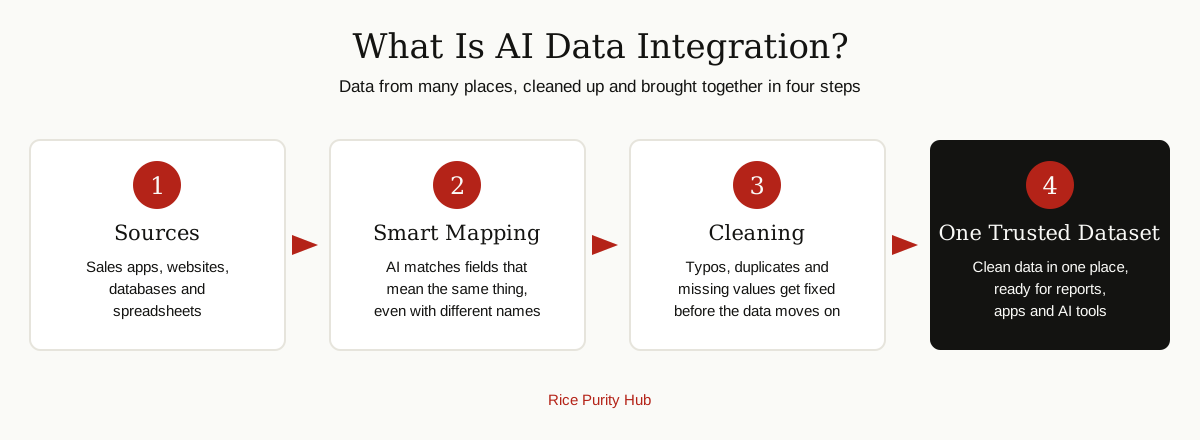
How AI Data Integration Works, Step by Step
Every platform does the job in a slightly different way, but the flow is almost always the same six steps.
1. Connect
The tool links to your sources: databases, cloud apps, files, and other software. Most platforms ship with ready made connectors, so this step is often just signing in and giving permission.
2. Map
Mapping means deciding which field in the source matches which field in the target. The field called “cust_email” in one system and “Email Address” in another is the same thing. The AI suggests the mapping, and you approve it.
3. Clean
The data gets washed. Typos are fixed, dates are put into one format, phone numbers are tidied up, and empty fields are flagged. Rules you set, plus patterns the AI has learned, do most of this work.
4. Match
The tool looks for records that describe the same real thing: the same customer, product, or order stored in more than one place. Duplicates are merged into a single record.
5. Load
The clean, matched data is written into its new home, usually a data warehouse or a data lake, in the shape your reports and apps expect.
6. Monitor
The pipeline keeps running on a schedule, or even in real time. If a source changes shape or a feed breaks, the tool raises an alert instead of quietly loading bad data.
Here is a quick example. An online store sells through its own website, a marketplace, and a small physical shop. Every night, the pipeline pulls orders from all three, matches products that carry different codes in each system, cleans the customer addresses, and loads one tidy sales table. In the morning, the owner opens a single dashboard and sees real totals, not three partial ones.
What the AI Actually Does
Vendors love the word AI, so it helps to know the specific jobs it does here.
- Auto mapping. The tool studies field names, data types, and sample values, then proposes how sources line up. On a new project, this can turn days of manual mapping into an hour of reviewing suggestions.
- Anomaly spotting. The system learns what normal looks like: daily sales in a certain range, orders from certain countries. When something odd appears, like sales dropping to zero at noon, it flags the problem fast.
- Record matching. The AI compares names, addresses, and other clues, then scores how likely two records are to be the same. It catches pairs a strict rule would miss, like “Bill” and “William” at the same address.
- Learning from fixes. When you correct a mapping or merge two records by hand, the tool remembers. The next similar case gets handled the way you handled the last one.
It is worth saying clearly: the AI suggests and assists. On sensitive data, a human should still approve merges and changes, especially in the first weeks.
Traditional vs AI Data Integration
| Part of the job | Traditional integration | AI powered integration |
|---|---|---|
| Mapping fields | Done by hand, field by field | Suggested by AI, checked by you |
| Handling changes | A renamed field can break the pipeline | Changes are spotted and flagged |
| Cleaning data | Fixed rules written in advance | Rules plus learned patterns |
| Finding duplicates | Exact matches only | Likely matches scored and merged |
| Setup time | Weeks to months | Days for common sources |
| Best for | Stable, simple data | Messy, growing, changing data |
Traditional tools are not bad. If your data is small and never changes, they may be all you need. AI help earns its keep when sources are many, messy, or always changing.
Benefits of AI Data Integration
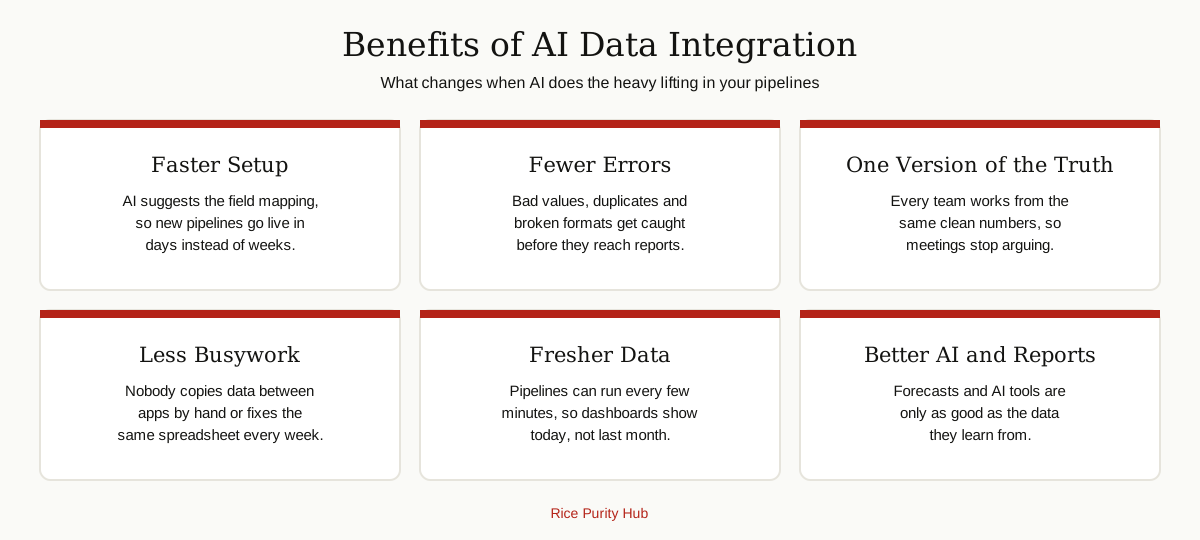
The biggest win is time. Reports that took a person two days of copying and pasting can build themselves every morning. Because the checks run on every load, errors get caught while they are still small, instead of surfacing in a board meeting.
There is a deeper win too. Clean, combined data is the fuel for every other smart tool in the business. It is what machine learning models need in order to learn anything useful, and it powers forecasting work like the predictive analytics in supply chain systems that plan stock and deliveries. Scattered, dirty data gives scattered, dirty answers. One trusted dataset changes that.
The Best AI-Driven Data Integration Platforms
There is no single best tool for everyone. The right pick depends on where your data lives and who will run the pipeline. These are the names that come up again and again, with an honest note on each.
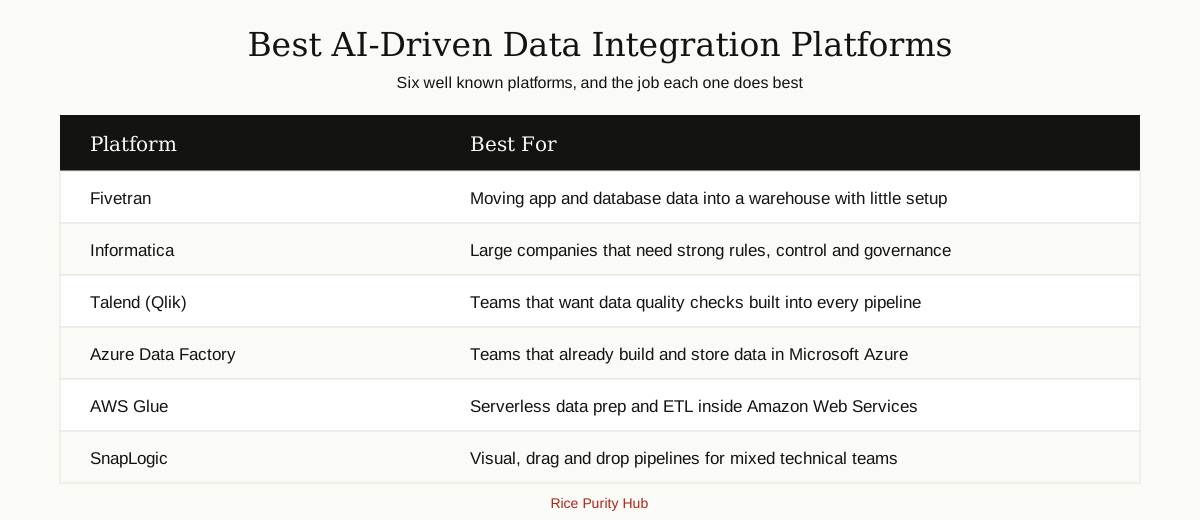
- Fivetran. Famous for ready made connectors that pull data from hundreds of apps and databases into your warehouse with almost no upkeep. A strong first choice for analytics teams that want data moving today, not next quarter.
- Informatica. The heavyweight for large companies. Deep features for governance, data quality, and complex rules, powered by its CLAIRE AI engine. Powerful, but built and priced for enterprises.
- Talend (now part of Qlik). Known for building data quality checks into the pipeline itself, so bad data gets flagged as it moves. A good fit for teams that care about clean, scored data.
- Azure Data Factory. Microsoft’s pipeline builder. If your company already lives in Azure, it fits naturally with the rest of the stack and offers a visual, mostly code free canvas.
- AWS Glue. Amazon’s serverless option. It scans your data, builds a catalog of what you have, and runs ETL jobs without servers to manage. The natural choice for AWS shops.
- SnapLogic. A visual platform where pipelines are built by snapping blocks together, with an AI assistant that suggests pipeline designs. Popular with teams that mix business apps and data sources.
Prices change often and depend on data volume, so check each vendor’s current plans before you decide. Any honest shortlist should end with a trial on your own data.
AI Data Integrity: Keeping the Data Trustworthy
Moving data is only half the job. AI data integrity is about making sure the data stays correct, complete, and trustworthy as it travels from system to system. Good platforms guard it with checks like these:

- Format checks. Dates, emails, and phone numbers must follow one agreed shape.
- Range checks. A discount of 400 percent, or a customer age of 250, should never pass quietly.
- Duplicate checks. The same order loaded twice will double your revenue on paper.
- Cross checks. Totals in the target are compared against totals in the source, so nothing goes missing on the way.
- Audit trails. Every load is logged, so you can see what moved, when it moved, and what the tool changed.
Run these checks on every load, and read the report they produce. Trust in data is built one verified load at a time.
Honest Challenges to Know About
No tool fixes everything, and it is better to know the hard parts up front.
- Garbage in, garbage out. AI can clean a lot, but if a source system is full of wrong data, the output will carry those mistakes until somebody fixes the source.
- Suggestions can be wrong. Auto mapping is a draft, not gospel. Review it carefully, especially for money and customer data.
- Costs can grow. Many tools charge by data volume. A pipeline that syncs everything every five minutes can get expensive fast.
- Privacy duties. Moving customer data means obeying privacy law and your own policies. Know where the data goes and who can see it.
- Old systems. Some older software has no modern connection and only exports files. You may need a manual step for those sources.
First Steps for a Small Team
- Pick one painful report. Choose the one somebody builds by hand every week. That is your first project.
- List the sources. Write down where every number in that report comes from. Most teams find three to five sources.
- Start with one pipeline. Connect the biggest source first. Use the AI mapping, but check every suggestion yourself.
- Compare for one month. Run the new pipeline next to the old manual report, and fix every difference you find.
- Add sources slowly. One at a time, with the same care. Do not try to integrate the whole company in a week.
- Give it an owner. One named person checks the alerts. Pipelines without an owner fail quietly.
Keep notes as you go. Every fix you make in the first month teaches the tool something, and those notes become the rulebook the next person on your team will thank you for. Small, careful steps beat a big, risky launch every time.
The Bottom Line
AI data integration takes one of the dullest jobs in business, copying and cleaning data, and hands it to software that learns as it goes. Done well, it gives every team the same clean numbers, fresher reports, and a solid base for bigger AI projects.
Start small, check the output like a skeptic, and let the tool earn your trust. Within a few months, most teams wonder how they ever ran reports the old way. You can explore more guides like this in our AI, ML and Data Science category.