Your app used to feel fast. Then it grew. More users, more orders, more history, and one day every page takes seconds to load. When people dig into a slowdown like this, the database is very often where the time is going.
Database optimization is the work of finding out why a database is slow and fixing the real causes, in the right order. It is not magic, and it is rarely about buying a bigger server first. Most slow databases are slowed down by a short list of ordinary problems: a few bad queries, a few missing indexes, and a few habits nobody questioned. This guide walks through the fixes in the order an experienced engineer would try them.
What Database Optimization Actually Means
A database spends its time answering questions, called queries. “Show me the orders for this customer.” “Count the products left in stock.” Database optimization means making those answers come back faster and making the whole system handle more work without falling over.
Two ideas sit underneath everything in this guide:
- You cannot fix what you have not measured. Feelings are not data. The slowest looking page is not always caused by the slowest looking query.
- Small causes, big effects. One missing index on one busy table can slow down an entire application, because everything else queues up behind it.
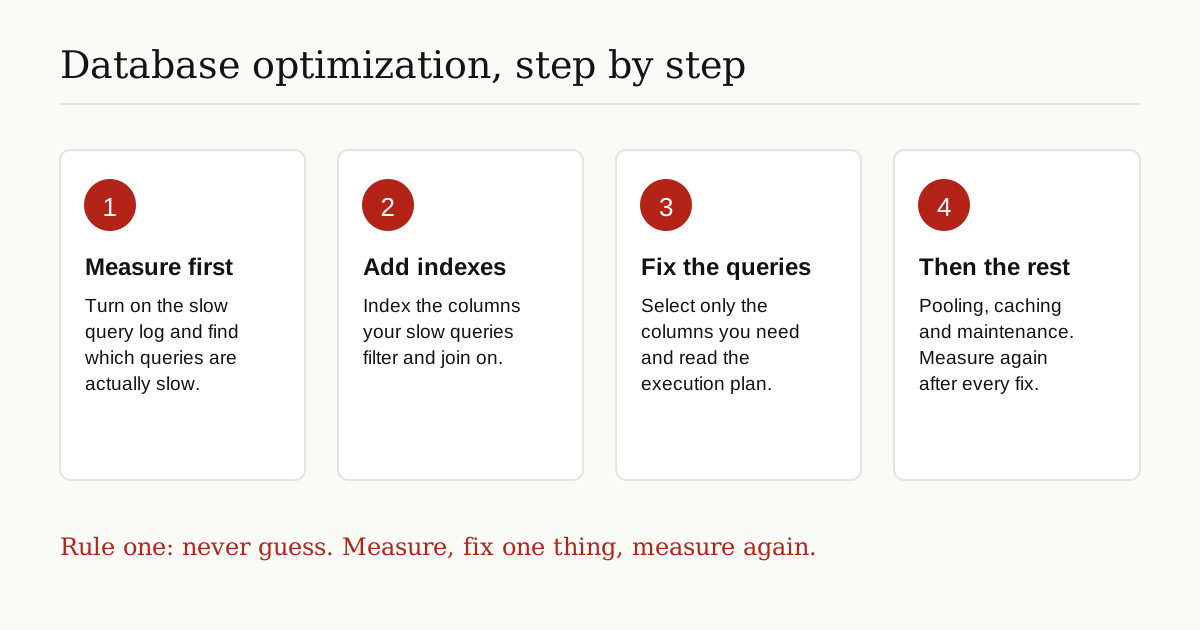
Step 1: Measure First, and Find the Slow Queries
Every serious tuning job starts with a list: which queries are slow, how slow, and how often they run. A query that takes two seconds but runs once a night matters far less than a query that takes 300 milliseconds and runs ten thousand times an hour. Total time wasted is the number that counts.
Databases can keep this list for you. MySQL has a slow query log, which records queries that run longer than a limit you set. PostgreSQL has a similar setting, log_min_duration_statement, and an add-on called pg_stat_statements that keeps running totals per query. These tools are covered in the official manuals, including the MySQL optimization chapter, which treats measuring as the starting point of all tuning.
Turn the logging on, let real traffic run through it, then sort by total time. The top few entries on that list are your real targets. Everything after this step is about fixing them.
One warning about the list: averages can hide pain. A query that averages 200 milliseconds might take five full seconds whenever it runs with certain inputs, like a customer with ten years of order history. Look at the worst runs as well as the averages, because your users remember the worst ones.
Step 2: Add Indexes, the Biggest Win
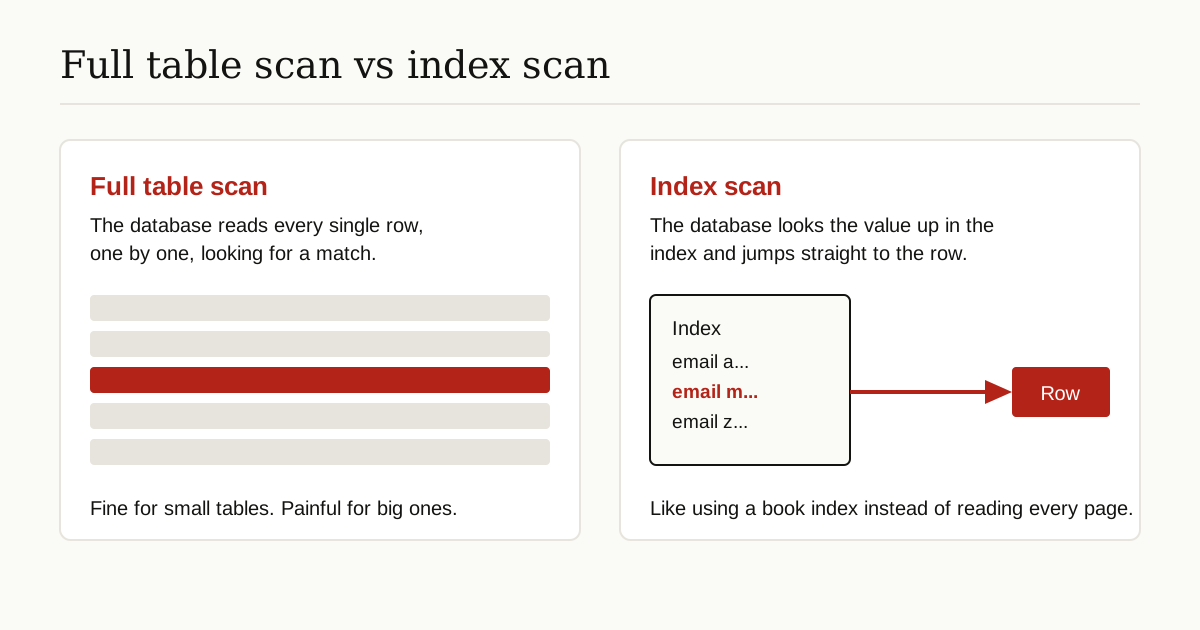
If one fix deserves the title of biggest win, it is indexing. An index is a separate, sorted lookup structure the database keeps next to a table, a little like the index at the back of a textbook. Without the index, finding every page that mentions a topic means reading the whole book. With it, you look the topic up in the index and jump straight to the right pages.

In practice, you add indexes on the columns your slow queries search by, filter on, and join with: things like customer email, order date, or the customer_id that links orders to customers. A well chosen index turns “read a million rows to find three” into “look up three rows directly.” The free online book Use The Index, Luke is the classic developer friendly guide to doing this well, and it makes the same point: indexing is the most effective tuning method, and the one most often skipped during development.
The Honest Cost of Indexes
Indexes are not free, and pretending otherwise leads to tables buried under twenty of them. Every time a row is inserted, updated, or deleted, each index on that table has to be updated as well. So indexes speed up reads and slow down writes. They also take real disk space, sometimes a noticeable share of the table itself.
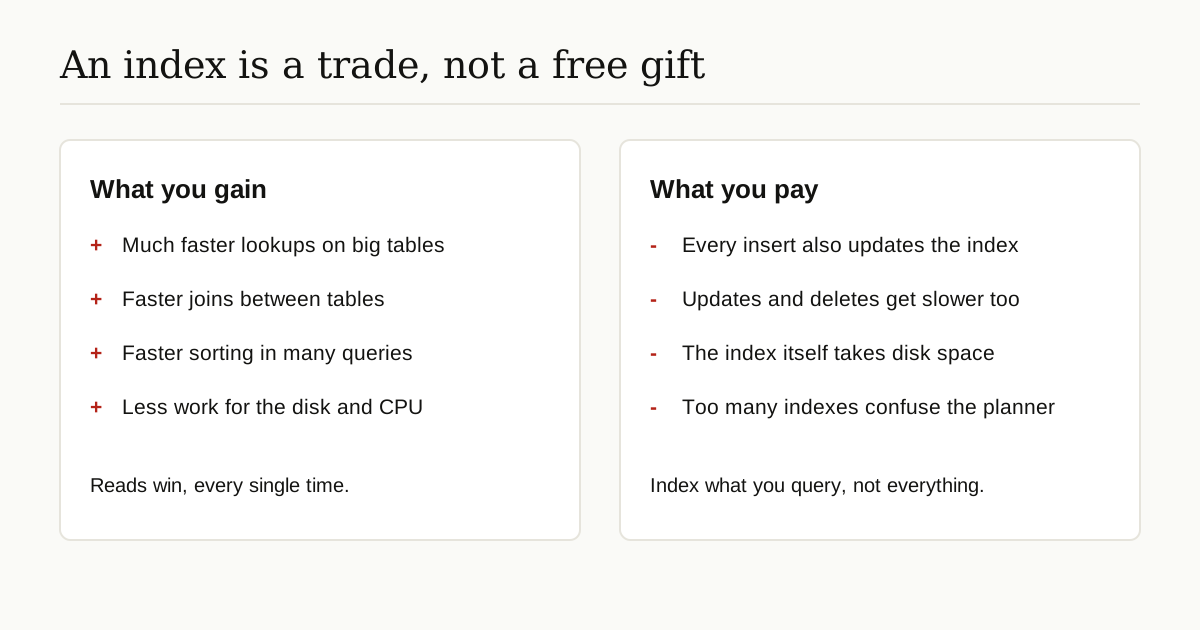
The rule is simple: index for the queries you actually run, especially the slow ones from step 1. Do not index every column just in case.
Special kinds of search need special kinds of indexes. Similarity search over embeddings, for example, uses its own index types designed for nearest neighbor lookups, which we explain in our guide to what is a vector database.
Step 3: Write Better Queries
Sometimes the index is fine and the query itself is the problem. A few habits fix most of it:
- Ask only for the columns you need.
SELECT *drags back every column of every row, including big text fields nobody displays. Name the columns instead. It is less data to read, sort, and send. - Join carefully. Joining tables is normal and healthy, but join on indexed columns, and make sure you are not joining the same table twice by accident or pulling in rows you then throw away.
- Watch how you filter. Wrapping an indexed column in a function, like searching on
LOWER(email), often stops the database from using the index, because the index holds the original values, not the lowered ones. Filter on the plain column where you can. - Fetch in pages, not avalanches. If the screen shows 20 results, ask for 20, not 20,000 with the rest discarded.
- Beware the quiet loop. Apps that run one tiny query per item, thousands of times in a loop, create death by a thousand cuts. One query that fetches the whole set is usually far faster.
- Do not fetch everything and filter in your app. Pulling a million rows across the network so your code can keep fifty of them wastes time at every step. Filtering is the database’s home turf. Let it do the job.

Step 4: Learn to Read an Execution Plan
Every database can show you its plan before it runs a query. In PostgreSQL and MySQL you ask with the word EXPLAIN in front of the query. The plan is a short recipe: which tables it will read, in what order, and how it plans to find the rows.
You only need to spot two things at first:
- Full table scan (PostgreSQL prints
Seq Scan, MySQL showsALLin the type column). The database reads the whole table. Fine on small tables, a red flag on big ones when the query only wants a few rows. - Index scan (MySQL shows types like
reforrange). The database used an index to go straight to the matching rows. This is usually what you want to see for lookups.
The PostgreSQL performance tips chapter in the official docs is a gentle, free introduction to reading these plans. Turn the plan habit into a reflex: write a query, explain it, and only then worry about its speed. It costs nothing, takes seconds, and it is the single database optimization habit that prevents the most surprises later.
Step 5: Get the Design Right, Normalization and Its Limits
Table design shapes performance before any tuning begins. Normalization is the classic design rule: store each fact in exactly one place. Customer names live in the customers table, and orders just carry the customer_id. Update a name once, and it is right everywhere. Normalized designs are clean, safe, and the right default.
Denormalization is the deliberate opposite: copying a fact into a second place so a common read does not need a join. A report table might store the customer name right next to the order total, because the report runs all day and the join was the bottleneck. The copy is faster to read, but now your code must keep both copies in agreement forever.
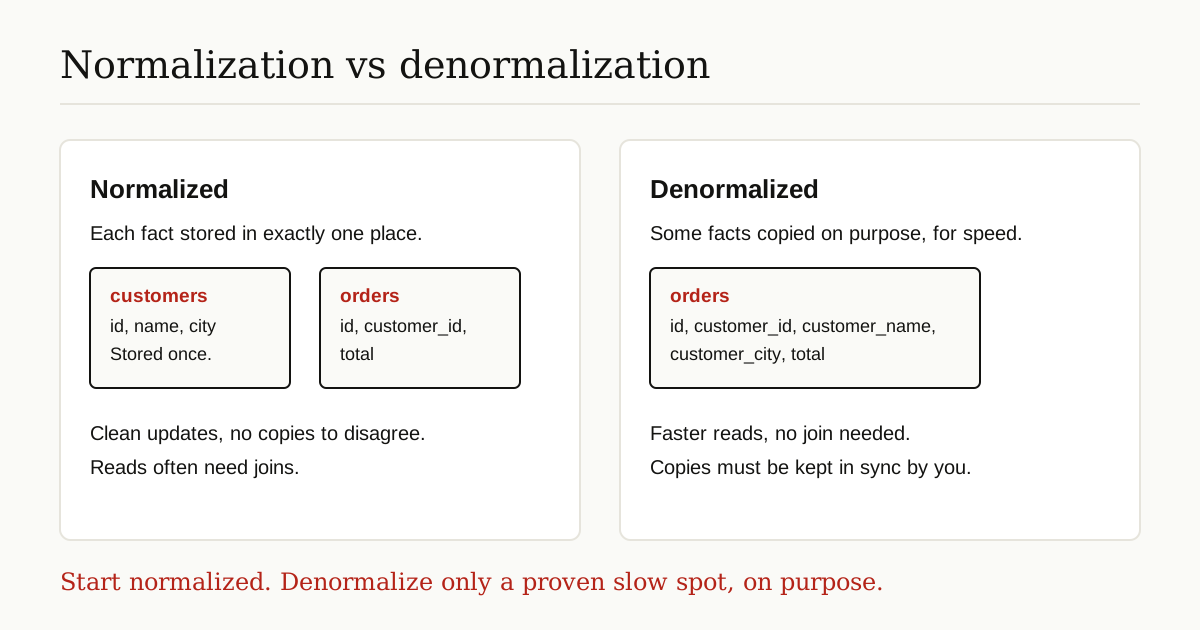
The honest guidance: start normalized. Denormalize one proven slow spot at a time, on purpose, with your eyes open about the sync work you just signed up for.
Step 6: Pool Connections and Cache the Hot Data
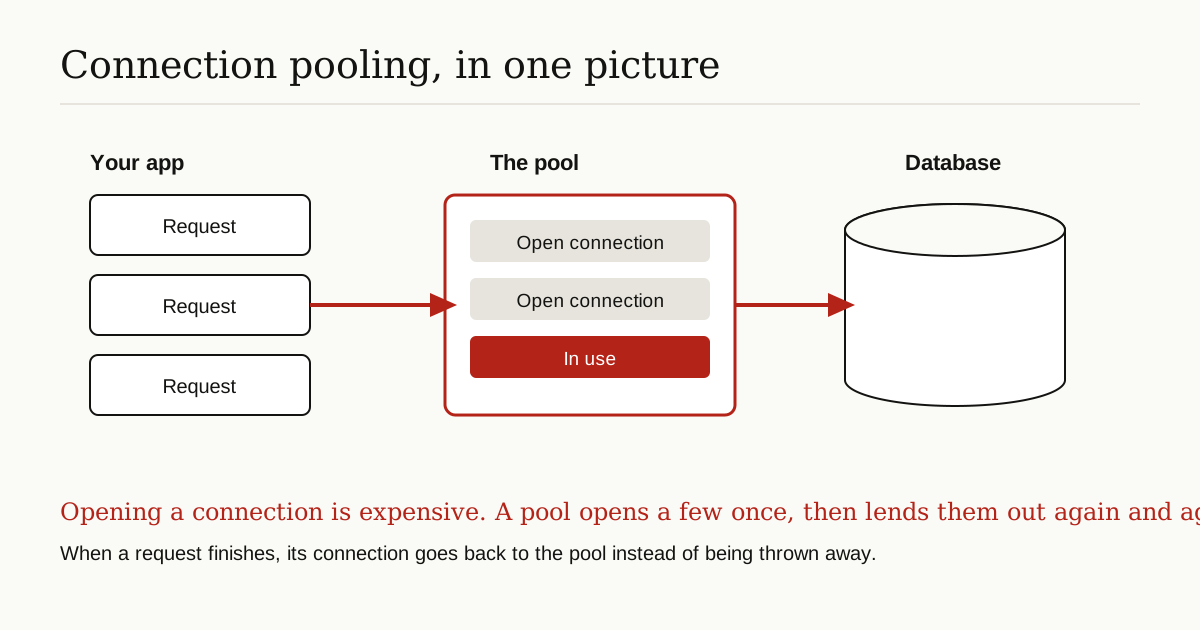
Opening a database connection is surprisingly expensive: network handshake, login checks, memory setup. If your app opens a fresh connection for every request, it pays that cost thousands of times a minute. A connection pool keeps a small set of connections open and lends them out. Tools like PgBouncer do this job for PostgreSQL, and most app frameworks have pooling built in.
Size the pool with care. Too small, and requests queue up waiting for a free connection. Too big, and you simply move the crowd: hundreds of active connections all fighting over the same CPU and disk. A modest pool, watched and adjusted as traffic grows, beats a giant one set blindly.
Caching is the other half. If the same question gets asked a thousand times an hour and the answer changes twice a day, store the answer. That can mean the database keeping hot data in memory (which it already does with its own buffers), your app caching results for a short time, or a dedicated cache in front. The discipline is knowing what is safe to cache and for how long, so users never see stale answers presented as fresh ones.
Step 7: Keep Up With Regular Maintenance
Maintenance is the quiet half of database optimization, and skipping it slowly undoes the loud half. Databases make their plans using statistics: summaries of how big tables are and how values are spread out. When statistics go stale, the planner guesses wrong and picks bad plans, like using an index where a scan would be faster, or the other way round. PostgreSQL refreshes them with ANALYZE, and keeps space tidy with VACUUM, which clears out the dead copies of rows left behind by updates and deletes. Other databases have their own equivalents. The concept matters more than the command names: a database that is never maintained slowly drifts into bad decisions.
Two working habits round this out. First, test every fix on a copy of the database before it touches the real one. Many teams keep a throwaway copy in a container for exactly this, as our guide to docker containerization explains. Second, measure again after each change, one change at a time, so you know what actually helped.
When the Real Answer Is Bigger Than Tuning
Sometimes you do all of the above and the database is still slow. Then the honest answer is structural, not another index:
- The data outgrew the design. Years of history in the same tables every query must wade through. Archiving old data into separate tables or storage is often the real fix.
- The hardware is genuinely maxed out. Disks that cannot keep up, or memory too small to hold the hot data. Tuning cannot repeal physics.
- One machine is doing two jobs. Reporting queries that scan everything will fight with the checkout queries that need instant answers. Splitting reads onto a copy of the database, called a read replica, is the standard escape.
None of this makes the earlier steps wasted. A tuned database on bigger hardware flies; an untuned one just hits the same wall a little later.
The Short Version
Database optimization is a loop, not a lottery ticket. Measure and find the slow queries. Index the columns they depend on, knowing indexes trade write speed for read speed. Write queries that ask for only what they need, and read the execution plan before trusting them. Keep the design normalized until a proven bottleneck earns an exception. Pool connections, cache the hot answers, and keep statistics and cleanup current. And when the wall turns out to be data volume or hardware, say so honestly instead of tuning forever.
Done regularly, this loop is part of looking after data properly, the same discipline covered at the wider level by data governance frameworks. For more guides like this one, browse the data, cloud and databases category.