
A web app can feel instant in the office and painfully slow on the other side of the world. The servers are healthy and the code is fine, but every click has to travel thousands of miles, and a modern page needs dozens of those trips before anything appears on screen. Distance, chatty protocols and heavy files turn a good app into a waiting game.
That gap between a fast server and a slow experience is the problem an application acceleration manager was built to close. This article explains the idea in plain words, then looks at the best known product with that exact name: the Application Acceleration Manager from F5, usually shortened to BIG-IP AAM. It covers what the module did, why companies bought it, and the honest part most pages skip. F5 retired AAM, and the work it did now lives somewhere else.

What Application Acceleration Actually Means
Application acceleration is an umbrella term for techniques that make an app feel faster without rewriting the app itself. The slowdown usually comes from the journey, not the destination: long distance links add delay to every round trip, big files take time to move, and older protocols waste trips on handshakes and chatter.
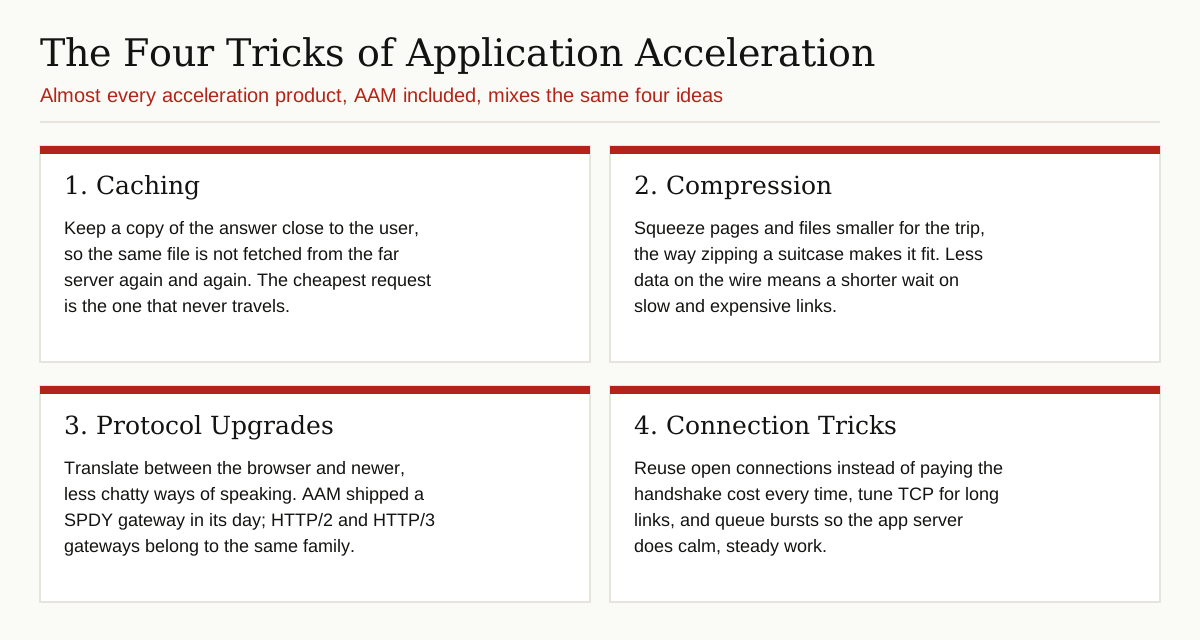
Almost every acceleration tool mixes the same four tricks. It caches, meaning it keeps a copy of the answer close to the user. It compresses, meaning it squeezes data smaller for the trip. It upgrades protocols, translating between the browser and newer, less chatty ways of speaking. And it manages connections, reusing open connections and tuning them for long links. F5’s own glossary frames WAN acceleration the same way, as speeding up access to server resources over a wide area network, the long distance link between offices or across the internet.
An application delivery controller, or ADC, is the box that normally does this work. It sits in front of the app servers, takes every incoming request, and decides how the request and the reply should be handled. AAM was F5’s acceleration module for its ADC platform.
What F5 AAM Was
BIG-IP is F5’s application delivery platform, the hardware appliance, virtual edition or VIPRION chassis that already handled load balancing in many data centers. AAM, short for Application Acceleration Manager, was a licensed software module you provisioned on that platform, turning the load balancer into an optimizer as well.
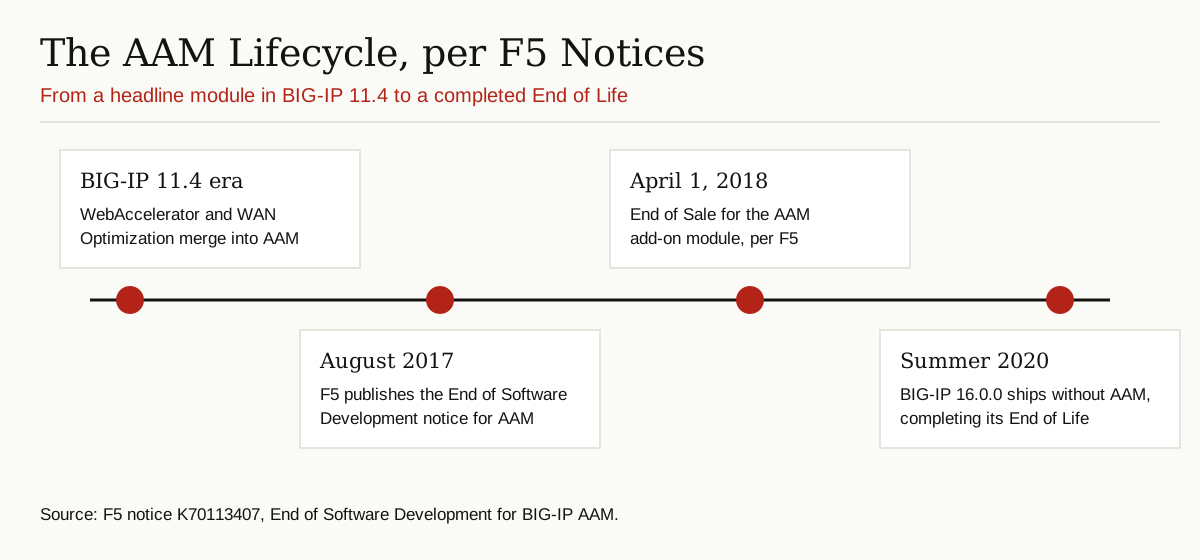
AAM had two parents. In the BIG-IP 11.4.0 release, F5 integrated the WebAccelerator module and the WAN Optimization Manager into AAM, and F5’s own operations guide describes AAM in exactly those terms, a combination of the two older products. WebAccelerator faced the browsers and worked on pages. WAN Optimization Manager faced the long link between data centers and worked on bulk traffic. AAM let an admin license and tune both from one place, with a ready-made or custom acceleration policy per application.
There was real hardware thinking behind it, too. F5’s operations guide explains that AAM kept its optimization data in a dedicated disk service called datastor, and admins could move that storage onto solid state drives on higher end platforms to make the disk cache faster. The cache was not an afterthought bolted onto a load balancer. It was a designed part of the machine.
The Main Features, in Plain Words
The feature list below follows F5’s own documentation, including the list F5 published when the features were withdrawn. Taken together, they show a module that attacked slowness from every angle it could reach.
Caching close to the user
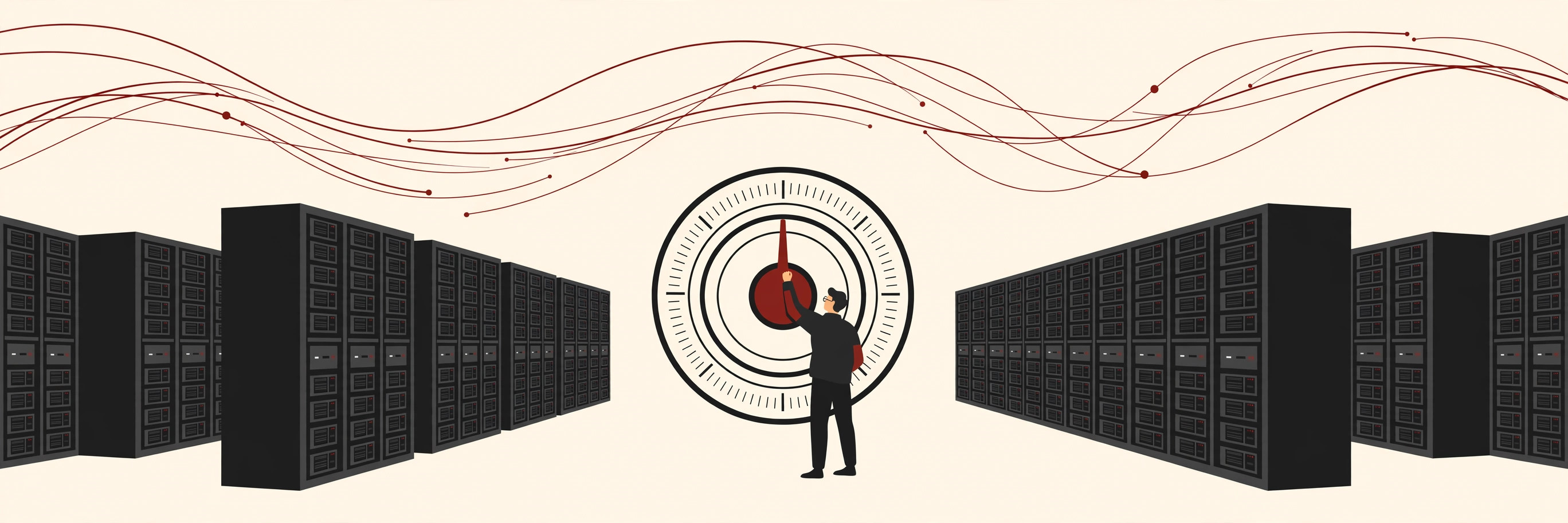
AAM kept copies of popular pages and files in a smart cache and a small object cache in memory, backed by disk caching on the appliance. When the next visitor asked for the same thing, the answer came from the BIG-IP instead of the app server. A fresh cache is an empty cache, which is why teams warm up the cache after restarts and releases, so the first real users still get the fast path.
Compression that adapts
Text files such as HTML, CSS and JavaScript shrink very well. AAM compressed responses on the fly and could adjust that compression to suit the link, spending the effort where bandwidth was scarce and skipping it where the trip was cheap.
Rewriting the page itself
This was the WebAccelerator inheritance. AAM could minify code by stripping out spaces and comments, inline small files directly into the page, concatenate several script or style files into one download, and reorder content so the visible parts arrived first. Its MultiConnect feature, also called domain sharding, spread downloads across parallel connections. Each trick removed round trips, and round trips were the real enemy.
Making browsers cache smarter
Intelligent Browser Referencing, or IBR, adjusted how pages pointed at their images and style files, so browsers could safely keep and reuse the copies they already had instead of checking back with the server. F5’s implementation guide for AAM devotes a full chapter to IBR alone, which gives a sense of how much tuning the platform allowed.
Shrinking images and PDFs
Image reduction re-encoded pictures at sizes and quality levels that suited the delivery, instead of shipping the original heavy file to every phone. PDF linearization rebuilt PDF files so the first page rendered immediately while the rest of the document kept downloading in the background.
Squeezing traffic between data centers
From the WAN Optimization side, AAM offered symmetric acceleration. With a BIG-IP at each end, deduplication removed repeated chunks of data, and the compressed result traveled through iSession tunnels, F5’s name for its compressed TCP tunnels. Branch offices and synced data centers moved far less data over expensive WAN links.
Protocol and connection help
The platform also handled the plumbing. F5’s datasheet listed a SPDY gateway, an early attempt at a faster web protocol, and the same generation of BIG-IP gear brought HTTP/2 gateway support. OneConnect reused open connections to the app servers, and tuned TCP profiles coped better with long, lossy links than default settings did.

Where It Sat and How a Request Flowed
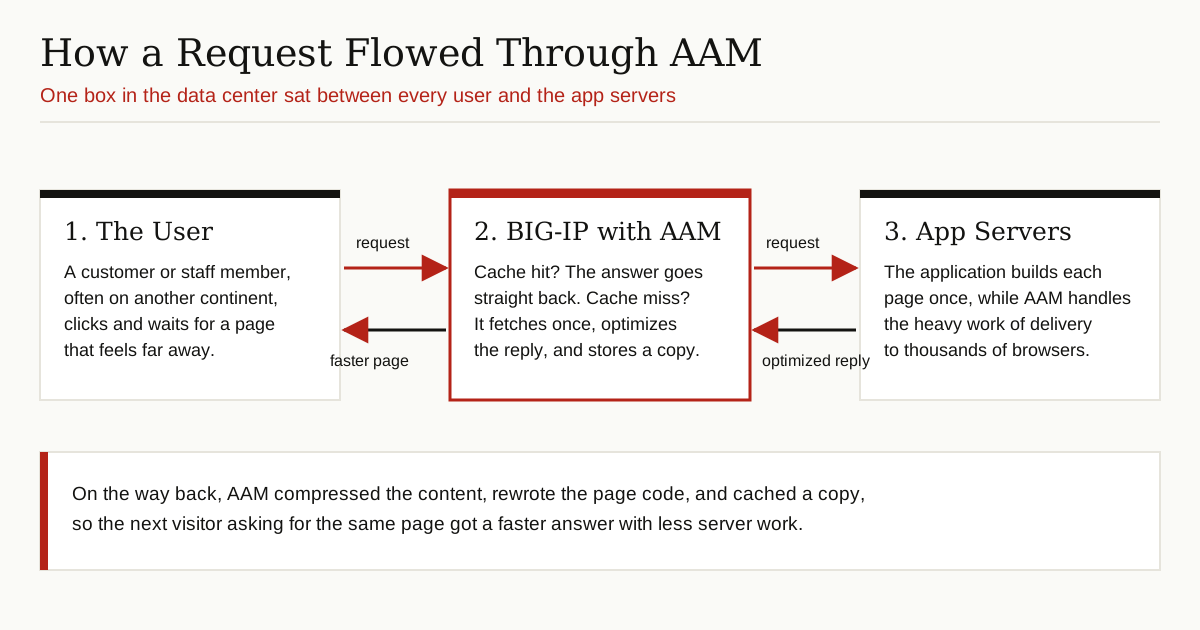
An application acceleration manager only earns its keep in the middle of the conversation. BIG-IP is a full proxy, which means it ends the user’s connection at the data center door and opens its own connection to the app server. Every request and every reply passes through its hands, so it can cache, compress and rewrite in both directions.
Most teams deployed AAM one of two ways. In an asymmetric setup, a single BIG-IP sat in front of the servers and optimized traffic toward any browser on the internet. In a symmetric setup, a second BIG-IP sat at a branch office or in a cloud location, and the pair squeezed traffic between them using deduplication and iSessions. The application itself did not change at all. When the app behind it grows into many cooperating machines, acceleration is only one layer of the story, and our explainer on what a distributed system is covers the rest.
Who Used It and Why
The typical buyer was a large organization whose application lived in one or two data centers while its users did not. Retailers with global stores, banks with branch networks, and companies whose staff opened the same heavy intranet app from three continents all felt the same pain. F5 pitched AAM hard at mobile and remote users, the people on the worst links, and at IT teams who wanted one licensed module instead of a shelf of separate point products.
The virtual edition mattered as well. F5 sold AAM as a Virtual Edition for common hypervisors, and its white papers described pairing a physical BIG-IP in the data center with virtual ones in the cloud, so the symmetric squeezing worked between a building and a rented data center too. That pairing captures the era in one picture: the fix was still sold as a box, but the box was already turning into software.
There was a second, quieter benefit. Every cache hit and every compressed response was work the app servers did not have to do. Offloading that effort to the BIG-IP let the same server hardware serve more users, which delayed expensive upgrades.
The Honest Part: AAM Is Retired
Many pages still describe AAM in the present tense. F5’s own notices tell a different story. In its End of Software Development notice for BIG-IP AAM, F5 set an End of Sale date of April 1, 2018 for the Application Acceleration Manager add-on module, covering both appliance and VIPRION versions. AAM was never offered on the newer iSeries hardware at all.
The bigger step came with software. F5 stated that AAM software would no longer be available starting with BIG-IP 16.0.0, which arrived in the summer of 2020. Anyone upgrading had to remove every piece of AAM configuration first, and the 16.0.0 release completed the End of Life of the product. F5’s guidance in the same notice is practical: use the application optimization features that remain in BIG-IP software, and use standard BIG-IP IPsec tunnels in place of iSessions. On older hardware that never moved past the 15.x line, support simply followed the lifecycle of the platform itself.
What Replaced This Approach
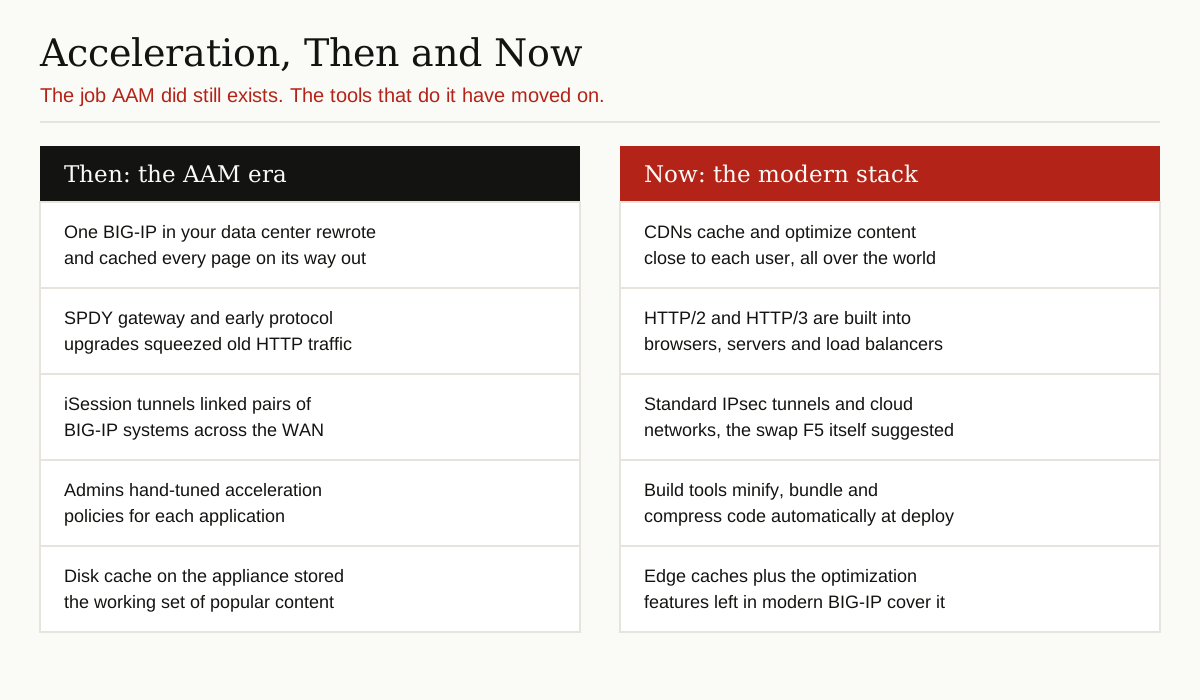
No single product replaced the Application Acceleration Manager. Its jobs scattered to the places where they now fit better.
Content delivery networks took over the caching and image work, and they do it from servers near each user instead of one box in one data center. Browsers, servers and load balancers now speak HTTP/2 and HTTP/3 natively, so the protocol gateway tricks AAM sold became table stakes. Minification and bundling moved into build tools, which optimize code once at deploy time instead of rewriting it on every request. Development teams also started treating speed as a feature in its own right, with performance budgets that fail a release when pages grow too heavy, so the safety net of a rewriting middleman is missed less than expected. Modern load balancers, BIG-IP included, kept the connection tuning, compression and basic caching features. F5 itself now sells much of its delivery and security as cloud services under its Distributed Cloud platform, which says a lot about where the industry decided this work belongs.
Reading Old AAM Documentation Today
The manuals for the 11.x to 15.x era are still online, and they are still worth reading for the right reasons. Teams maintaining a legacy install that never upgraded need them for daily work. Teams planning the jump to a current BIG-IP release need them to find and remove old acceleration policies, profiles and iSession settings before the upgrade, because leftover AAM objects can block the move. Legacy estates also lean on monitoring and event tooling around these boxes, where quirks such as platform event traps can eat an afternoon if nobody documented them.
What the old docs cannot do is guide a new design. There are no new AAM licenses to buy, the screens they describe are gone from current releases, and every technique in them has a living replacement. Treat the documentation as a maintenance archive and a good history lesson, not a shopping list.
Conclusion
The Application Acceleration Manager was a smart consolidation: two older F5 products, one license, and a complete toolkit for making distant applications feel local. Its retirement was not a verdict on the idea. The idea won so completely that it dissolved into CDNs, modern protocols, build pipelines and the load balancer itself. If you meet AAM in an old network today, you are looking at a well built answer to a real problem, from the era when the fix had to live in a single box in your data center. For more explainers in this series, browse the software development category.