AI coding assistants are now part of daily development. They finish your functions, explain error messages and write the boring parts of the code for you. But every helpful paste has a quiet side effect: the text you send leaves your computer and lands on someone else’s servers.
That text is often more sensitive than it looks. A single prompt can contain production code, an API key, a customer’s email address or your company’s unreleased plans. This guide shows, in plain English, how to prevent LLM from accessing confidential data in development, using layers of simple controls that work together.
How Confidential Data Leaks Into LLM Tools
Most leaks are not hacks. Nobody breaks in. A developer is in a hurry, copies a file into a chat window, and the data is gone. Security teams call this problem sensitive information disclosure, and it sits near the top of the OWASP Top 10 for LLM applications as risk LLM02.
There are four common paths:
- Direct pasting. A developer pastes code, config files or error logs into a chatbot to get help.
- IDE context. Coding assistants read the file you are working on, and sometimes nearby files, to give better answers. That can include files you never meant to share.
- Logs and history. Many tools store conversations. A chat that feels private can sit in an account history for a long time.
- Training defaults. On some personal plans, what you type can be used to train future models, which means your data may shape answers given to strangers.

The Samsung Lesson
This is not theory. In 2023, Bloomberg reported that engineers at Samsung had uploaded sensitive semiconductor source code into ChatGPT while asking it for help, and in another case pasted in a transcript of an internal meeting to turn it into notes. Samsung found three such leaks in a short period and banned staff from using generative AI tools on company devices, warning that data sent to outside AI servers is hard to retrieve or delete.
The engineers were not careless people. They were doing their jobs with a helpful new tool whose data rules they had never read. That is exactly why this needs controls, not just good intentions.
What Counts as Confidential Data?
Confidential data is wider than most developers think. It includes:
- Source code for products that are not public yet, and the comments inside it, which often explain internal systems in honest detail.
- Config files and infrastructure files, which map your servers, databases and internal addresses.
- Customer and user data: names, emails, account details, support tickets, and anything covered by privacy law.
- Logs and error reports, which often contain tokens, user details and file paths copied straight from production systems.
- Internal documents: roadmaps, pricing, contracts and meeting notes.
A simple test helps. If a stranger having this text would embarrass the company, help a competitor or harm a customer, treat it as confidential. When in doubt, leave it out, or share a cleaned copy instead.
The Layered Approach
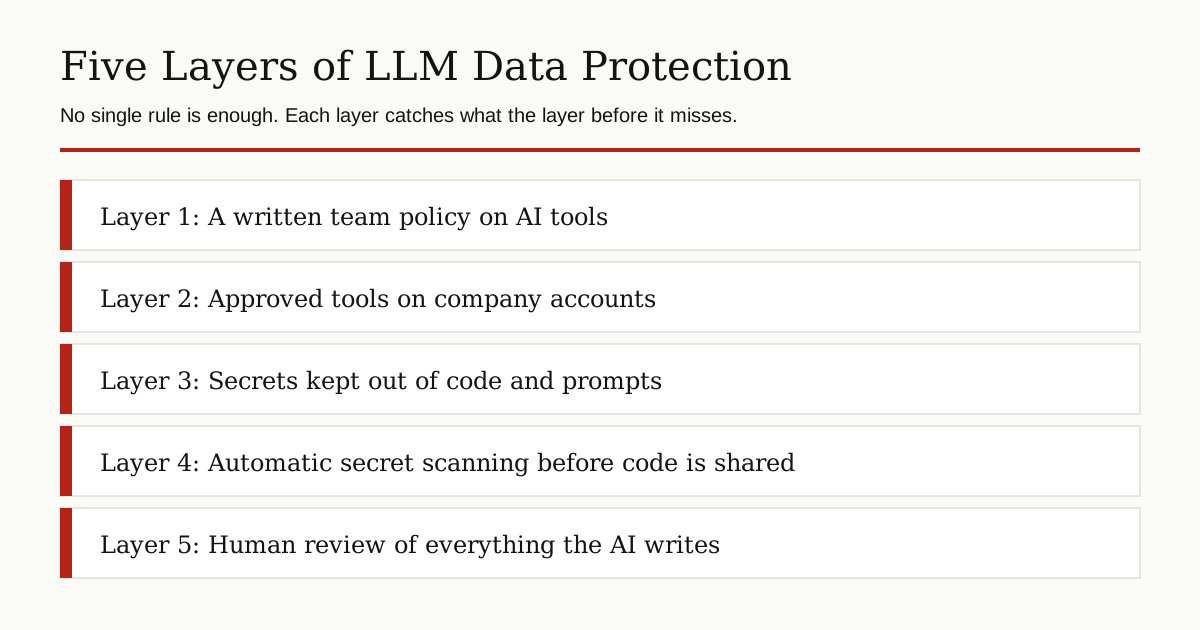
No single rule will save you. People forget, tools change their settings, and new AI features appear every month. The safe approach is layers: several simple controls stacked together, so that when one fails, the next one catches the problem.
Layer 1: Know What Each Tool Does With Your Data
Before anyone on the team uses an AI tool for work, one person should read its data policy and answer three questions. What is stored? For how long? Is it used for training?
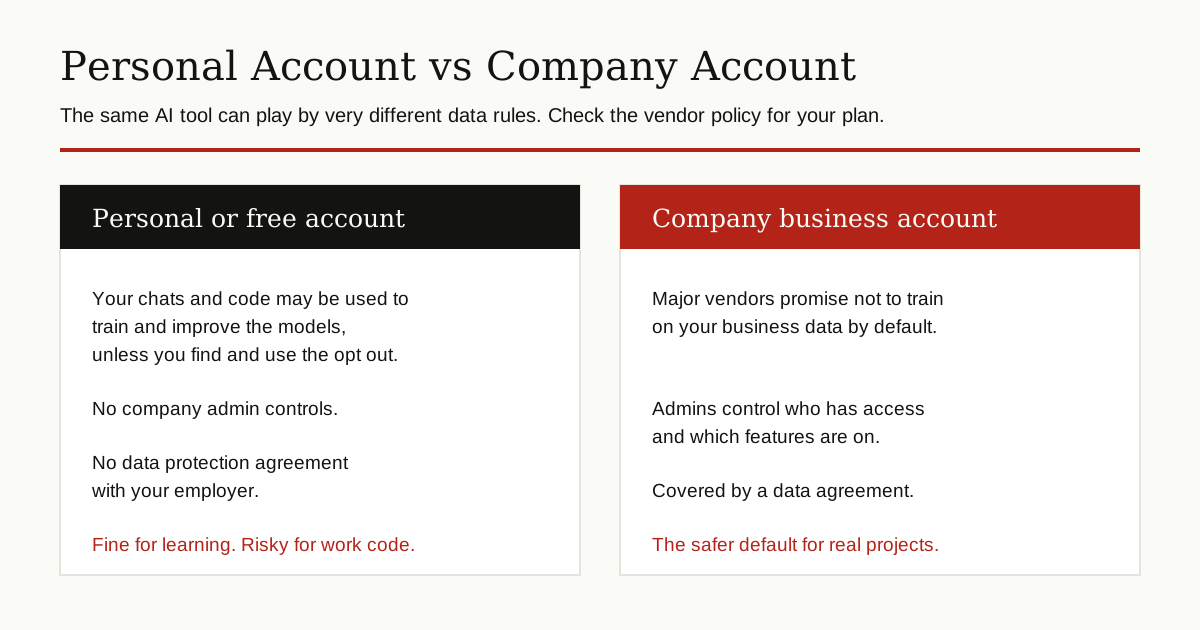
The answers change with the plan you pay for. GitHub’s Copilot documentation says GitHub does not use Copilot Business or Copilot Enterprise customer data to train AI models, and that business data is protected by a data protection agreement. The same docs say that on individual plans, GitHub may use interaction data, including prompts, suggestions and code snippets, to train and improve models, unless the user opts out in their settings.
OpenAI makes a similar split. Its enterprise privacy page states that OpenAI does not train its models on business data by default, covering ChatGPT Business, ChatGPT Enterprise and the API platform, and that enterprise customers control how long their data is retained. On a personal account, the defaults are different: OpenAI’s data controls let you stop your chats being used to improve the model, but opting out of training is not the same as your chats being deleted.
Vendor wording changes over time, so check the current policy page for each tool your team uses, and check it again when plans or terms change. Write down what you find, with the date. That one page of notes is the foundation for every other layer.
Layer 2: Never Paste Secrets
Some things should never enter any AI tool, on any plan, ever:
- API keys, access tokens and session cookies
- Passwords and private keys, including the private half of an SSH key
- Database dumps and real customer records
- Certificates and their private keys, the building blocks of public key infrastructure
- Unreleased contracts, prices and product plans
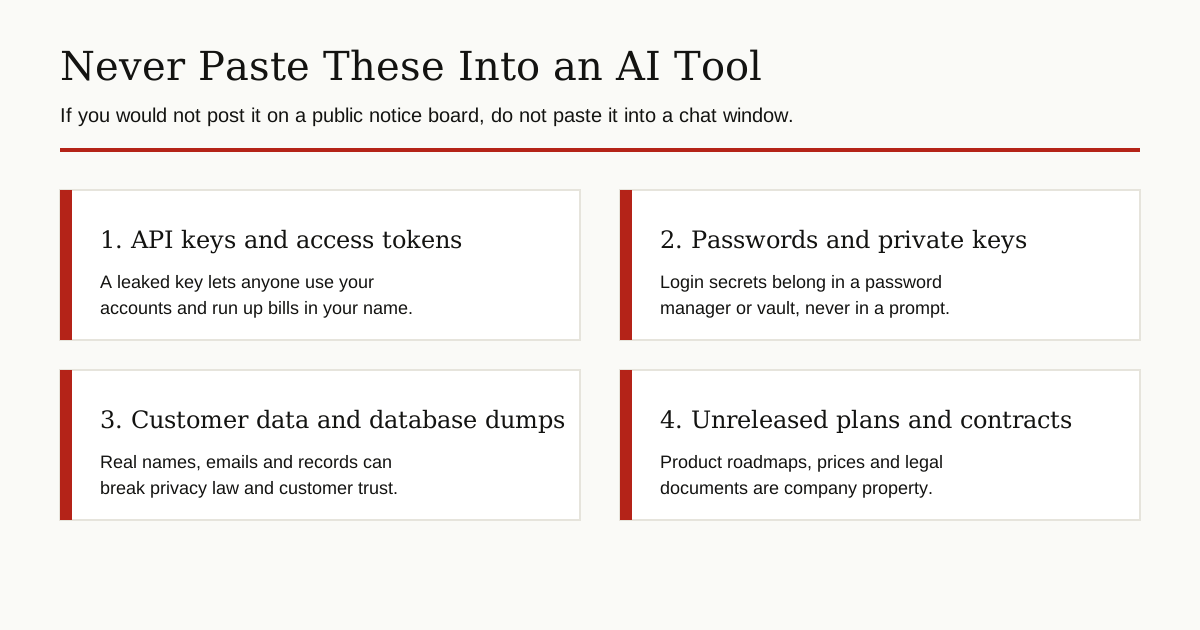
The deeper fix is to keep secrets out of your code in the first place. A key that lives in a source file will eventually be pasted somewhere. Instead:
- Store secrets in environment variables (settings the program reads when it starts, kept outside the code) or in a secret manager, a vault tool built for storing keys safely.
- Add secret files and config files to your .gitignore file, the list that tells Git which files never to save or share.
- Use fake values in examples. When you ask an AI for help with a config file, replace the real key with the words YOUR_KEY_HERE first.
If a secret does get pasted into a chat, treat it as leaked. Revoke it and create a new one right away. Deleting the chat is good housekeeping, but rotation is the real fix, because you cannot be sure where copies of the text have gone.
Share Less in Every Prompt
Make a habit of shrinking what you send. Share the one function that is broken, not the whole file. Delete comments that name internal servers or customers. Replace real data with small made up samples that have the same shape. The less the tool sees, the less it can leak. You usually get a better answer too, because the AI can focus on the actual problem instead of pages of unrelated code.
Layer 3: Scan for Secrets Automatically
People forget. Scanners do not. A secret scanner is a program that searches code for things that look like keys, passwords and tokens, and warns you before the code goes anywhere.
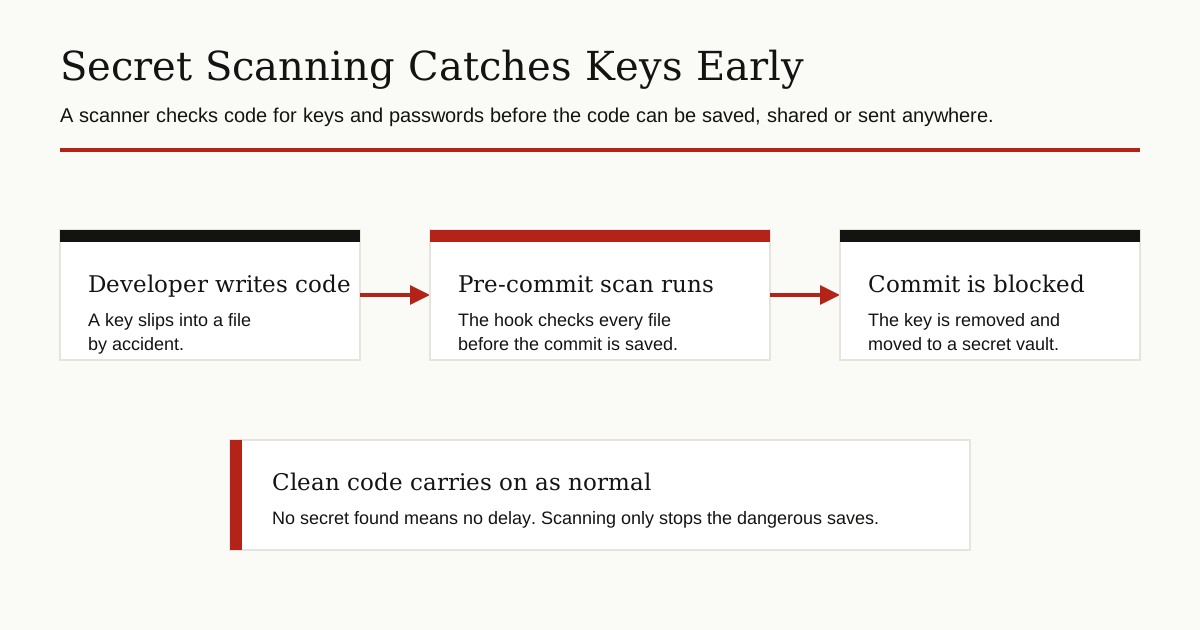
Two places to run it:
- Pre-commit hooks. A hook is a small check that runs when a developer tries to save code into Git. Open source scanners such as Gitleaks can block the save if they find a secret, while it is still only on that one laptop.
- On the code platform. Services such as GitHub offer secret scanning and push protection on repositories, which catch keys that slip past the laptop checks.
Scanning matters for AI safety as much as for Git safety. Code that contains no secrets is far safer to show to any tool, because the most damaging thing a developer could paste is simply not there.
Layer 4: Approved Tools and Company Accounts
The biggest risk is often not the tool your company chose. It is the free tool a developer found on their own, signed up for with a personal email, and started pasting work into. Security teams call this shadow AI: AI use that nobody approved and nobody can see.
Fix it by making the safe path the easy path:
- Give the team an approved AI tool on a company account, with the business data protections from layer 1.
- Set admin controls: who can use it, which features are on, and how long data is kept.
- Say clearly which tools are not allowed for work data, and why.
Some companies add one more control: a gateway. All AI traffic goes through a single company checkpoint, which can block known secret patterns, log which tools are being used, and stop traffic to unapproved services. It is the same idea as a firewall, applied to AI prompts, and it turns the policy from a document into something the network itself enforces.
Be careful with AI agents too. Tools that can browse the web, open your files and act on your behalf can reach far more data than a simple chat window. Our guide to the browser agent security risk explains how that wider access creates new ways for confidential data to escape, and why agents need tighter limits than chatbots.
Layer 5: Keep the Most Sensitive Code at Home
For your most sensitive projects, consider a model that runs on your own machines. Open weight models can run on a company server or even a strong laptop. The code never leaves your network, so there is no outside vendor to trust.
There are also middle options:
- Redaction tools that automatically replace names, emails, keys and other sensitive details in your text before it is sent to an AI, then put them back in the answer.
- Dummy data. Ask the AI to work with made up examples that have the same shape as your real data, but none of the real content.
- Partial sharing. Share one function at a time, with names changed, instead of the whole file or the whole project.
Local models are not automatically better. Your team becomes responsible for updates and security, and the quality may be lower than the big cloud tools. Many teams mix both: an approved cloud tool for normal work, and a local model for the crown jewels.
Layer 6: Review Everything the AI Writes
Data can leak in both directions. AI output pasted into your product without review can carry other people’s code, weak security patterns, or even secrets the model picked up from somewhere else. Review AI suggestions the way you would review code from a new junior developer: read it, test it, and never merge it just because it looks confident.

If Data Has Already Leaked
Do not panic, and do not hide it. Speed matters more than blame.
- Revoke and rotate any secret that was shared. This step comes first, always.
- Delete the conversation if the tool allows it, and ask your admin about the retention settings on your plan.
- Check the affected systems for strange use, in case the secret was seen by anyone else.
- Write a short incident note: what was shared, where it went, and what you changed.
- Fix the gap that allowed it, for example by adding scanning or updating the approved tool list.
Teams that report leaks early stay safe. Teams that hide them repeat them.
Put It in Writing: Policy and Training
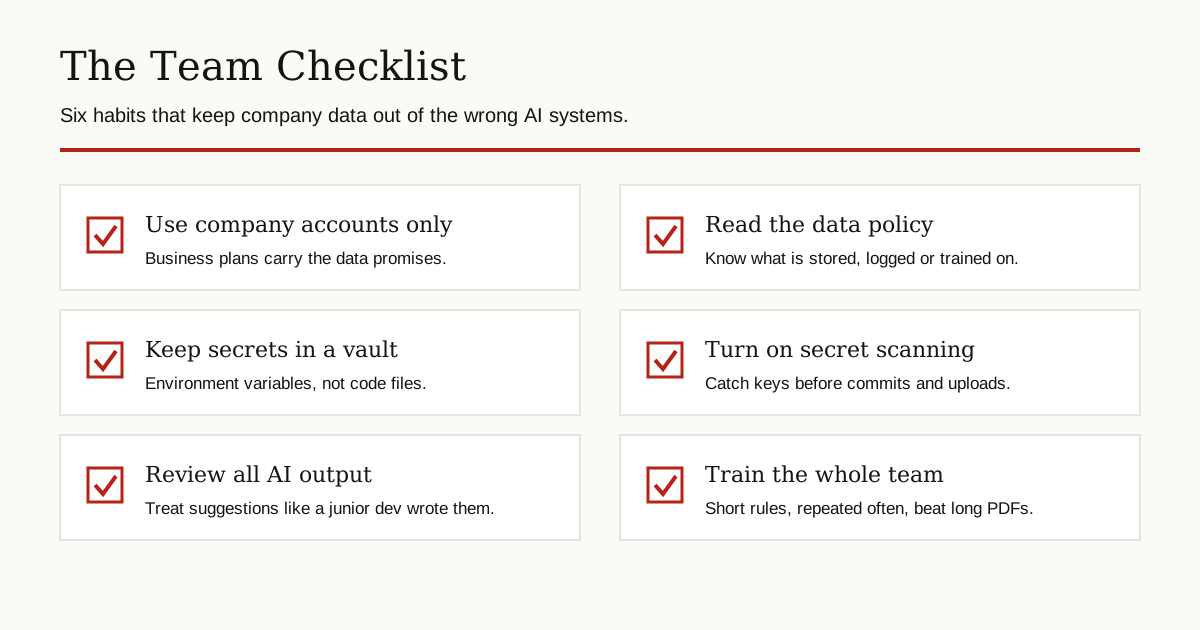
Layers only work if people know them. Write a short AI policy for the team: which tools are approved, what must never be pasted, and what to do when something slips. Keep it to one page. Then train on it briefly and repeat the training when tools change, because a policy nobody remembers is just a document. Post the checklist where the team will see it: these six habits are the practical, everyday way to prevent LLM from accessing confidential data in development.
The Bottom Line
To prevent LLM from accessing confidential data in development, you do not need exotic technology. You need to know what your tools do with data, keep secrets out of code and prompts, scan automatically, use company accounts on approved tools, keep the most sensitive work local, and review what comes back. Stack those layers, and your team can use AI’s speed without handing it the keys to the company.
For more guides like this one, browse our cybersecurity and networking category.